SAP N+1 Landscape Testing: How Best-in-Class Teams Run TUT, FUT, SIT, UAT and Regression From ECC to S/4HANA on RISE
A practitioner’s guide to testing across an SAP N+1 landscape during an ECC to S/4HANA move: the maintenance and project lines, RISE realities, retrofit and dual maintenance in Solution Manager and Cloud ALM, freeze strategy, every test level by stream, SIT across SAP and non-SAP systems, OX1 convergence, Cloud ALM traceability and the Varian case.

Every ECC to S/4HANA program runs two clocks. One is the project: design, build, convert, test, cut over. The other is the business, which keeps closing books, shipping orders and changing tax rules while the project is still months from go-live. In most SAP shops those two clocks belong to two teams. Application Maintenance (AM) keeps ECC running on the maintenance line. The project team builds S/4HANA on a parallel line. Both feed one production system, and before go-live their work has to converge in a pre-production system without losing a fix or breaking a process.
That arrangement is the N+1 landscape. It is not new, and SAP has supported it for years. What is new is the combination: an ECC maintenance line feeding a converted S/4HANA line, often hosted under RISE with SAP, with retrofit tooling that changed in December 2025 and test evidence expected to live in SAP Cloud ALM. This guide is about the testing that holds it together: which test runs where, who owns it, what the entry and exit criteria are, and what evidence you hand the people who sign.
Disclosure: Matt Angerer, who runs The Sign-Off Table, works at ACCELQ. ACCELQ appears in this guide as the worked example for automating and managing tests, in clearly marked sections. The core guidance on landscapes, retrofit, freezes, test levels and evidence is tool-neutral and applies whatever tools you use. ACCELQ does not sponsor or review this site. Read the full disclosure.
Key takeaways
- An N+1 landscape runs two lines: a maintenance line (here DX1 → QX1 → PX1, on ECC) and a project line (DX2 → QX2, on S/4HANA). They converge in pre-production (OX1) before go-live. The SIDs are illustrative; SAP’s own examples use DEV, MNT, QAS, PRE and PRD.
- Every ECC fix needs a decision: is it relevant to S/4HANA? If yes, it is retrofitted (by tool or by hand), checked with ATC, and retested in the project line. SAP Notes and SAP objects are never retrofitted automatically.
- SAP Cloud ALM gained a Retrofit app in December 2025 with an ECC to S/4HANA conversion scenario. It is CTS-only, has two categories (automatic and manual), and has no native freeze periods.
- Under RISE, extra systems such as DX2, QX2 and OX1 are additional non-productive tiers you buy. Up to 12 homogeneous refreshes per ABAP SID per year are included in the standard R&R; data masking is not.
- Freezes are a governance choice, not an SAP feature. Define a soft freeze, a hard freeze and a strict emergency path in advance, and re-scope regression after every emergency change.
- SIT is a web: S/4HANA plus middleware, EDI partners, banks, warehouses and analytics. Test each connection the way data crosses it, and repeat the critical flows in OX1 with production-like connections.
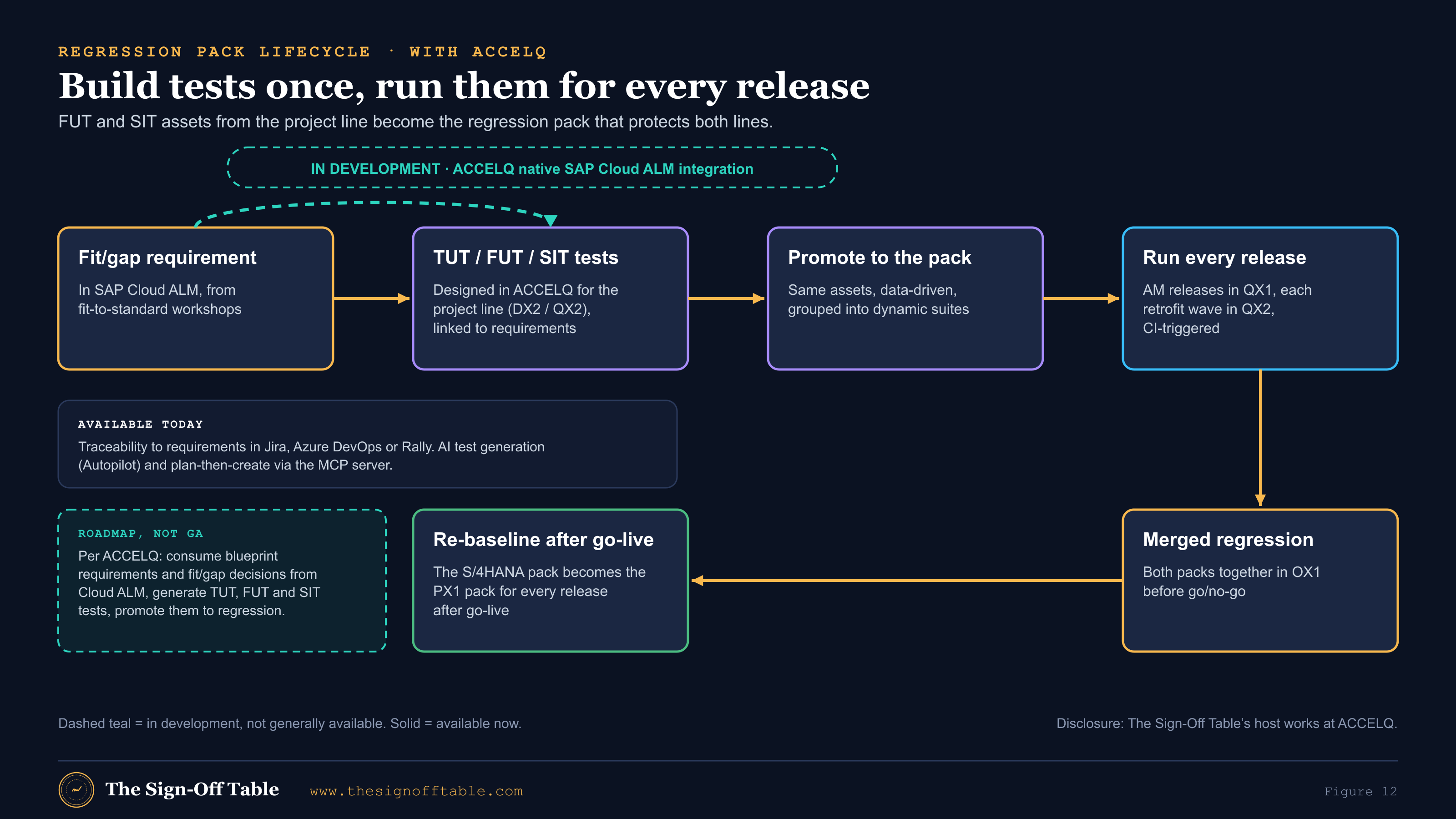
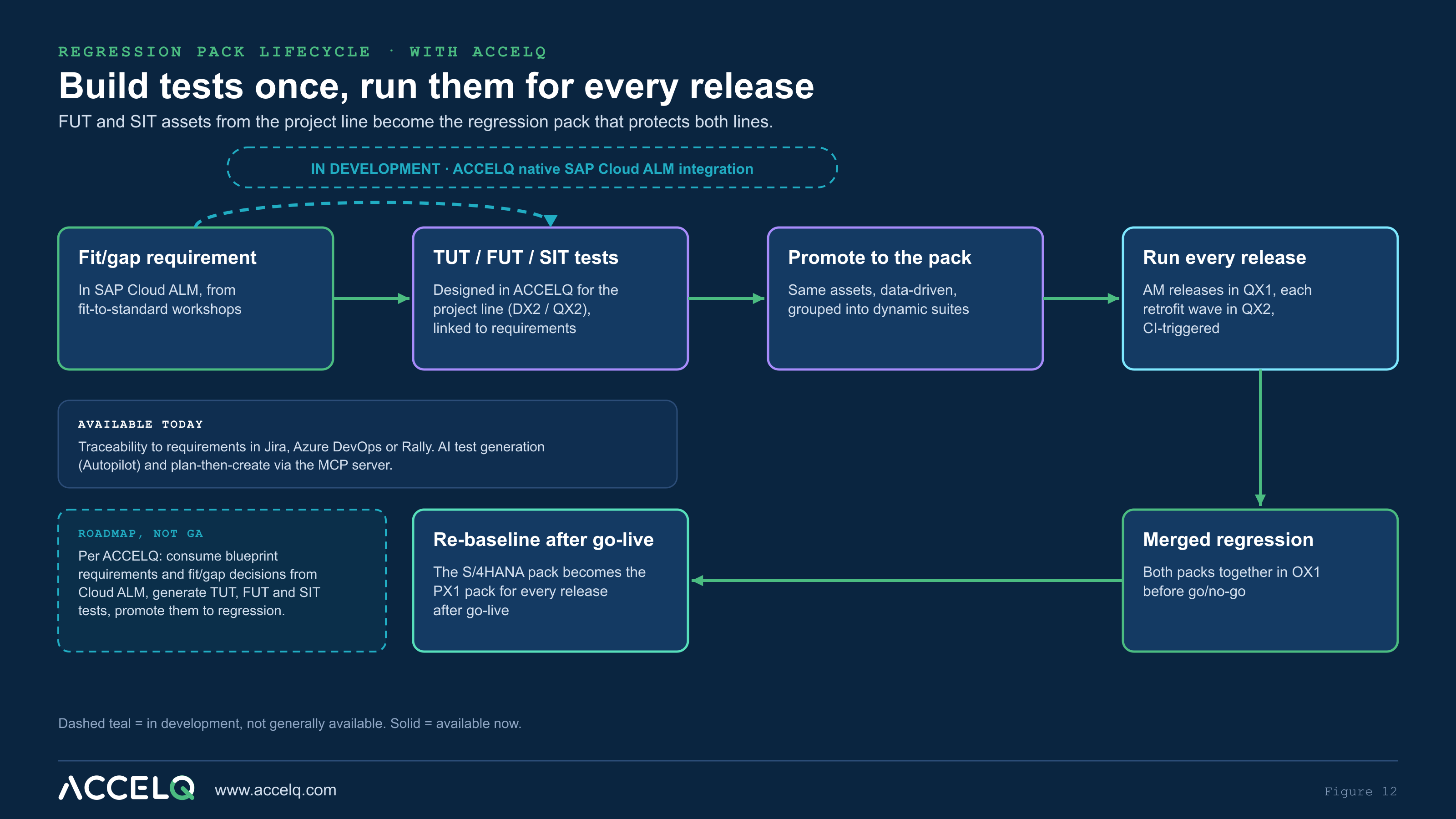
- Build FUT and SIT assets so they become the regression pack. The pack then protects both lines: every AM release, every retrofit wave, the merged regression in OX1 and every release after go-live.
Why the N+1 landscape decides your test plan
SAP’s guidance for conversions to S/4HANA Cloud Private Edition says outright that a dual maintenance strategy is part of planning, because “the business needs to make changes to the production environment before everything is finalized”[2]. The same SAP post recommends at least five conversion cycles: sandbox, development, QA, dry run and production[2]. Put those two facts together and you have the testing problem. Production changes keep arriving while you convert, and each conversion cycle has to absorb them.
The cost of getting this wrong shows up as a long tail. Varian Medical Systems, which presented its ECC to S/4HANA program at ASUG in 2019, said that maintaining two landscapes, and retrofitting and remediating code in the project landscape from production, “was challenging”, and that more than 18 months went into dual maintenance of custom code[36]. That is the whole program length again, spent keeping two lines in step. The Varian section walks through its numbers.
What an N+1 landscape is (and why S/4HANA projects need one)
SAP’s own definition is plain. Solution Manager’s retrofit documentation describes synchronizing changed objects “from maintenance development system to project or upgrade development system in dual track landscapes (also known as N+1 landscapes)”[11]. Cloud ALM uses the same definition and adds the direction: “In retrofit, the maintenance track is the source and the implementation track is your target”, and “when both tracks are in sync, you can deploy your changes from your implementation track into your production system”[16].
SAP Learning’s landscape course describes the same model with generic system names: DEV, MNT, TST, QAS, PRE and PRD. A Production Support track handles urgent and standard changes; a Project Development track handles major releases, larger functionality and support packages. “Changes done in the Production Support track are retrofitted into the Project Development track (in a timely manner).” The course also says that “more than one Project Development track is usually not recommended”, and that the pre-production system “is the environment for the final integration test”[1].
In practitioner shorthand, N is the release in production and N+1 is the release under development. Moore’s 2013 article describes the N+1 landscape as “dedicated to project changes”, with a development system that starts as a copy of the N development system just before the project begins, and test systems copied from production[34].
Maintenance line vs project line: DX1/QX1/PX1 and DX2/QX2
This guide uses one set of illustrative names throughout. Your SIDs will differ; ASUG material shows DEV1/QAS1 with DEV2/QAS2[35], Moore uses DV2/TS2/QA2[34], and SAP uses the generic names above[1].
| Line | Owner | Systems (illustrative) | Release | Purpose |
|---|---|---|---|---|
| Maintenance (N): the top of the diagram | Application Maintenance (AM), also called BAU, run or production support | DX1 → QX1 → PX1 | ECC 6.0 | Break/fix, legal and regulatory changes, small enhancements |
| Project (N+1): the lower part of the diagram | Project team (SI and client) | DX2 → QX2 | S/4HANA (converted copy, or a new build for greenfield) | Conversion remediation, new design, build, SIT and UAT |
| Convergence | Joint: test lead, cutover manager, AM lead | OX1 (pre-production) → PX1 | S/4HANA after the cutover rehearsal | Merged regression, dress rehearsal, cutover rehearsal |
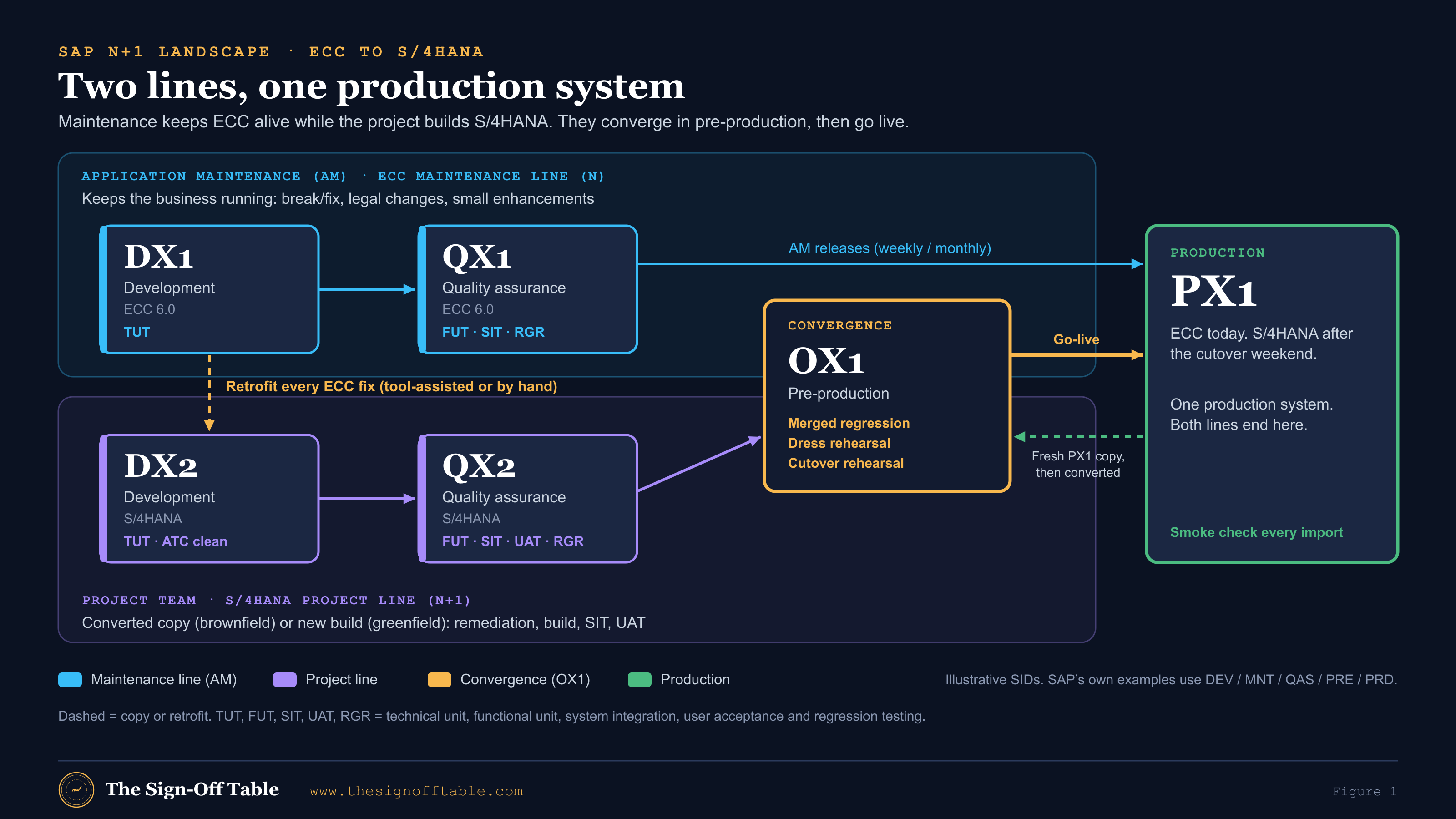
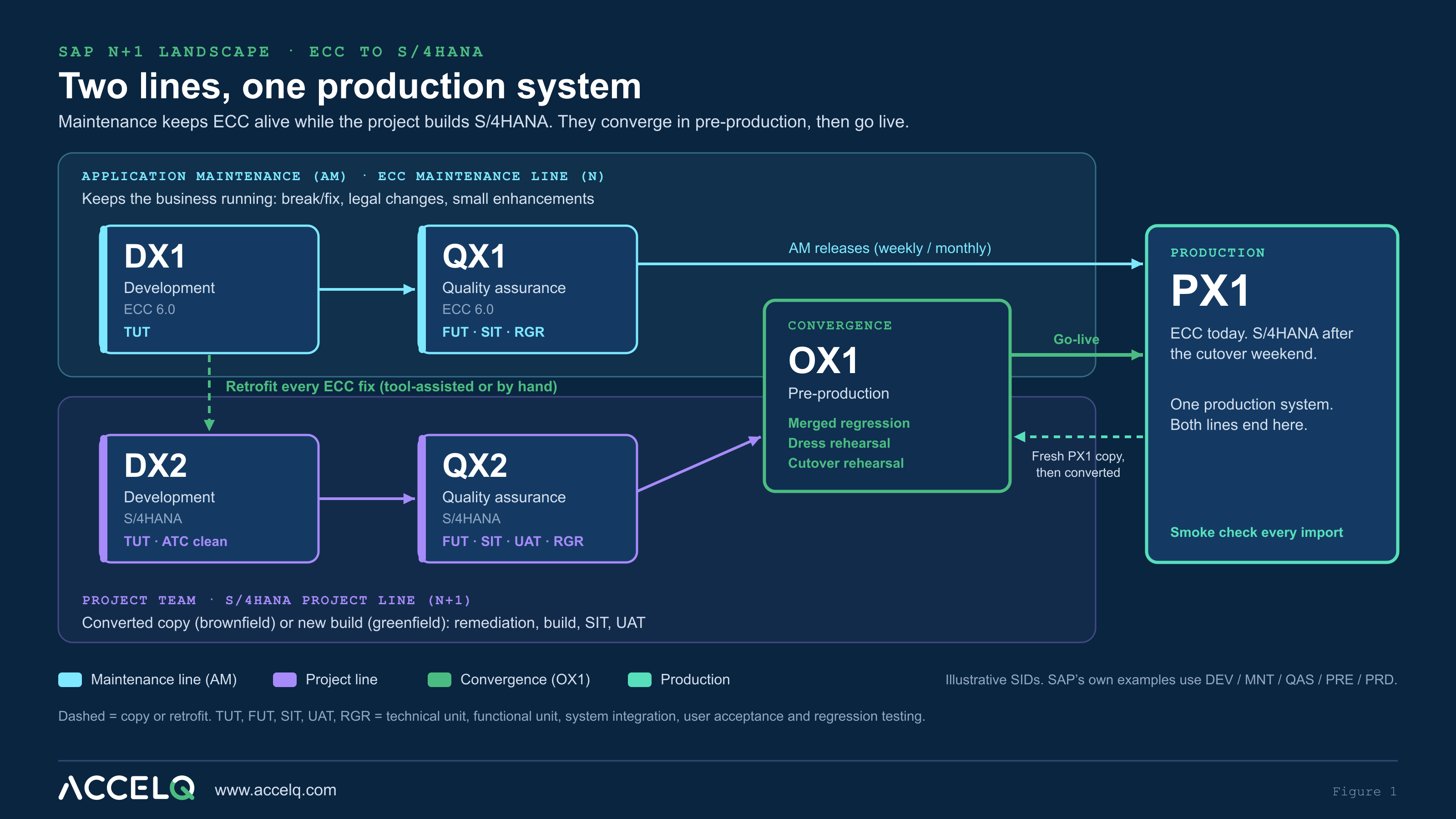
The point of the split is isolation. The AM team can move a fix to production in days without dragging half-built S/4HANA objects with it. The project team can rebuild pricing, re-platform finance and remediate custom code without destabilizing the system the business runs on. The price is that every change on the top line has to be assessed for the bottom line, and that assessment has to be tested.
Where the lines converge: pre-production (OX1)
In a classic N+1 landscape for an upgrade or a release, convergence is a transport merge. Moore describes importing the project transports into the N development system, closing DV2 for changes, running final regression and then moving to production, a step that “usually takes one to two weeks”[34].
An ECC to S/4HANA conversion converges differently. The S/4HANA code base cannot be transported into ECC, so the convergence point is a converted copy of production. SAP’s guidance for running a conversion says the dress-rehearsal system “should be created from the latest version of the SAP ERP production system”[3]. In practice, OX1 is a fresh copy of PX1, converted with the current runbook, after which the project transport stack (including the final retrofit wave) is applied. That is an inference consistent with SAP and Moore, not a quoted SAP procedure, so write your own OX1 build into the cutover plan.
N+1 vs N+2, and conversion vs greenfield
| Variant | What it is | Testing consequence |
|---|---|---|
| N+1 (dual track) | One maintenance line and one project line | Retrofit every relevant ECC fix; regression on both lines; converge once |
| N+2 (cascade) | A third line for a further release. Cloud ALM documents it: “In a landscape with more than two systems (n+2), mapping is done in a cascade manner”, n to n+1, then n+1 to n+2[17]. SAP Learning describes n, n+1 (preparing for cutover) and n+2 (under development) running in parallel[1]. | Two retrofit hops per fix, two regression packs in flight. Use only when releases genuinely overlap |
| Permanent vs temporary N+1 | Moore: the model “can be permanent for frequent project cutovers or temporary for a one-time project such as a major upgrade”[34]. | A temporary N+1 for a conversion is dismantled after go-live; the regression pack is not |
| Conversion (brownfield) | DX2 starts as a copy of DX1 or PX1 and is converted. Production fixes must reach DX2 through retrofit, by tool or by hand[2]. | Object-level retrofit, ATC on every retrofitted object, FUT and regression delta in QX2 |
| New implementation (greenfield) | The S/4HANA line is built new. ECC fixes are usually assessed and re-implemented selectively rather than retrofitted object by object (practitioner inference; I found no SAP source stating it this way). | Process-level relevance decisions; tests follow the S/4 design rather than the ECC change |
N+1 under RISE with SAP: what’s included and what you buy
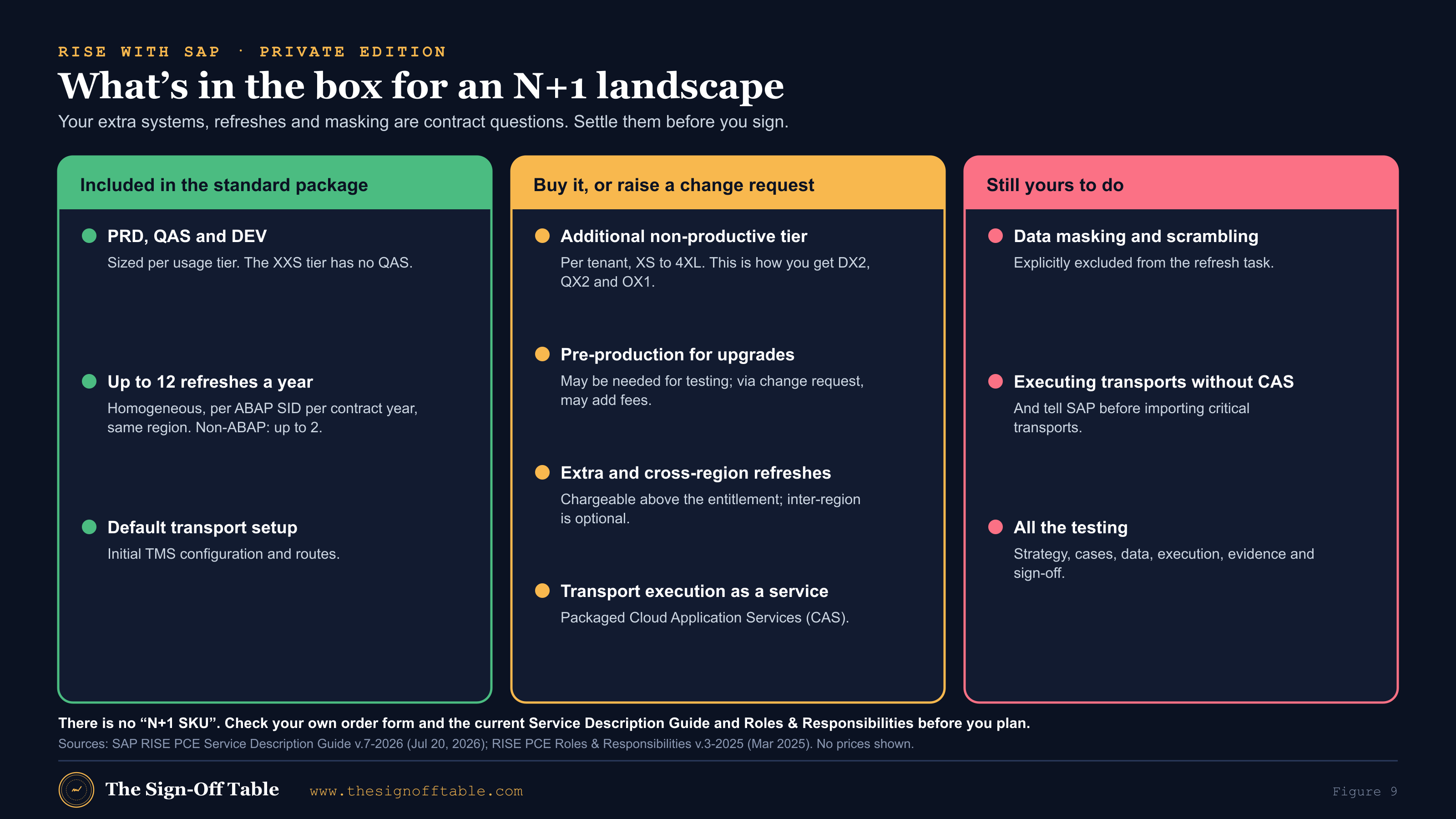
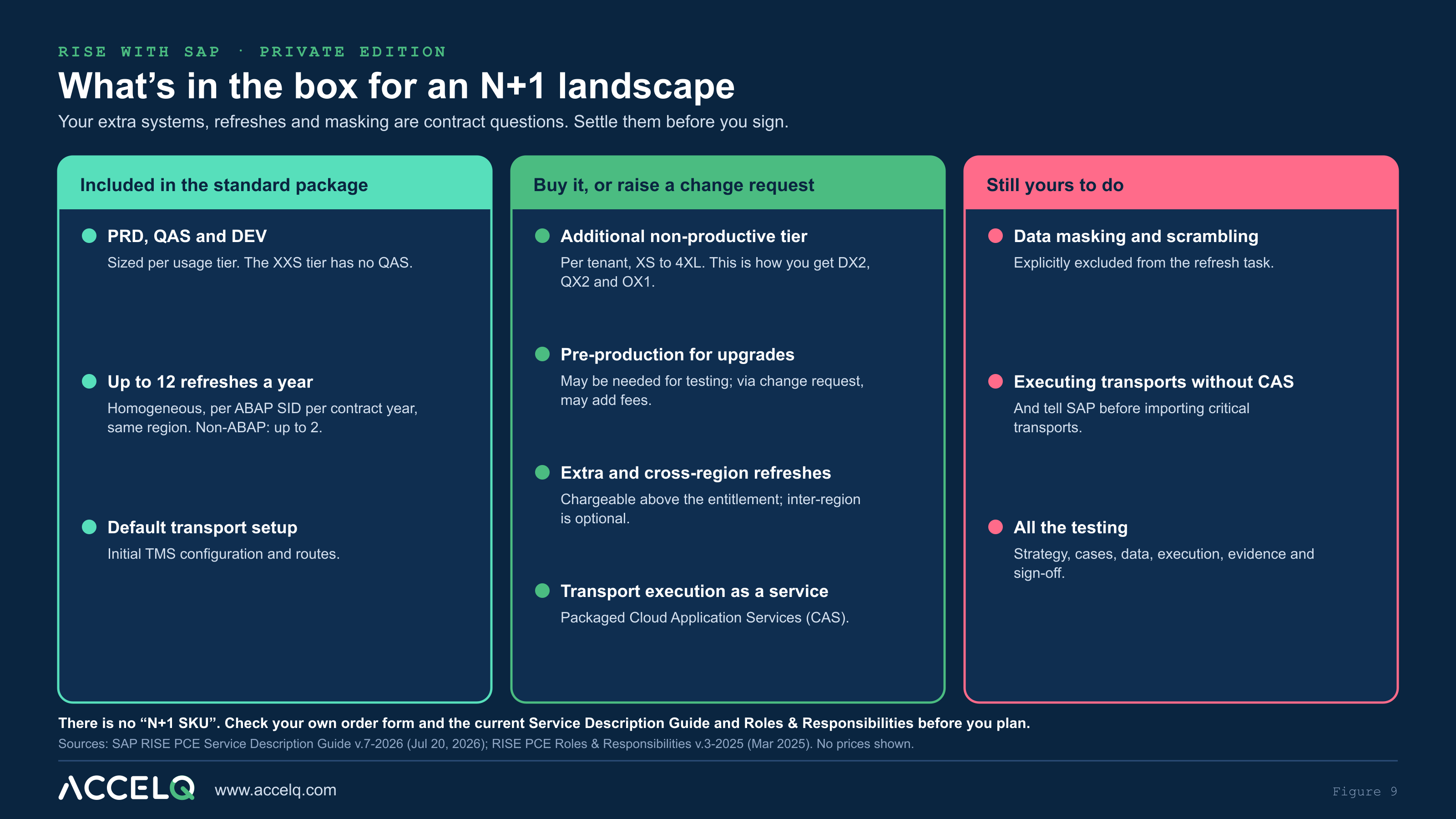
Under RISE with SAP, private edition, the landscape is a commercial question before it is a technical one. There is no “N+1 SKU”. What exists is a set of line items in SAP’s Service Description Guide (SDG) and a division of tasks in the Roles and Responsibilities (R&R) document. Everything below comes from those documents; check your own order form and the current versions before you plan, because contracts differ.
Additional non-productive tiers and pre-production
The private edition package tables list PRD, QAS and DEV system sizes for each usage tier; for the XXS tier, “No QAS system delivered”[8]. Extra systems are separate line items. The “additional non-productive tier, private edition” is metered per tenant with sizes from XS to 4XL; an “additional productive tier” also exists; and “an additional tier can only be attained with a service package which includes infrastructure, where applicable”[8]. The same SDG covers SAP ERP, private cloud edition, so the ECC maintenance line itself can be hosted under RISE during the project[8].
For an N+1 landscape that means DX2, QX2 and OX1 are almost always additional non-productive tiers. The R&R adds a related point for later: updates and upgrades “may require … a QA or Pre-production system to perform testing and validation”, supplied through a change request that “may result in additional service fees”[9]. If you will keep OX1 after go-live as a permanent pre-production system for upgrades, say so in the contract.
System refreshes, test data and masking
The standard R&R (v.3-2025) includes up to 12 homogeneous system refreshes per ABAP SID per contract year; additional refreshes are chargeable, refreshes are intra-region (inter-region is an optional service), and non-ABAP SIDs get up to 2 per year. The refresh task explicitly “does not include activities such as data masking, scrambling etc.”[9]Older R&R versions reportedly allowed 6 refreshes; I did not re-read those, and a newer standard-option R&R may exist, so confirm the number that applies to your contract.
For targeted test data, SAP’s tailored-option R&R lists “Refresh test data” as an additional service that copies application data based on business objects from production to non-production, with S/4HANA 2023 as a minimum[10]. I have not confirmed whether the standard option offers the same service.
Twelve refreshes sounds like plenty until you count. QX1 needs periodic refreshes to stay close to production. QX2 needs fresh copies for each SIT cycle in a brownfield conversion. OX1 needs a fresh PX1 copy for every mock cutover and the dress rehearsal. Moore’s advice from 2013 still applies: “If your refresh strategy takes days and not hours, then take some time to review your capabilities”, and keep an ordered project transport package you can replay after each refresh to rebuild the test system[34]. Build the refresh calendar into the test data management strategy before you sign, and budget masking yourself.
Transports and who presses import
Under the standard R&R, initial TMS setup and routes are a standard service, limited to a default setup. Transferring and releasing transport orders, and executing transports “to move objects between SAP systems”, are packaged Cloud Application Services (CAS), or customer tasks if you don’t buy CAS. And: “Before importing critical transports the customer should inform service provider”[9]. In an N+1 landscape, with retrofit transports, emergency imports and replayed project stacks, decide early who presses import in each system and how fast. Your hard-freeze emergency path depends on it. The test environment and transport strategy template has a section for exactly this.
RISE contract questions for an N+1 landscape
- Which additional non-productive tiers (DX2, QX2, OX1, any sandbox) and at what sizes, and for how long?
- Is OX1 kept after go-live as pre-production for upgrades, or released?
- How many refreshes per SID per contract year apply under our R&R version, and what does an extra one cost?
- Are any refreshes cross-region? Is a selective test-data refresh available to us?
- Who masks or scrambles refreshed data, with what tool, and how long does it add to each refresh?
- Are transport imports a CAS service or ours? What is the turnaround for an emergency import during a hard freeze?
- Is the ECC maintenance line also on RISE (SAP ERP, private cloud edition), and does its refresh entitlement differ?
Retrofit and dual maintenance explained
Dual maintenance means making a change twice: once in the maintenance line, once in the project line. Retrofit is the tooling and process that moves or re-creates the maintenance change in the project line. Daniel Enderli, an SAP Champion, lays out three ways to stay in sync: an organizational process with no system support, a dual maintenance workflow with ChaRM plus Retrofit, or the same with Focused Build. His rule applies to all three: “Every change in the maintenance track needs to be checked whether this is also relevant for the project landscape”[29].
Tool support matters because of conflicts. SAP’s Solution Manager documentation makes the point directly: unlike manual synchronization, “retrofit allows to detect and manage conflicts when the same object changed in both systems”[11].
Solution Manager retrofit, ChaRM and CSOL
Solution Manager 7.2 sorts each object in a maintenance transport into one of three categories[12]:
- Green (automatic): applied to the project line through a transport of copies.
- Yellow (tool-assisted): the correction workbench (SCWB) for workbench objects, BC Sets for customizing.
- Red (manual): SAP Notes, PFCG roles, objects locked in the target, and cases where “the ATC (ABAP Test Cockpit) Central Check System detected a change affecting SAP S/4HANA, and the object is not supported by the correction workbench”.
Cross-system object lock (CSOL) is the conflict guard. When an object changes in a managed system it is locked centrally, which “prevents version conflicts at an early stage”, and “the object must stay locked until it has been imported in the production system”. Downgrade protection can only be switched on when CSOL is active, and SAP warns that “Warning Only” mode risks “possible software downgrades”[14]. A 2025 commenter on Enderli’s post notes that a “standalone retrofit” option works without full ChaRM[29].
The S/4HANA scenario is where it gets complicated. Solution Manager’s S/4HANA upgrade scenario uses an ATC hub with the default check variant S4HANA_READINESS_<target_release> and Simplification Database checks for customizing, but its prerequisites require that “all the included systems are SAP S/4HANA systems”, and it points to SAP Note 2652106, “Retrofit to SAP S/4HANA”[13]. Community commenters report that ECC to S/4HANA retrofit under that note required SAP involvement because it was in a pilot phase, with one commenter saying SAP confirmed this in April 2023[29]. Check the note’s current status with SAP before you plan around it.
Time matters too. Mainstream maintenance for Solution Manager 7.2 runs to the end of 2027, and SAP recommends that all customers move to Cloud ALM before then. Customers who take Business Suite 7 extended maintenance (to the end of 2030) get extended Solution Manager maintenance at no extra cost, but only for named functions: requirements, project and process management, the test suite, change control management, IT service management and landscape management[15]. ECC’s own mainstream maintenance ends in 2027, with optional extended maintenance to the end of 2030[6]. The separate SAP ERP, private edition, transition option is not a maintenance extension: it is a RISE subscription for customers who move ECC to SAP ERP, private edition, on SAP HANA before the end of 2030, and since an October 2026 update it may run to the end of 2035, with further prerequisites in SAP Note 3591251[7]. A conversion that runs into 2027 is planning its retrofit tooling around at least two end dates.
The SAP Cloud ALM Retrofit app: what shipped in December 2025, and what’s missing
Cloud ALM’s Retrofit app arrived in the week-51 release of 2025, “designed to support dual-track (n+1) development landscapes”, and added a Retrofit Status column on a feature’s transports, including a “Not Applicable” value[39]. SAP Help says that retrofit is “currently … only possible for CTS-managed landscapes”[16].
Setup follows a two-track model: two system groups (maintenance and implementation), a separate source project and target project, separate source and target deployment plans, and a Retrofit tab that maps the source development system to the target development system, where “multiple development systems can have the same target system”[17]. A December 2025 walkthrough lists the managed-system prerequisites it found: ST-PI 740 SP31 or later plus SAP Notes 3688071 and 3639096, a domain link between the domain controllers, RFC users with the role SAP_SDF_CALM_CDM_RETROFIT_RFC, a production-system parameter for the maintenance line, and an analysis period that defaults to 180 days[30]. Treat that list as a practitioner’s checklist and confirm it against SAP’s current notes.
Categorization is simpler than in Solution Manager. Cloud ALM has two categories, Automatic (transport of copies) and Manual; there is no yellow, tool-assisted category. Released target transports from the last 6 months (configurable up to 2 years) and all modifiable target transports are checked for conflicts, and SAP recommends you “align the period with your go-live plan”. Retrofit “uses the Cross-System Object Lock (CSOL) check framework … to prevent inconsistencies and downgrades in the target system”. One example from SAP: a target transport still “in pre-production or quality system” makes the source object Manual[18]. A “Display Conflicts” function shows which objects cause a Manual category; it works for source transports categorized on or after July 8, 2026, and needs a current ST-PI with SAP Notes 3767627 and 3770247 on the managed systems[18].
At deployment, “Downgrade Protection and Cross-Reference Checks” can run on a deployment schedule for a feature bundle whose target is production[20]. That is a useful gate for both lines.
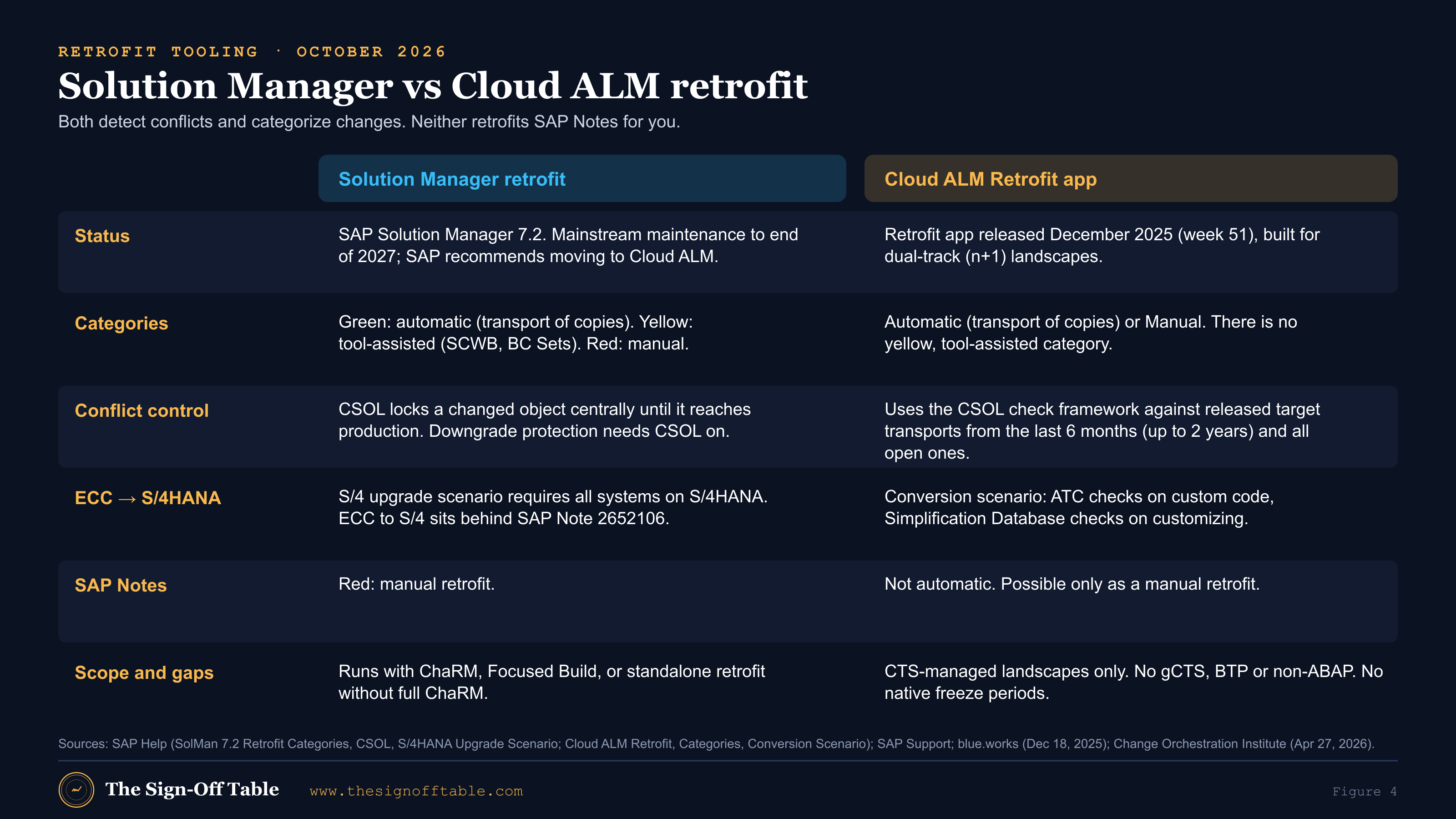
What is still missing? A commercial analyst, whose publisher sells a competing change-management add-on, lists the gaps as of April 2026: “Single-landscape CSOL is still missing”; release cycles and freeze periods are not native; gCTS, BTP and non-ABAP changes are not covered; and “the functional gap compared to ChaRM remains”[40]. Read that with its commercial interest in mind, but the freeze-period gap matches what SAP’s own documentation shows. Freeze windows and CAB rules still live in your process.
ECC to S/4HANA retrofit: ATC, simplification checks and manual re-implementation
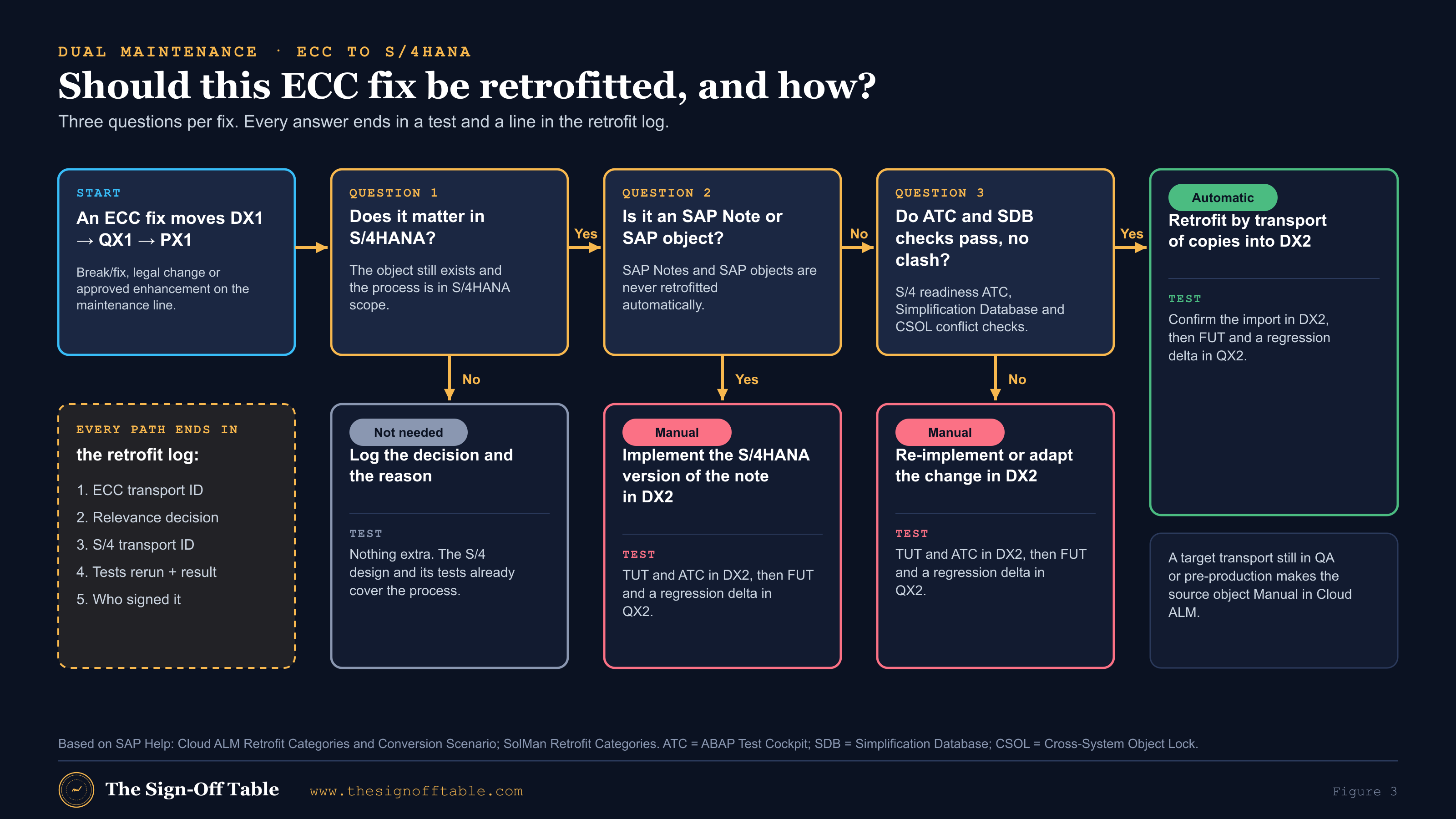
This is the scenario that matters for a conversion, and Cloud ALM now documents it. Its “SAP S/4HANA Conversion and Upgrade Scenario” covers custom code with automatic or manual retrofit plus ATC checks, and customizing with automatic or manual retrofit plus customizing (Simplification Database) checks. SAP Notes and SAP objects: “no (possible with manual retrofit)”[19]. A sibling page says that “currently, SAP S/4HANA Upgrade Scenario and structure comparison aren’t available”[18], so read the scope carefully for your release.
The safe summary for a steering committee: SAP tooling can categorize ECC changes for S/4HANA compatibility; anything that fails the checks is retrofitted by hand. Practitioners describe manual retrofit as “resource-intensive and prone to human error in large transformation programs”[31], and older community answers for N+1 upgrades across different releases fall back to manual tracking and re-keying too[32]. Moore’s 2013 rule is still sound: “Code and configuration re-keys are required because of the risk associated with moving older versions of SAP objects”, and production changes should reach the project development system within 72 hours[34].
A fix in ECC can touch an object that no longer exists in S/4HANA or means something different there: a simplification item, a compatibility-scope function, a custom-code finding. So in a conversion every ECC fix needs four things: a relevance decision, re-implementation or adaptation in DX2, an ATC run on DX2, and a FUT plus regression re-test in QX2[19],[12].
Where gCTS fits (and doesn’t)
gCTS is Git-enabled CTS for ABAP, aimed at CI/CD, and SAP lists it for workbench and customizing objects from the S/4HANA 2020 era onward[27]. Because it needs an S/4HANA-era stack, it cannot be the bridge from an ECC maintenance line, and Cloud ALM retrofit is CTS-only[16]. I found no SAP guidance on using gCTS branches for dual-track retrofit. If someone proposes it for your conversion, ask for the SAP reference.
Freeze strategy: soft freeze, hard freeze and the emergency path
I found no SAP document that defines “soft freeze” and “hard freeze”. The terms below are The Sign-Off Table’s framing, built on practitioner guidance. One consultancy’s 2026 advice is to classify ECC changes as “mandatory, deferrable, or conversion-conflicting”, to “set recurring retrofit windows rather than moving changes ad hoc”, and to phase the freeze so that high-risk areas freeze earlier. It also warns that “projects slip when the dual-maintenance strategy is defined after the development freeze becomes politically impossible”, and that “the existence of tooling does not remove the need for governance”[38].
| State | What may move to PX1 | Retrofit rule | Test rule |
|---|---|---|---|
| Normal | Any approved AM change on the normal release cadence | Every change assessed; relevant ones retrofitted in the next retrofit window | FUT and risk-based regression in QX1; FUT and regression delta in QX2 per wave |
| Soft freeze | No new discretionary scope. Legal, break/fix and CAB-approved items only | Every change retrofitted to DX2 within an agreed SLA (for example, 72 hours, following Moore) | Each change carries a named regression delta in QX2; SIT and UAT scope updated |
| Hard freeze | No transports to PX1 except emergencies | Emergency fixes retrofitted immediately; nothing else moves | Every emergency triggers a regression re-scope in QX2 and OX1 |
| Emergency (during hard freeze) | Only changes that meet the written emergency definition, approved at director level | Mandatory retrofit, tracked to closure before go/no-go | Targeted regression in the emergency path, then the OX1 delta |
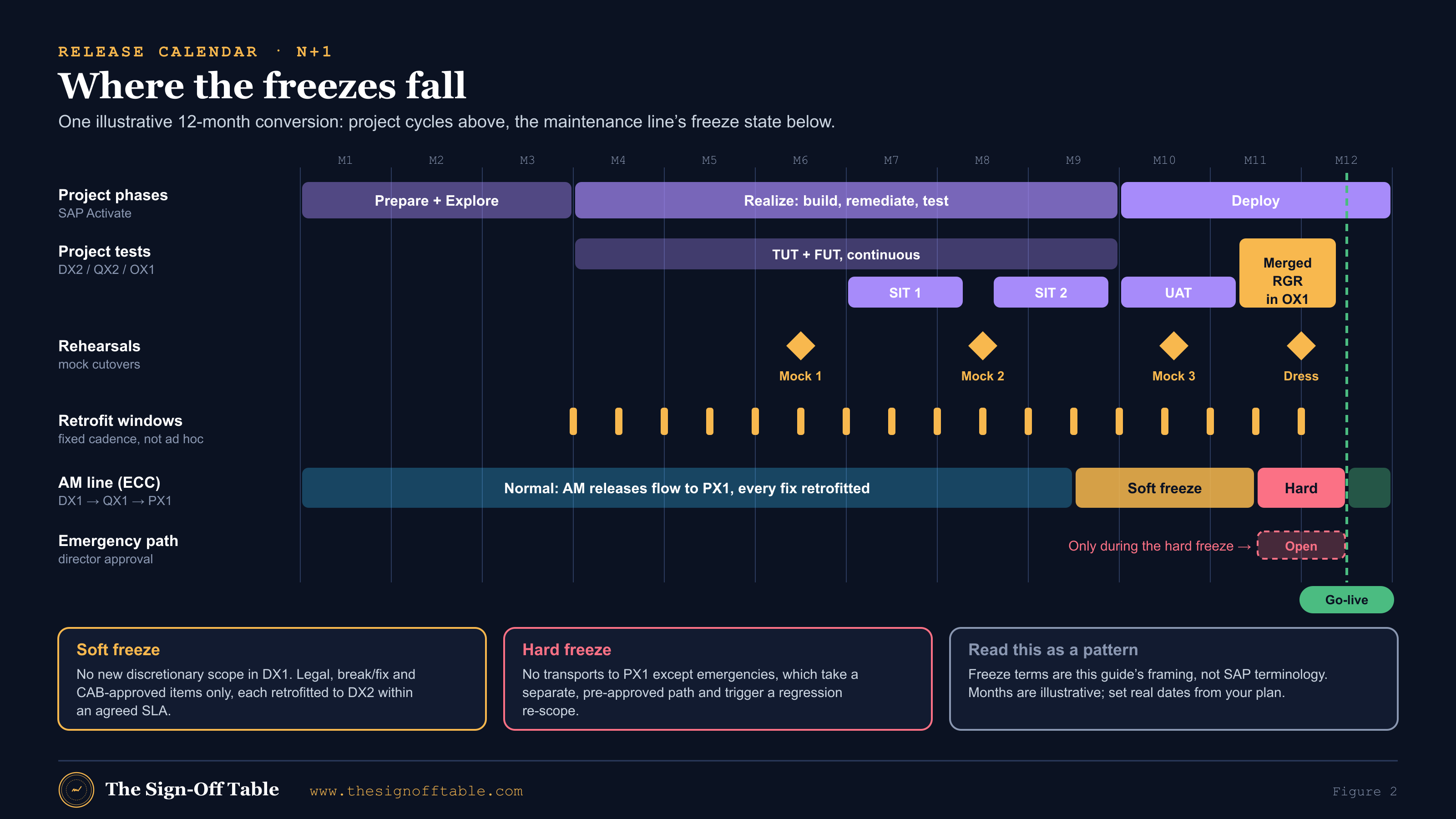
How long should the hard freeze be? Moore’s answer is that the regression freeze length “depends on how long regression testing lasts”[34]. If your merged regression takes three weeks by hand, your hard freeze is at least three weeks plus the dress rehearsal. That is the single strongest business case for automating regression before the project starts, and it is a case the AM team will make for you once they see the calendar. The pain-point table in the ACCELQ section sets out what each manual step costs.
The emergency path
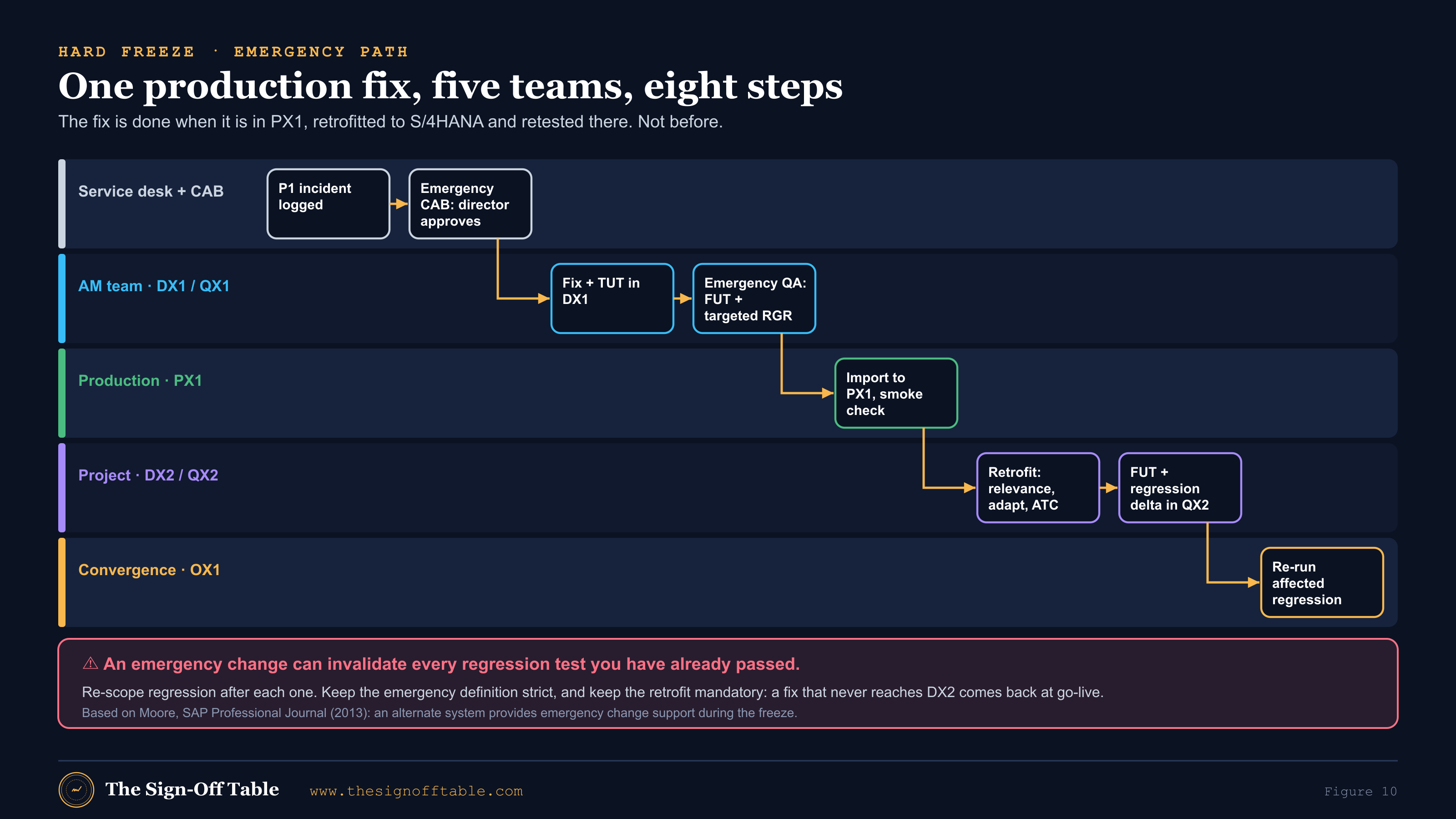
During the freeze, Moore describes production support as frozen, with “an alternate system … selected to provide emergency change support”: a QA system refreshed from production and used as the emergency path to production. Two warnings from the same article belong on your wall: “Every completed regression test case is potentially invalidated” by an emergency change, and “do not waiver on the definition or rules associated with emergency changes”. Approval is usually at director level[34].
Emergency path rules to agree before the freeze
- A written emergency definition (production down, legal deadline, financial misstatement), signed by the business
- Named approvers at director level, with a deputy for every day of the freeze
- The emergency QA system named and refreshed from production before the freeze starts
- Who imports into PX1 under RISE (CAS or your team), and the agreed turnaround
- Retrofit to DX2 is mandatory and tracked: no emergency fix is closed until its S/4HANA status is known
- An automatic regression re-scope in QX2 and OX1 for every emergency change, logged in the change impact analysis log
Governance that keeps both lines safe
CAB, release calendar and merge points
Moore’s release categories are a good starting point: Production Support Weekly, Production Support Monthly, Project and Emergency[34]. In Cloud ALM, deployment plans carry release date ranges and system groups[21],[30], so each line can have its own plan. Because Cloud ALM has no native freeze periods[40], the freeze calendar and CAB rules live in your process. Here is a governance calendar that works for most conversions. It is recommended practice, not an SAP standard; adjust the cadence to your volume.
| Cadence | Forum or activity | Inputs | Outputs and evidence |
|---|---|---|---|
| Daily | Retrofit triage (AM lead, project dev lead, test lead) | New ECC transports released to QX1 or PX1 | Relevance decision per transport, owner, target retrofit window |
| Weekly | Joint CAB for both lines | AM change requests, project changes affecting shared interfaces, freeze status | Approved AM release, regression scope for QX1, retrofit scope for the next window |
| Twice a month | Retrofit window | Approved retrofit backlog | Retrofit transports in DX2, ATC results, QX2 regression delta run and logged |
| Per AM release | Release regression on QX1 | Change impact analysis | Pass rate against baseline, defects, release sign-off |
| Per SIT/UAT cycle | Cycle entry and exit gate | Entry criteria checklist, retrofit log status | Signed cycle report, open defects with owners, retrofit backlog at cycle start |
| Per mock cutover | Mock review | Runbook timings, OX1 build log, regression results | Timing deltas, defects, runbook changes |
| Freeze milestones | Steering committee | Freeze readiness, retrofit backlog, open emergencies | Soft and hard freeze dates confirmed, emergency approvers named |
| Go/no-go | Go/no-go meeting | Evidence pack (see the evidence matrix) | Minuted decision against criteria agreed in advance |
Environment and refresh strategy
SAP describes the pre-production system as the place that mirrors production for final integration, regression, acceptance and technical tests[1]. Varian’s lesson sharpens that: cutover landscapes “ought to replicate production and include connectivity to HA”, after the company hit high-availability issues at go-live despite seven formal cutover runs[36]. Plan each system’s source, refresh cadence and connections.
| System | Built from | Refresh cadence (typical) | Connected to | Data |
|---|---|---|---|---|
| DX1 | Existing ECC development | Rarely | Sandboxes and stubs | Unit test data |
| QX1 | PX1 copy | Before each freeze; on demand for emergency QA | Non-production partners and middleware | Masked production copy |
| DX2 | Copy of DX1 or PX1, converted (brownfield) | Not refreshed once build starts; rebuilt by replaying transports if needed | Stubs | Unit test data |
| QX2 | PX1 copy, converted, plus project stack | Per SIT cycle | Non-production partners, middleware (often new Integration Suite flows), EDI test partners or virtualized stand-ins | Masked production copy plus scenario data |
| OX1 | Latest PX1 copy, converted with the current runbook | Per mock cutover and the dress rehearsal | Production-like connections, HA included | Masked production copy (or unmasked under controlled access, per your policy) |
| PX1 | Production | n/a | Production | Production |
Under RISE, every row with a refresh draws on the entitlement described above, and masking is your job[9]. Write refreshes into the release calendar so they don’t collide with SIT cycles.
Test data across both lines
Two lines double the test-data problem. The AM team needs QX1 close enough to production to reproduce incidents. The project team needs QX2 data that exercises the S/4HANA design: business partners after customer-vendor integration, new pricing, new finance structures. And the same business scenario often has to run on both lines, for example when a retrofitted fix is retested in QX1 and QX2, so the data has to mean the same thing in both places.
- Name scenarios by business object, not by document number. “Domestic customer, credit-managed, plant 1000” survives a refresh; “order 4500012345” does not. Data-driven tests that pick fresh records on each run survive refreshes too.
- Script the post-refresh rebuild. Replay the ordered project transport package, re-create test users and roles, re-point interfaces to test partners and re-seed scenario data, as Moore recommends for refreshes[34]. Time it; it belongs in the refresh calendar.
- Mask on the way in. RISE refreshes don’t include masking[9], so the masking step is part of every refresh to QX1, QX2 and OX1, with its own run time and its own check that it worked.
- Fence outbound interfaces. A fresh production copy still has production partner settings. Disable or re-point outbound IDoc partner profiles, RFC destinations and file drops before the system is opened to testers.
The SAP test data management strategy template and the S/4HANA test data management guide cover the options in depth.
The retrofit log: proving every fix landed and was retested
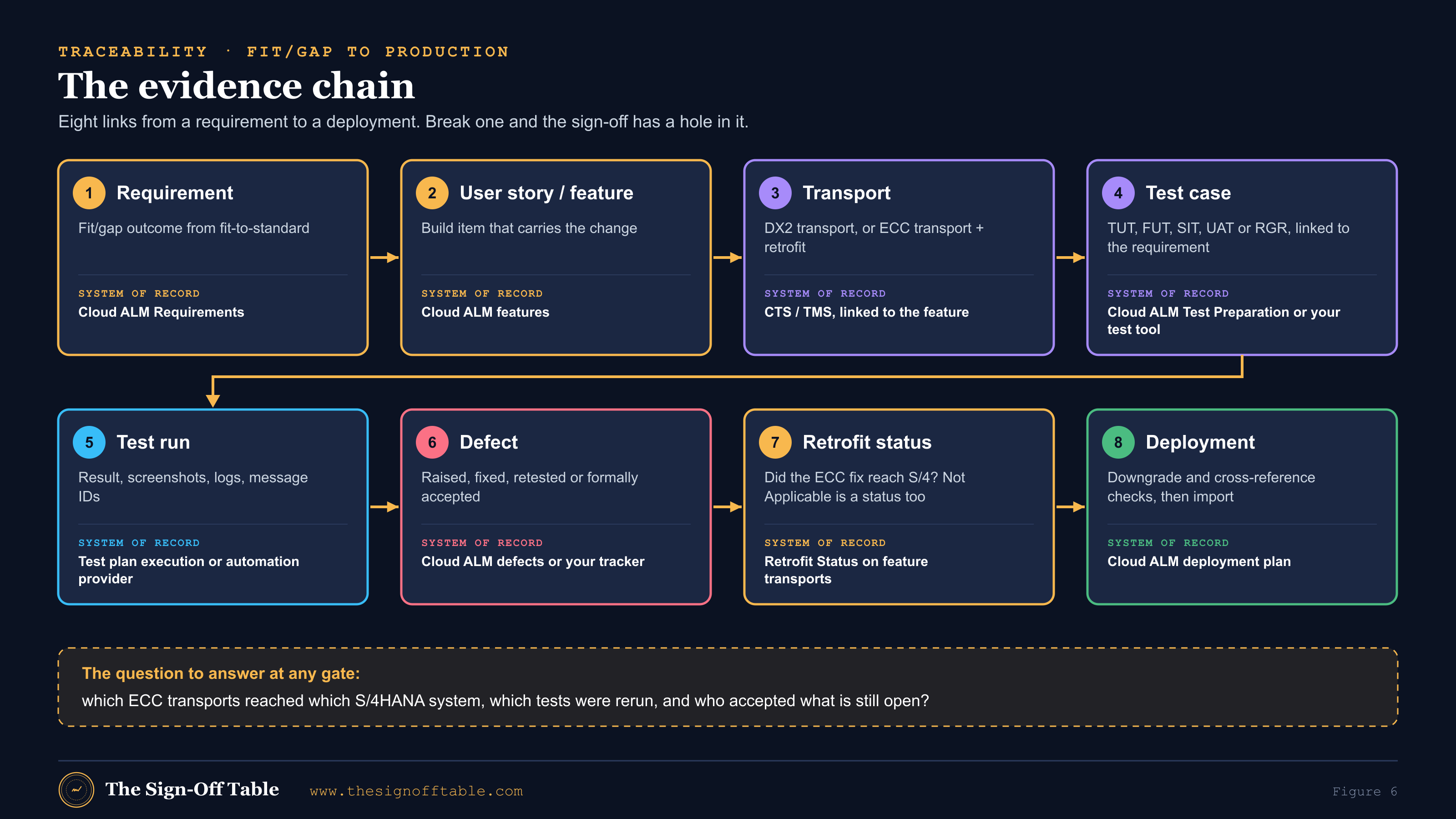
The evidence that matters most at go/no-go is a record of “which ECC transports reached which S/4HANA system and which regression tests were rerun”[38]. Cloud ALM’s Retrofit Status on feature transports, including “Not Applicable”[39], gives you part of this. The rest is a log with one line per ECC transport: the ECC transport ID, the relevance decision and its reason, the S/4HANA transport ID or re-implementation reference, the ATC result, the tests rerun with their results, and who signed it. The change impact analysis log template is built for this.
Who does what: a RACI across the two streams
The most common governance failure in an N+1 program is not a missing tool but a missing owner. Retrofit falls between the AM team, which made the change, and the project team, which has to absorb it. Settle it in a RACI before DX2 is built. This one is recommended practice (R = responsible, A = accountable, C = consulted, I = informed).
| Activity | AM lead | Project dev lead | Test lead | Process owner | Cutover manager |
|---|---|---|---|---|---|
| ECC fix built and unit-tested in DX1 | A/R | I | I | C | — |
| Relevance decision for S/4HANA | R | A | C | C | I |
| Retrofit or re-implementation in DX2, ATC clean | C | A/R | I | — | — |
| FUT and regression delta in QX2 | I | C | A/R | C | — |
| Retrofit log complete and current | R | R | A | I | I |
| AM release regression in QX1 | A | — | R | C | — |
| SIT and UAT cycle gates | C | C | A/R | R (UAT) | I |
| Emergency approval during hard freeze | R | C | C | A (with director) | I |
| OX1 build, merged regression, dress rehearsal | C | R | R | C | A |
| Go/no-go recommendation | C | C | R | R | A |
Metrics that show the lines are in sync
You cannot manage dual maintenance by feel. Report a handful of measures weekly from the moment DX2 exists. None of these are industry benchmarks; set your own thresholds and track the trend.
| Metric | What it tells you | Watch for |
|---|---|---|
| Retrofit backlog (count and oldest item age) | How far the project line lags production | An oldest item older than one retrofit window |
| Share of ECC transports decided within the SLA | Whether triage is keeping up | A falling share in the weeks before a freeze |
| Manual share of retrofitted objects | How much hand re-implementation the team carries | A rising share as more remediated objects are touched |
| Regression delta pass rate per retrofit wave | Whether retrofits break tested functions | Repeated failures in the same process area |
| Defects by line (maintenance, project, retrofit) | Where quality problems originate | Retrofit defects that reach SIT or UAT |
| Emergency changes during the hard freeze | Freeze discipline | More than a few, or any without a completed retrofit |
| Requirements with linked, executed tests | Coverage of the fit/gap outcome | Requirements with no executed test at UAT entry |
Test levels across the streams
SAP’s public cloud test strategy course defines the levels most teams use: a unit test “validates one component of a business process”, a string test “validates several connected components”, then business role testing, end-to-end process tests documented in Cloud ALM Test Management, integration and data migration tests, user acceptance testing that is “ideally … performed by the customer LoB experts who participated in the Fit-to-Standard workshops”, and regression, which in the Run phase checks “whether a release upgrade affects the customer’s configurations or customizations”[4]. The SAP Activate test strategy template for RISE private edition lists objectives, scope, test cycles, Q-gates, deliverables, test automation (recommended) and defect management[5].
“TUT” and “FUT” are practitioner terms, not SAP Activate names. Technical unit testing covers a user exit, custom program or interface; functional unit testing covers configuration, “usually” with actual or masked data[33]. This guide uses five levels plus the rehearsals: TUT, FUT, SIT, UAT and regression (RGR).
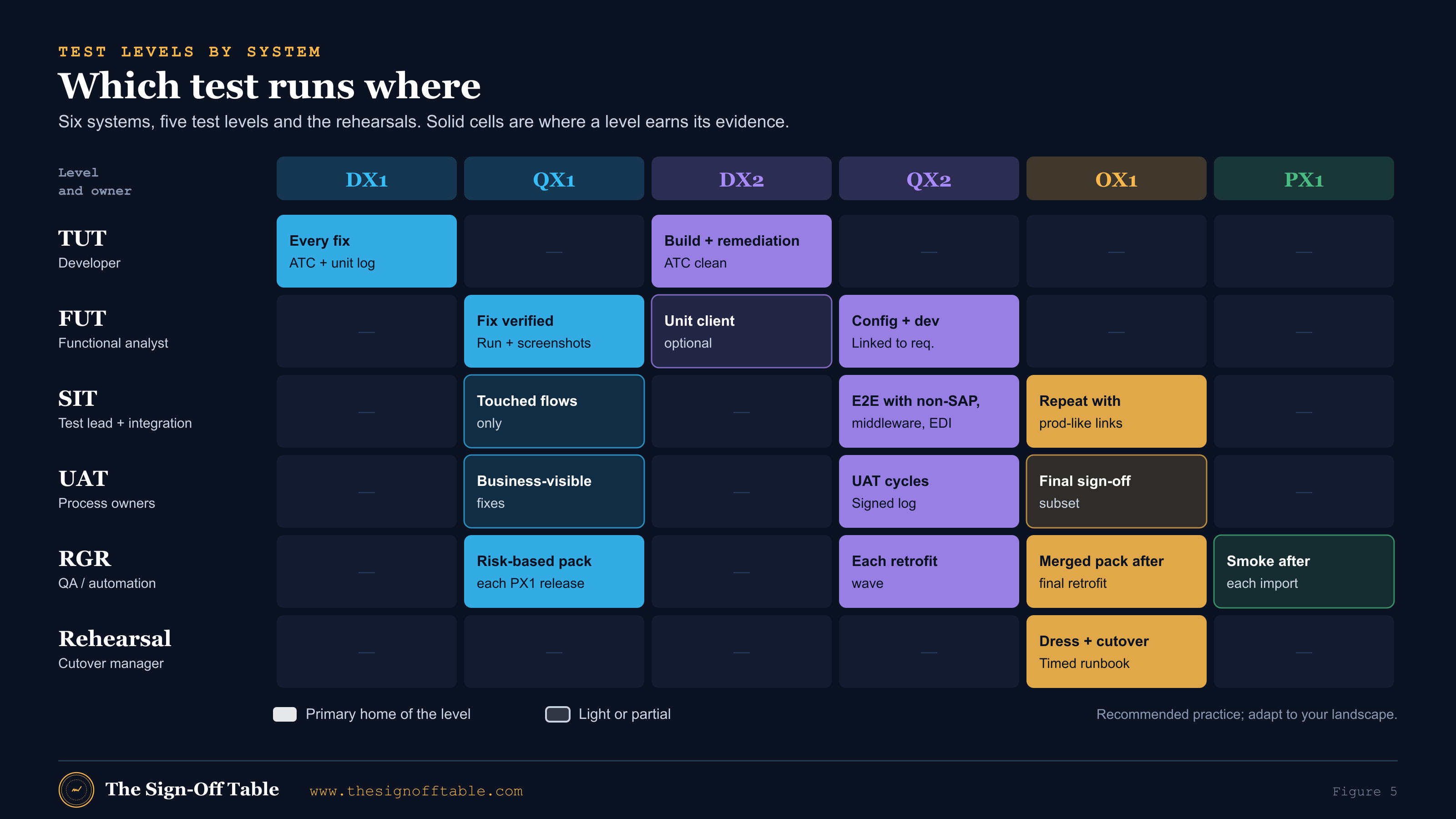
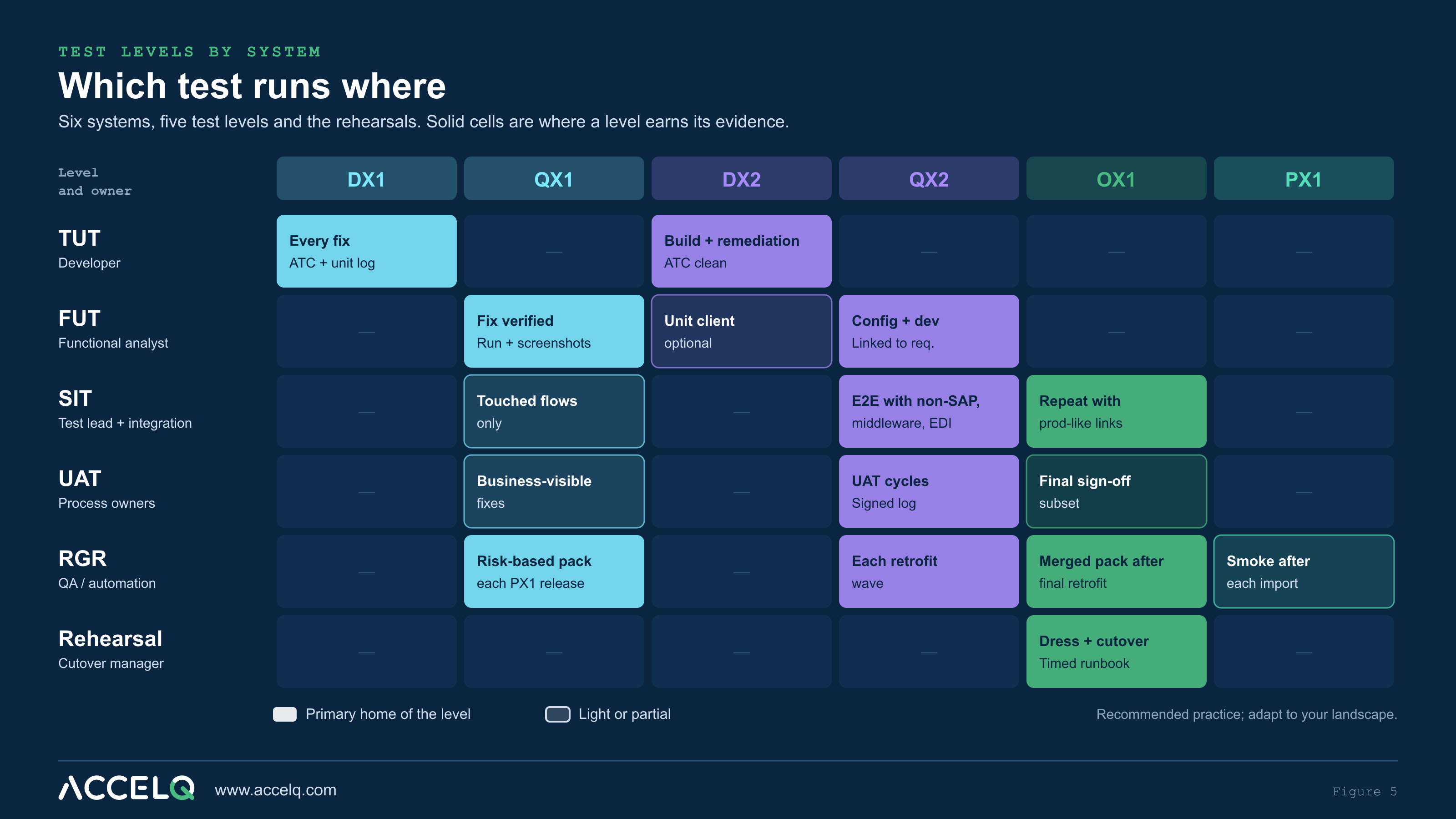
| Level | Maintenance line (ECC) | Project line (S/4HANA) | Convergence (OX1) | Owner | Exit evidence |
|---|---|---|---|---|---|
| TUT | DX1, every fix | DX2, build and remediation; ATC clean | n/a | Developer | ATC result, unit test log, transport ID |
| FUT | QX1 | QX2 (or a DX2 unit client) | n/a | Functional analyst | Test case run, screenshots, linked requirement or defect |
| SIT | QX1: regression of touched flows only | QX2 with non-SAP apps, middleware, EDI partners or stubs | Repeated with production-like connections | Test lead and integration team | E2E results, interface message IDs, IDoc status, reconciliation |
| UAT | Light, for business-visible fixes | QX2, in cycles | Final sign-off subset | Business process owners | Signed UAT log, open defects formally accepted |
| RGR | Every PX1 release, risk-based pack | Each retrofit wave in QX2 | Merged regression after the final retrofit | QA or automation team | Pass rate, deltas against baseline, defect closure |
| Dress and cutover rehearsal | n/a | n/a | OX1 built from the latest PX1 copy | Cutover manager | Timed runbook, go/no-go criteria met |
TUT: developer evidence on both lines
On the maintenance line, TUT is ordinary: the developer tests the fix in DX1 and attaches the result to the transport. On the project line, TUT does two jobs. It proves new build objects work, and it proves remediated or retrofitted objects work on S/4HANA. Make an ATC run with the S/4HANA readiness checks part of the TUT exit for every DX2 transport, because the retrofit tools themselves use ATC to decide what can move automatically[19],[13]. A retrofitted object that was never unit-tested on S/4HANA is the most common hidden defect in a conversion.
FUT: functional evidence linked to a requirement
FUT is where analysts prove that configuration and development do what the requirement says. On the maintenance line, FUT in QX1 verifies the fix. On the project line, FUT in QX2 should link every test to a requirement or user story, because that link is what lets you report coverage of the fit/gap outcomes later. Use masked production data where you can; FUT on toy data misses the edge cases that real master data carries. The FUT strategy and TUT strategy templates set out entry and exit criteria for both.
UAT with business users
On the project line, UAT runs in QX2 in cycles, ideally by the business experts who took part in the fit-to-standard workshops[4]. On the maintenance line, UAT is light: business-visible fixes get a confirmation from the requester. In OX1, a final sign-off subset confirms that what the business accepted in QX2 still works on the converged system. Three things make UAT in an N+1 program different from a single-line project:
- Retrofit status at UAT entry. Business testers must know which production fixes are already in QX2. Publish the retrofit backlog with the UAT entry report, or testers will raise defects for fixes that are simply not retrofitted yet.
- Defect routing. A UAT defect may belong to the project line, to the maintenance line, or to a retrofit that went wrong. Add a “line” field to defect triage.
- Acceptance of open items. UAT ends when critical defects are closed or formally accepted under clear rules[38]. Use a UAT sign-off form that lists them.
Regression: protecting PX1 while the project builds
Regression runs on both lines at once. On the maintenance line, every AM release to PX1 needs a risk-based regression in QX1. On the project line, every retrofit wave needs a regression delta in QX2, because each retrofitted object can break something the project already tested. Then, in OX1, the two packs run together as the merged regression. After go-live, the S/4HANA pack becomes the production regression pack. Practitioners put the principle simply: “coverage should follow change and business risk”[38].
The efficient way to get there is to design FUT and SIT tests so they can be promoted into the regression pack rather than rewritten. Name them by business process, parameterize the data, and link them to requirements from day one. The release regression plan and regression suite inventory templates help you keep both packs honest.
SIT across SAP and non-SAP platforms
System integration testing is where N+1 programs find out what they didn’t know. Varian’s third-party interface impact surfaced only in integration test cycle 1, when it turned out the middleware assumed an 18-character material number[36]. That is a typical SIT finding: not an SAP defect and not a partner defect, but an assumption in the space between.
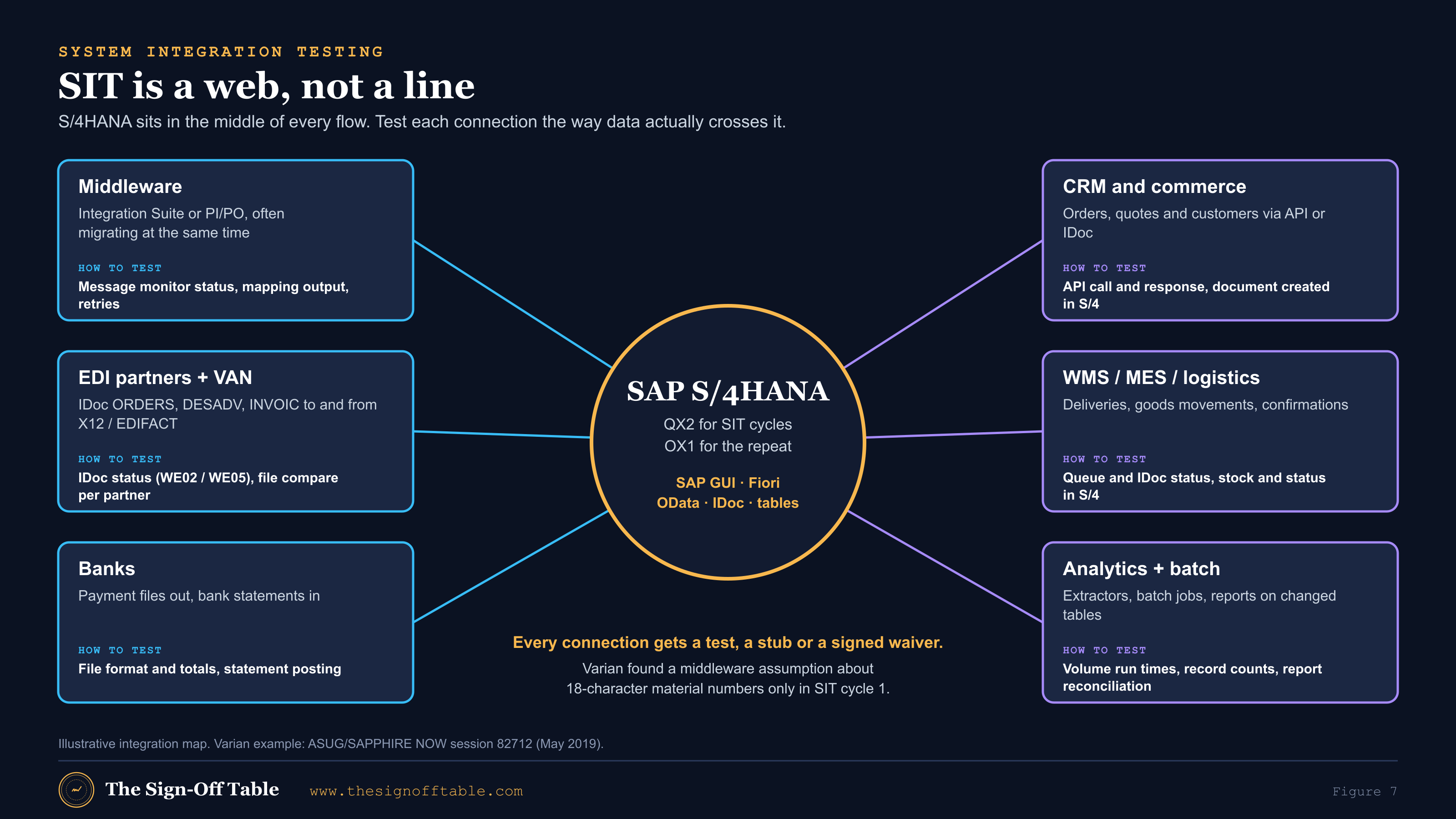
Plan SIT from the interface inventory, not from the process list. For each connection, record the direction, the protocol (IDoc, EDI through a VAN, API or OData, file, message queue), the middleware in between, the partner’s test system or stub, and the technique that proves the flow. The interface inventory and test tracker, IDoc integration test strategy and EDI test strategy templates give you the columns.
| Connection | Typical flows | How to prove it in SIT |
|---|---|---|
| EDI trading partners (through middleware and a VAN) | Inbound ORDERS, outbound DESADV and INVOIC IDocs mapped to X12 or EDIFACT | IDoc status and segment content (WE02, WE05; reprocess with BD87), mapped output file compared per partner, business document created and correct in S/4HANA |
| Middleware (Integration Suite or PI/PO) | Routing, mapping, retries | Message monitor status and IDs, mapping output compared with the pre-conversion baseline, error and retry handling |
| Banks | Payment files out, statements in | File format and totals against the payment run, statement posting and clearing |
| CRM, commerce and portals | Orders, quotes, customers via API or IDoc | API call and response, the resulting document in S/4HANA, status back to the caller |
| WMS, MES, logistics | Deliveries, goods movements, confirmations | Queue and IDoc status, stock and document status in S/4HANA |
| Analytics, extractors, batch | Extractors, reports and jobs on changed tables | Record counts and reconciliation, job run times at production volume |
Two techniques deserve special mention. First, regression by reprocessing: a SAPinsider session on conversion interface testing describes persisted messages that “can be automatically reprocessed”, with the resulting business documents compared against pre-conversion output, and covers virtualizing legacy EDI applications that have no test system[37]. Second, structure diffs: before SIT, compare the IDoc type documentation (WE60) for every message type you exchange between the ECC and S/4HANA systems, so mapping changes are found on paper rather than in a failed partner test.
Watch the middleware calendar too. PI/PO 7.5 mainstream maintenance ends on December 31, 2027, with optional extended maintenance to December 31, 2030, and SAP frames the move to Integration Suite around those dates[28]. If your middleware changes during the conversion, SIT has to cover both changes, and the OX1 repeat has to run on the middleware you will actually use on go-live day. Varian also found that batch jobs and extractors on tables that became views degraded after go-live[36], which is why the analytics row above includes production-volume run times.
Entry/exit criteria and the evidence matrix
Criteria agreed in advance are what keep test cycles from ending on the calendar rather than on quality. Practitioners say cycles end “when critical defects were closed or accepted under clear rules”[38]. The tables below are recommended practice for an N+1 conversion; the SIT cycle plan template carries the same structure.
| Level | Entry criteria | Exit criteria |
|---|---|---|
| TUT (DX1 and DX2) | Object built; transport assigned to a change or feature; for DX2, retrofit decision recorded | Unit test passed and logged; ATC clean (S/4HANA readiness checks in DX2); transport released |
| FUT (QX1 and QX2) | TUT exit met; test case linked to a requirement, story or defect; test data available | All planned cases executed; no open critical or high defects, or each formally accepted; evidence attached |
| SIT (QX2, repeated in OX1) | FUT exit met for in-scope objects; interfaces connected or stubbed; partner test windows booked; retrofit backlog published | All E2E scenarios executed; interface message IDs and IDoc statuses recorded; reconciliation passed; open defects accepted with owners |
| UAT (QX2, subset in OX1) | SIT exit met; testers trained; retrofit status published; UAT scripts approved by process owners | Process owners sign; open defects listed and accepted; workarounds documented |
| RGR (QX1, QX2, OX1) | Baseline pack defined; change impact analysis done; environment refreshed as planned | Pass rate meets the agreed threshold; every failure explained (defect, data, or expected change); deltas against baseline recorded |
| Dress rehearsal (OX1) | OX1 built from the latest PX1 copy; final retrofit wave applied; merged regression passed | Runbook executed within the window; all cutover tasks done; go/no-go criteria met |
The evidence matrix
Evidence is what survives the program: what an auditor, a controller or the next upgrade team can look at and trust. Decide where each type lives before SIT 1, not after.
| Evidence | Produced at | Proves | System of record (example) |
|---|---|---|---|
| Retrofit decision per ECC transport | Daily triage | Every production fix was assessed for S/4HANA | Cloud ALM Retrofit Status; retrofit log |
| ATC result per DX2 transport | TUT | Code is S/4HANA-ready | ATC, linked to the feature |
| Test case linked to requirement | FUT design | Coverage of fit/gap outcomes | Cloud ALM Test Preparation or your test tool |
| Test run with step results and screenshots | FUT, SIT, UAT, RGR | What was executed and what happened | Test plan execution or automation provider |
| Interface message IDs and IDoc statuses | SIT | Data crossed each boundary correctly | Middleware monitor; IDoc monitor; SIT report |
| Reconciliation results | SIT, mocks | Totals and counts match | Reconciliation workbook |
| Defects with line, severity and closure | All levels | Problems were found, fixed or accepted | Cloud ALM defects or your tracker |
| Signed UAT log | UAT | The business accepts the solution | UAT sign-off form |
| Regression pass rate and deltas | Each release, wave and OX1 | Nothing that worked before is broken | Regression reports |
| Timed runbook and go/no-go minutes | Mocks and dress rehearsal | The cutover fits the window and was decided on criteria | Mock tracker; go/no-go checklist |
Convergence in OX1: merged regression, dress rehearsal and cutover rehearsal
OX1 is where the two lines become one. In a conversion it is rebuilt for each rehearsal: a fresh copy of PX1, converted with the current runbook, with the project transport stack and the latest retrofit wave applied on top. SAP says the dress-rehearsal system should come from the latest production copy and run “all the functional and technical tasks outlined in the cutover plan”[3]. Practitioners add two cautions: “the first rehearsal should be treated as measurement, not as proof”, and “a cutover rehearsal didn’t pass because SUM completed”[38].
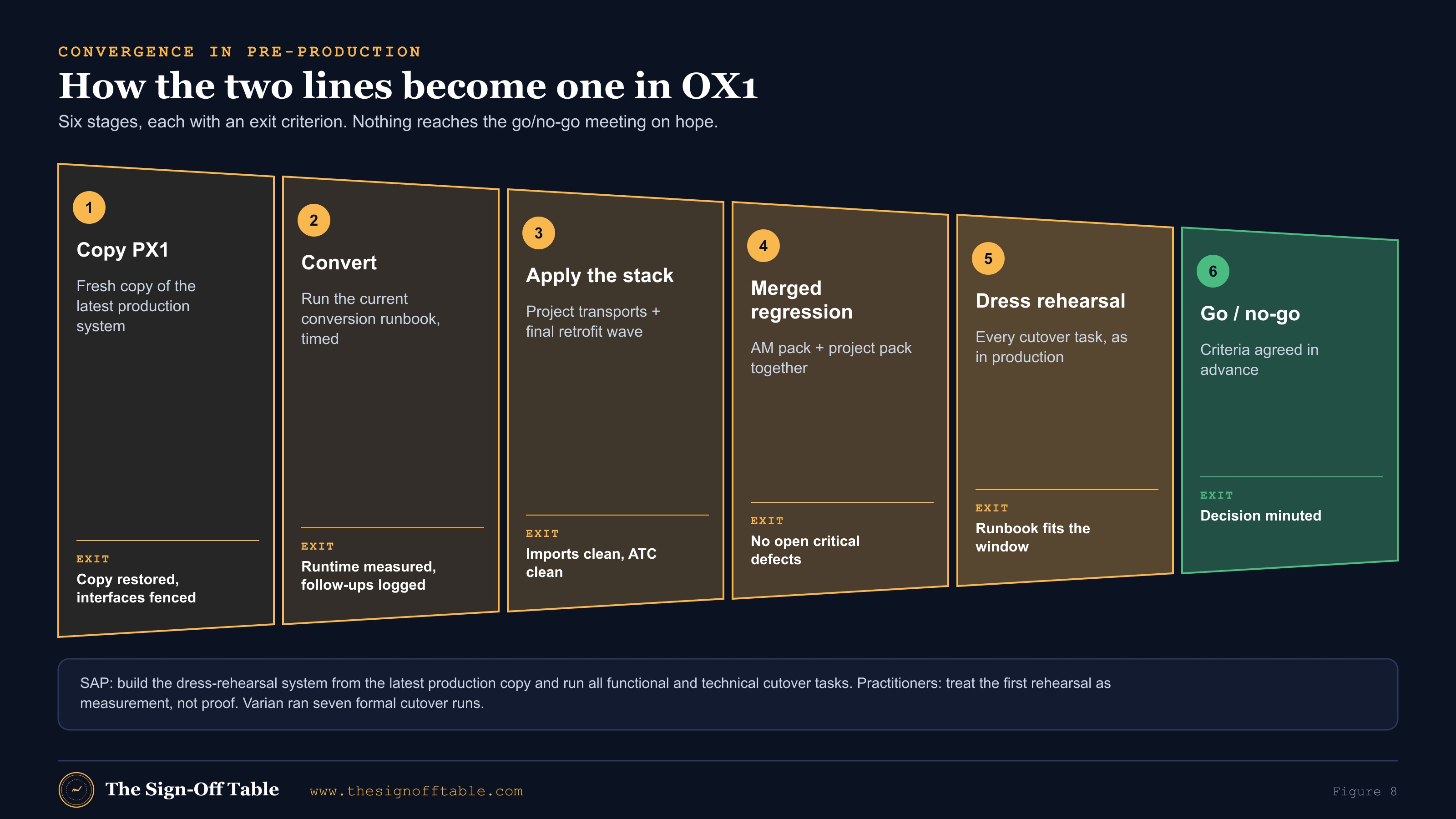
| Stage | What happens | Exit criterion | Evidence |
|---|---|---|---|
| 1. Copy PX1 | Restore the latest production copy into OX1; fence outbound interfaces before anything starts | Copy restored; no message leaves OX1 for a production partner | Copy log, interface fencing checklist |
| 2. Convert | Run the conversion with the current runbook; time every step | Conversion and follow-up activities complete; timings recorded | Timed runbook, follow-up log |
| 3. Apply the stack | Import project transports in order, then the final retrofit wave | All imports clean; ATC clean; retrofit log complete for the period | Import logs, retrofit log, ATC results |
| 4. Merged regression | Run the AM pack and the project pack together, plus SIT on production-like connections | No open critical defects; failures explained | Regression report with deltas, SIT report |
| 5. Dress rehearsal | Execute every cutover task as it will run in production, including data loads and validations | Runbook fits the downtime window; reconciliation passes | Timed runbook, reconciliation results |
| 6. Go/no-go | Decide against criteria agreed in advance | Decision minuted with owners for accepted risks | Go/no-go checklist and minutes |
How many rehearsals? SAP recommends at least five conversion cycles, including a dry run[2]; practitioner guidance usually asks for at least two full mock cutovers; Varian ran seven formal cutover runs[36]. The right number is the one that makes the last rehearsal boring. Track each one in the mock cutover rehearsal tracker, and keep the cutover runbook and go/no-go checklist under version control from the first mock.
SAP Cloud ALM as the backbone: fit/gap to test case to regression
Requirements and fit-to-standard
In Cloud ALM, requirements are “expectations that need to be fulfilled from a business point of view” that the standard solution does not meet, typically collected “as part of the fit-to-standard workshops”. The Requirements app supports creating and approving requirements, generating tasks, and mass upload and download[22]. In a conversion, fit-to-standard workshops come out of the conversion readiness assessment, and SAP groups simplification items as “Needs functional/technical fixes”, “Needs fit-to-standard workshops” or “Not applicable”[2]. Those groupings are a ready-made starting point for test scope: every item that needs a fix needs a TUT and a FUT; every item that went through a workshop needs FUT and probably SIT.
Test preparation, test plans and traceability
Cloud ALM’s Test Preparation manages manual test cases and “automated test cases integrated from the connected test automation provider”. It can “create automated test cases in the automation provider directly from SAP Cloud ALM”, and lets you “assign requirements and/or user stories to your manual and automated test cases to achieve full traceability from the creation, through testing, to deployment”[23]. Test plans are “sets of test cases that are executed in specific test cycles”, useful where test cases are reused across phases or rolled out to several organizations[24]. That maps naturally onto SIT 1, SIT 2, UAT and the regression cycles in an N+1 program. Add Retrofit Status on feature transports[39] and the deployment-plan transport checks[20], and Cloud ALM can hold most of the evidence chain in Figure 6.
The Test Automation API: how external tools plug in
Cloud ALM integrates “automated test cases from any external test automation provider that has implemented our public Test Automation API”. Setup needs the Global Administrator role and a Landscape Management service of type Test Automation, with an endpoint secured by Basic authentication or OAuth2 client credentials. After setup, “whenever new processes are scoped … a synchronization with the automation provider takes place to retrieve the existing automated test cases”[25]. The direction matters: the provider implements the API and Cloud ALM calls it. An SAP author notes that this is “valid for cloud solutions only or you have to develop a connector” for on-premise tools[26]. I did not read the endpoint-level specification, which sits behind a sign-in on the SAP Business Accelerator Hub, so check it before you design around a specific operation.
For a deeper walk-through, see the getting started with SAP Cloud ALM guide and the Cloud ALM test automation integration guide.
Worked example: one ECC fix, end to end
Here is one change followed through every step. The company, transports and dates are illustrative; the steps are the ones this guide recommends. A manufacturer is in month 8 of a 12-month brownfield conversion, during the soft freeze’s run-up. SIT 2 is under way in QX2.
- The change. A state sales-tax rate changes on the first of next month. The AM team raises a legal change; the joint CAB approves it for the next weekly AM release.
- DX1 build and TUT. A functional consultant updates the tax condition records and a developer adjusts a custom pricing routine that hard-codes a rate threshold. Both are unit-tested in DX1 and released in ECC transport DX1K904321.
- QX1 FUT and regression. The analyst runs FUT on order-to-invoice for the affected state, and the weekly AM regression pack (order-to-cash for all tax jurisdictions) runs in QX1. It passes and the change moves to PX1.
- Retrofit triage. The next morning, triage reviews DX1K904321. Question 1: relevant to S/4HANA? Yes: the tax rates apply on day one after go-live, and the custom pricing routine was kept in the S/4 design. Question 2: SAP Note or SAP object? No. Question 3: do the checks pass? The condition records are customizing that passes the Simplification Database check, so they are categorized Automatic. The pricing routine fails the ATC S/4HANA readiness check because it reads a table that is replaced in S/4HANA, so it is categorized Manual.
- DX2 retrofit and TUT. The condition records arrive by transport of copies. The developer re-implements the routine change in the already-remediated S/4HANA version of the routine, runs ATC clean, and releases DX2K901877. Both transports are linked to the same feature in Cloud ALM, and its Retrofit Status is set.
- QX2 FUT and regression delta. In the next retrofit window, the analyst runs the same FUT case in QX2 against S/4HANA. The regression delta for the window is order-to-cash for the affected state, plus the EDI INVOIC flow to two large customers, because invoices carry the tax amount. Both pass.
- SIT impact. SIT 2 already passed the EDI invoice scenario last week, before the retrofit. The test lead re-runs that scenario rather than relying on the earlier result, and notes the re-run in the SIT 2 report.
- The retrofit log. One line records DX1K904321, the decision and reason, DX2K901877, the ATC result, the three tests re-run with their results, and the approver.
- OX1. At the next mock cutover, OX1 is built from a PX1 copy that already contains the new rates. The project stack brings in the S/4HANA routine. The merged regression runs the tax scenarios once more, now on the converged system.
Nine steps for one tax change. Multiply by the number of ECC transports in a year and you see why Varian spent more than 18 months on dual maintenance[36], and why the retrofit windows, the log and a reusable regression pack matter more than any single tool.
Case study: what Varian learned running two landscapes for 18 months
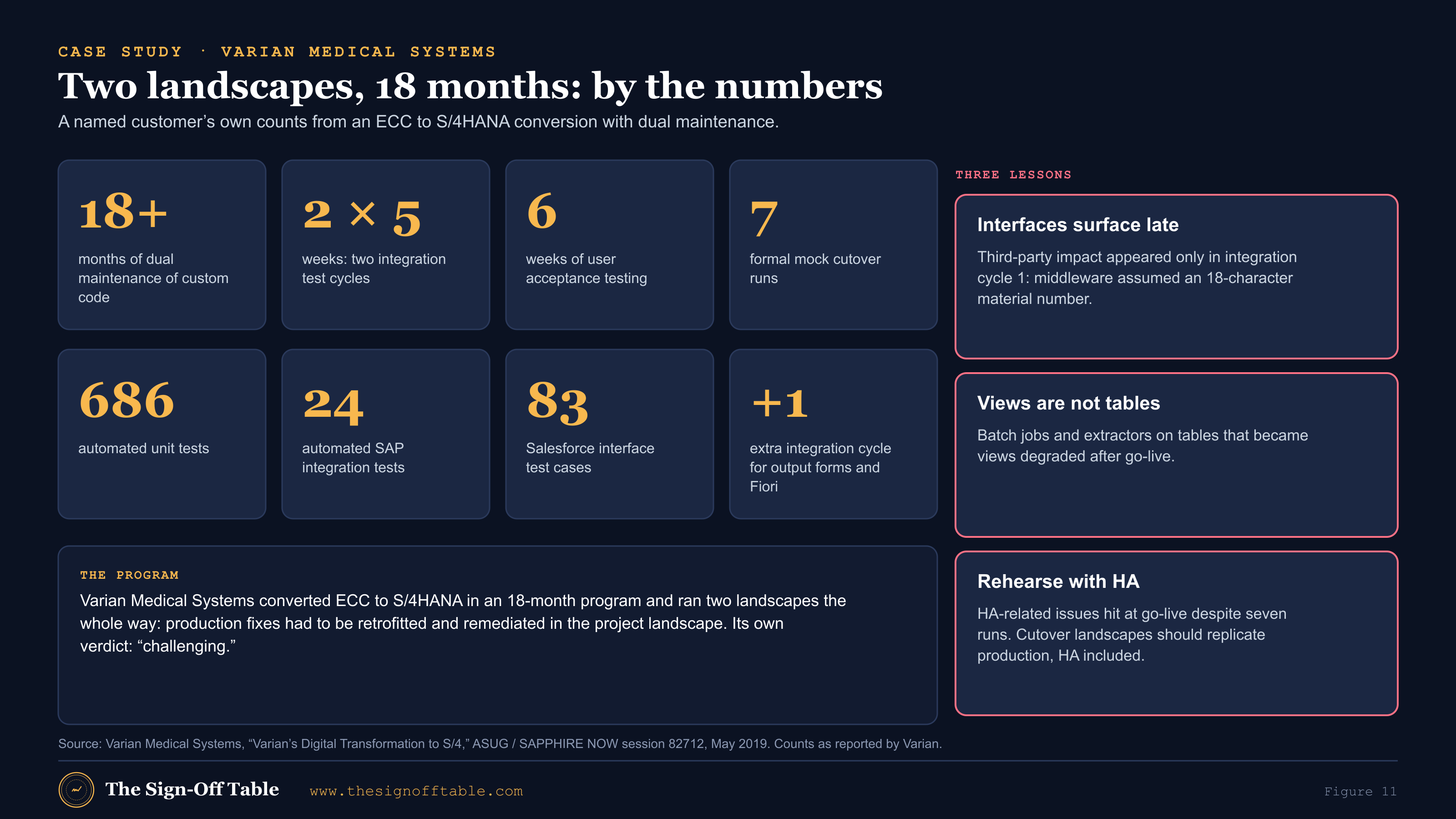
Varian Medical Systems presented its ECC to S/4HANA conversion at ASUG and SAPPHIRE NOW in May 2019. It is one of the few public cases with real numbers about dual maintenance and testing, and every figure below is Varian’s own, from that deck[36].
| What Varian reported | What it means for your N+1 program |
|---|---|
| An 18-month conversion program; “maintaining two landscapes, retrofitting and remediating code in project landscape from production was challenging” | Plan dual maintenance as a workstream with its own staff, not as a side task for developers |
| “Dual maintenance of custom code: create clear strategy … more than 18 months was spent on dual maintenance” | Write the retrofit strategy, windows and log before DX2 is built |
| Two integration test cycles of 5 weeks each, a 6-week UAT, and a third integration cycle for output forms and Fiori | Budget for an extra cycle; output and UI layers are easy to under-scope |
| Automated testing: 686 unit tests, 24 SAP integration tests, 83 Salesforce interface test cases | Automation at scale is achievable and pays back across cycles; interface tests deserve their own count |
| Seven formal mock cutovers | More rehearsals than SAP’s minimum is normal for a complex landscape |
| Third-party interface impact surfaced only in integration cycle 1 (middleware assumed an 18-character material number) | Run interface structure checks before SIT, and start SIT with partner flows, not SAP-only flows |
| Batch jobs and extractors on tables that are now views degraded after go-live | Add batch and extractor run times at production volume to the OX1 merged regression |
| HA-related issues at go-live despite seven cutover runs; cutover landscapes “ought to replicate production and include connectivity to HA” | Make OX1’s connections, including HA, match production for the dress rehearsal |
Where test automation helps: ACCELQ in an N+1 program
Disclosure: Matt Angerer, who runs The Sign-Off Table, works at ACCELQ. This section describes ACCELQ’s documented capabilities and one capability in development. Everything above it is tool-neutral. Full disclosure.
ACCELQ describes itself as “a cloud-based, continuous testing platform for functional and API testing needs”, with a manual testing and test management product alongside, offered as SaaS or on-premise[41]. In an N+1 program it fits at every test level, with one honest exception: developer unit tests stay with ABAP Unit and ATC.
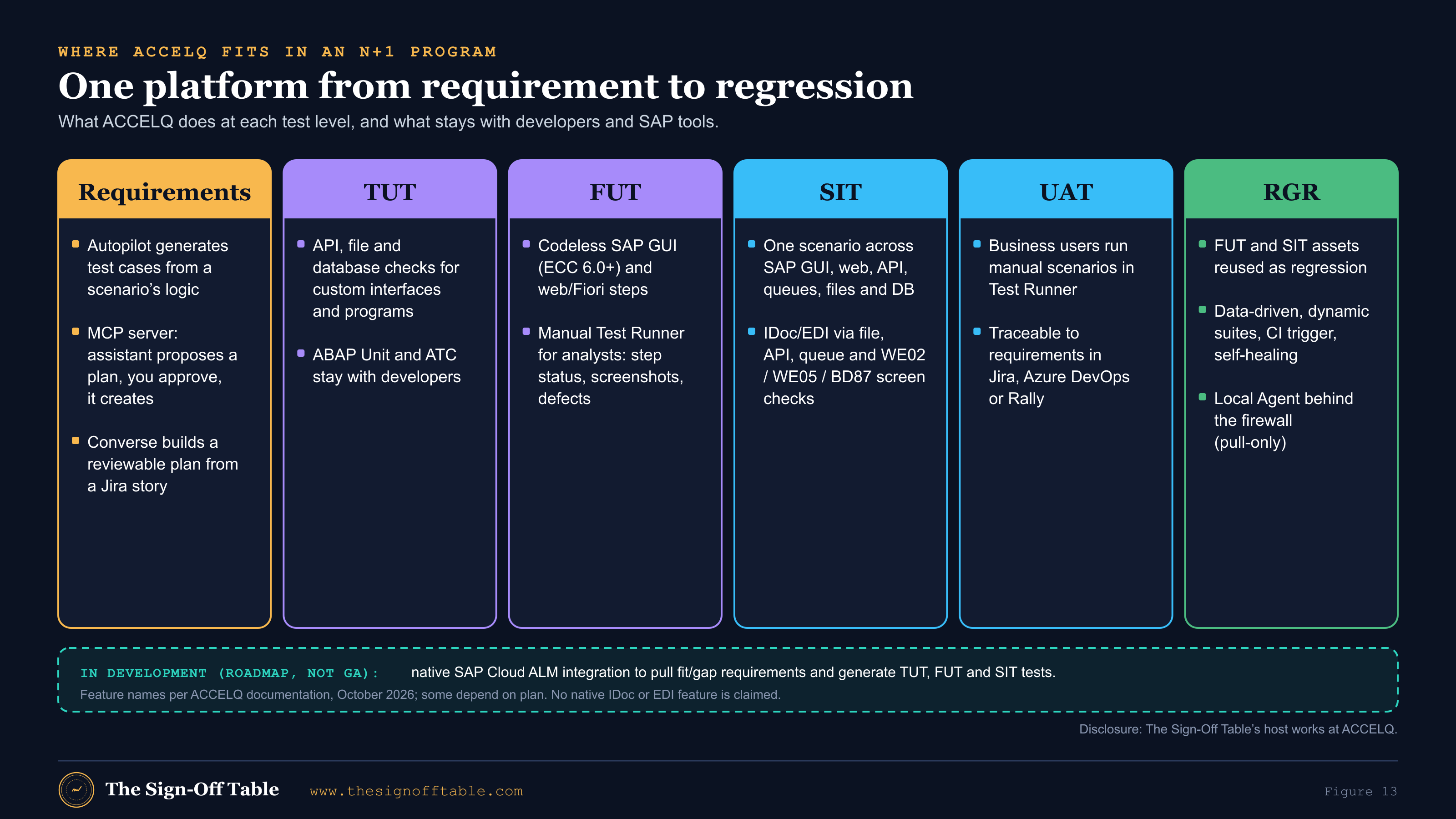
AI for blueprint requirements: from O2C, P2P and R2R requirements to proposed tests
An S/4HANA blueprint produces hundreds of requirements across order-to-cash, procure-to-pay, record-to-report and the rest. Turning them into TUT, FUT and SIT test designs is slow work, and it is where AI can help today, with a human approving the output:
- Autopilot.“Use Generate > Autopilot to have AI automatically create relevant test cases based on your scenario’s logic”; Autopilot Architect suggests where to modularize and parameterize actions[55].
- The ACCELQ MCP server. Part of Autopilot, it lets an AI assistant “plan and create tests, run them, and tell you how your runs went”, proposing a test plan for your approval before it creates anything[57],[58]. Point an assistant at a set of P2P requirements and you get a proposed FUT and SIT plan to review, not a pile of unreviewed scripts.
- Converse. ACCELQ’s blog says “pointing Converse at a Jira story ID is one of its supported sources for building a test plan”, that it “returns a structured, reviewable test plan”, and that generated plans, scripts and test data are presented for review before they are finalized or executed. Support for BRD, PRD and SRS documents is described as upcoming, without a date[59].
Availability of these features depends on your ACCELQ plan[55]. ACCELQ’s April 2025 Autopilot press release says early adopters reported a 65% reduction in test creation time and an 80% decrease in maintenance effort[60]; those are vendor-reported figures, not independent measurements, so test them on your own landscape.
SAP Cloud ALM integration (in development)
Seven N+1 pain points: what they cost and how ACCELQ addresses them
Every pain point below comes from the method earlier in this guide, and every cost is one the sources describe or that follows directly from the process; none is a benchmark. The third column lists only capabilities ACCELQ documents today.
| Pain point | What it costs the program | How ACCELQ addresses it today |
|---|---|---|
| Regression across both lines | Every AM release needs regression in QX1, every retrofit wave a delta in QX2, then a merged run in OX1. Done by hand, the merged regression sets the length of the hard freeze, because the freeze “depends on how long regression testing lasts”[34], and when time runs short it is coverage that gets cut. | One set of data-driven scenarios built from reusable actions[55],[56]; dynamic suites group them into an AM release pack, a retrofit-wave pack and a merged pack without copies[54]; runs start from CI or the REST API[62] and execute behind the firewall through the pull-only Local Agent[63]. |
| Retrofit retesting | Each retrofit can invalidate results already reported, and every emergency change can invalidate completed regression[34]. Teams either re-test by hand, which stretches every retrofit window, or report stale results at the gate. Varian spent more than 18 months on dual maintenance[36]. | Tag scenarios by process area and requirement, and a dynamic suite selects the delta for each wave[54]. Trigger it from the pipeline after the import[62] and record the run in the retrofit log. |
| Business users running FUT, SIT and UAT | Business testers juggle spreadsheets, screenshots and email. Evidence ends up scattered, defects arrive without steps, and someone rebuilds the evidence pack by hand before every sign-off. | The manual Test Runner records step status (Pass, Fail, Blocked, Skipped, Not Run), screenshots and Jira or Azure DevOps (TFS) defects[49]; existing scripts import from Excel or CSV[50]; a manual scenario links to its automated counterpart, so a business user’s FUT case can become regression without losing its history[53]. |
| Traceability for sign-off | At go/no-go nobody can show which requirements have an executed, passing test. The meeting debates whose numbers are right, and auditors get screenshots instead of a trace. | Manual and automated scenarios link to requirements in Jira, Azure DevOps or Rally, with requirement-based suites per release and coverage reporting[51],[52]. Native SAP Cloud ALM traceability is in development (roadmap per ACCELQ; not generally available). |
| Cross-platform SIT | Interface defects surface late: Varian’s middleware assumption about material number length appeared only in integration cycle 1[36]. Each late interface defect means re-running SIT and rebooking partner test windows. | One scenario across SAP GUI, web, API, message queue, file and database steps[47],[45]; API virtualization stands in for partners with no test system[46]; IDoc and EDI flows are validated through file, API, queue and SAP GUI checks[65],[66]. There is no IDoc- or EDI-specific feature. |
| AI requirement analysis | Hundreds of blueprint requirements across O2C, P2P and R2R have to become TUT, FUT and SIT designs before SIT 1. Test design becomes the critical path, and coverage gaps are found in UAT. | Autopilot generates test cases from scenario logic[55]; the MCP server lets an AI assistant propose a test plan for your approval before it creates tests[57],[58]; Converse builds a reviewable plan from a Jira story[59]. Availability depends on plan. Generating tests from Cloud ALM requirements is part of the in-development integration. |
| Self-healing through upgrades | The conversion, support packs and Fiori updates all move screens. Scripts that break on every change consume the automation team in exactly the weeks before a freeze, and broken scripts quietly drop out of the pack. | Self-healing recovers broken element identification at runtime, is on by default, and is reported in the run report so you can review what changed[61]. It repairs how elements are found, not changed process logic, so a retrofit that changes behavior still needs a test update. |
On SAP coverage, be precise in your own business case: the SAP GUI framework is documented for ECC 6.0 and higher[42], and S/4HANA, Fiori, SuccessFactors and Ariba coverage is claimed in SAP’s partner listing, which is vendor-supplied text[44]. Pilot your own critical transactions and apps on your S/4HANA release before you size the regression pack around them.
The first 30 days: setting up N+1 testing
If your program is about to build DX2, this is the order to work in. It is a sequence, not a schedule; larger programs will need longer.
| Week | Do this | Output |
|---|---|---|
| 1 | Agree the landscape, SIDs and system sources; confirm the RISE tiers, refresh entitlement and transport responsibilities | Landscape diagram (Figure 1 for your SIDs) and the contract questions answered |
| 1 | Choose the retrofit route: Cloud ALM, Solution Manager or manual; confirm prerequisites and note status | Retrofit tooling decision with its known gaps written down |
| 2 | Write the retrofit strategy: triage cadence, windows, SLA, log, RACI | Signed retrofit strategy and an empty, ready retrofit log |
| 2 | Write the freeze states, dates, emergency definition and approvers | Freeze calendar signed by the business |
| 3 | Map test levels to systems with entry and exit criteria; agree the evidence matrix and systems of record | Test strategy section for N+1 (Figure 5 and the criteria tables) |
| 3 | Build the interface inventory and book partner test windows for SIT 1 | Interface tracker with a test, stub or waiver per connection |
| 4 | Capture the regression baseline on QX1: the AM release pack, designed for reuse on QX2 | First regression pack, linked to requirements, run once with results kept |
| 4 | Set up traceability: requirements, tests and defects in Cloud ALM or your test tool; define the defect “line” field | Traceability model in use before the first FUT |
Failure patterns to design out
These patterns recur in the sources above and in practitioner accounts of N+1 programs. Each comes with the design choice that prevents it. None of them is a statistic.
| Pattern | What it looks like | Design it out |
|---|---|---|
| Strategy after the fact | Dual maintenance is defined once the freeze is already politically impossible[38] | Write the retrofit and freeze strategy in the Prepare phase and get it signed |
| Tool as strategy | “We have retrofit tooling, so we’re covered”, while categorization sends most remediated objects to manual[38],[19] | Staff manual retrofit as real work and measure the manual share |
| Ad hoc retrofit | Fixes move to DX2 whenever a developer has time; nobody knows what is missing | Recurring retrofit windows and a log[38] |
| Stale test results | SIT passed a flow last week; a retrofit changed it yesterday; the old result is reported | Every retrofit wave names the tests it invalidates and re-runs them |
| SAP-only SIT | Partners and middleware are stubbed until late; interface defects surface in cycle 1 or later[36] | Start SIT with partner flows; diff IDoc structures before SIT; book partner windows early |
| A rehearsal system that isn’t production | OX1 lacks HA, real connections or production volume; go-live finds what the mocks did not[36] | Build OX1 from the latest PX1 copy with production-like connections, HA included |
| Elastic emergencies | The emergency definition stretches during the hard freeze, and regression results quietly expire[34] | Written definition, director approval, mandatory regression re-scope |
| Refreshes as an afterthought | Refreshes take days, collide with SIT cycles or exceed the RISE entitlement; masking is not planned[34],[9] | A refresh calendar inside the release calendar, masking budgeted, transport replay scripted |
| Rewriting tests for every cycle | FUT, SIT and regression are separate artifacts; each cycle starts from scratch | Design FUT and SIT for promotion into the regression pack from day one |
The master checklist
Before DX2 is built
- Landscape and SIDs decided with retrofit in mind (no identical source and target SIDs)
- RISE order form covers DX2, QX2 and OX1 as additional non-productive tiers; refresh entitlement and masking confirmed
- Retrofit tooling chosen (Cloud ALM, Solution Manager, or manual) and the status of SAP Note 2652106 checked if relying on Solution Manager
- Retrofit strategy written: triage cadence, retrofit windows, SLA, log format, owners
- Freeze states, dates, emergency definition and approvers agreed with the business
- Test strategy names each level, its system, owner, entry and exit criteria, and evidence
- Requirements in Cloud ALM (or your tool) with an agreed traceability model to tests and defects
During build and test cycles
- Daily retrofit triage; every ECC transport has a decision within the SLA
- ATC with S/4HANA readiness checks is part of TUT exit for every DX2 transport
- FUT and SIT tests linked to requirements and designed for reuse as regression
- Retrofit backlog published at every SIT and UAT entry gate
- AM release regression on QX1 and a regression delta on QX2 for every retrofit wave
- Interface inventory complete; every connection has a test, a stub or a signed waiver
- Middleware changes (PI/PO to Integration Suite) tested in the same SIT as the ERP
Convergence and go-live
- OX1 built from the latest PX1 copy for every mock and the dress rehearsal; interfaces fenced
- Final retrofit wave applied and logged; post-copy changes listed and retested
- Merged regression passed, including batch and extractor run times at production volume
- Dress rehearsal fits the window with HA and production-like connections
- Evidence pack complete per the evidence matrix; go/no-go decided on criteria agreed in advance
- After go-live: the S/4HANA pack re-baselined as the production regression pack; DX1/QX1 retired on plan
Templates and courses
Every template below is free to download from the template library.
| Area | Templates |
|---|---|
| Landscape, data and change | Test environment and transport strategy; SAP test data management strategy; change impact analysis log |
| Strategy and unit testing | SAP master test strategy; TUT strategy; FUT strategy; requirements traceability matrix |
| SIT and interfaces | SIT cycle plan and entry/exit criteria; interface inventory and test tracker; IDoc integration test strategy; EDI test strategy |
| UAT | SAP UAT plan; UAT sign-off form; defect severity and triage matrix |
| Regression | Release regression plan; SAP regression suite inventory |
| Convergence and cutover | Mock cutover rehearsal tracker; cutover plan and runbook; go/no-go readiness checklist; ECC to S/4HANA migration test plan |
Academy courses that go deeper: release management with change and release management fundamentals, ABAP transport management in practice, change control with SAP Cloud ALM, release readiness and sign-off governance and dual maintenance and retrofit during transformation; testing with the SAP test landscape, entry criteria, exit criteria and quality gates, integration and end-to-end testing, user acceptance testing for SAP, regression testing strategy, testing SAP interfaces, change impact analysis, the go/no-go evidence pack, cutover rehearsal testing and testing an S/4HANA conversion end to end; Cloud ALM with requirements, user stories and traceability, test preparation and test plans, features, deployment plans and release orchestration and transitioning from Solution Manager; and the transformation track with simplification items, custom code migration and remote ATC, conversion cutover and downtime planning and leading a brownfield transformation.
Related guides: the ECC to S/4HANA migration testing plan, who owns testing under RISE, S/4HANA test data management, what to automate first and the ECC maintenance dates.
Frequently asked questions
What is an N+1 landscape in SAP?
A dual-track landscape: a maintenance line for the release in production (N) and a parallel project line for the release under development (N+1). Changes in the maintenance line are retrofitted into the project line, and the project line goes live into the same production system[11],[1].
What is a good SAP N+1 landscape strategy for an ECC to S/4HANA conversion?
Keep ECC on a DX1 → QX1 → PX1 maintenance line, build S/4HANA on a DX2 → QX2 project line, and converge in a pre-production system (OX1) built from the latest production copy[3]. Add a written retrofit strategy, freeze states with an emergency path, and a regression pack that serves both lines. See What an N+1 landscape is.
How does an SAP upgrade N+1 landscape differ from a conversion?
In an upgrade, both lines run the same product and convergence is a transport merge, which Moore says usually takes one to two weeks[34]. In an ECC to S/4HANA conversion the code bases differ, so ECC fixes are checked with ATC and Simplification Database checks, and failures are re-implemented by hand[19].
What is dual maintenance in SAP, and how is it different from retrofit?
Dual maintenance is the practice of applying a change in both lines. Retrofit is the mechanism, tool-supported or manual, that brings a maintenance-line change into the project line and detects conflicts when the same object changed in both[29],[11].
What is the SAP retrofit process?
Assess each maintenance transport for relevance, categorize its objects (automatic, tool-assisted or manual in Solution Manager; automatic or manual in Cloud ALM), apply or re-implement in the project development system, check for conflicts with CSOL, then test[12],[18]. Figure 3 shows the decision.
Does SAP Cloud ALM support retrofit?
Yes, since the week-51 2025 release[39], for CTS-managed landscapes only[16]. It documents an ECC to S/4HANA conversion scenario with ATC and Simplification Database checks; SAP Notes and SAP objects need manual retrofit[19].
How do you configure retrofit in SAP Cloud ALM?
Create maintenance and implementation system groups, separate source and target projects and deployment plans, and map source to target development systems on the Retrofit tab[17]. A practitioner walkthrough adds managed-system prerequisites such as ST-PI 740 SP31, specific SAP Notes, a domain link and RFC roles[30].
What is CSOL in SAP Cloud ALM?
Cloud ALM retrofit uses the cross-system object lock check framework to prevent inconsistencies and downgrades in the target system[18]. An analyst notes that single-landscape CSOL, which Solution Manager offers, is still missing in Cloud ALM[40],[14].
Does Solution Manager 7.2 retrofit support ECC to S/4HANA?
Its S/4HANA upgrade scenario requires all systems to be on S/4HANA and points to SAP Note 2652106; community comments report that ECC to S/4HANA retrofit under that note needed SAP involvement as a pilot[13],[29]. Check the note’s current status with SAP.
What are SAP dual landscape best practices?
One project track, not several[1]; recurring retrofit windows rather than ad hoc moves[38]; production changes in the project line within a short SLA[34]; a retrofit log; a pre-production system that mirrors production for final integration tests; and regression on both lines.
What is an N+2 landscape?
A third line for a further release in parallel. Cloud ALM maps it in a cascade: n to n+1, then n+1 to n+2[17].
Does RISE with SAP include a pre-production system?
Not by default. The package tables list PRD, QAS and DEV; extra systems are additional non-productive or productive tiers[8], and a pre-production system for upgrades comes through a change request that may add fees[9]. Check your order form.
How many system refreshes does RISE include, and is masking included?
The standard R&R v.3-2025 includes up to 12 homogeneous refreshes per ABAP SID per contract year, and excludes data masking and scrambling[9].
What is an SAP code freeze, and what is a soft freeze vs a hard freeze?
A period when changes to production are restricted so testing results stay valid. The soft and hard freeze definitions in this guide are this guide’s framing, not SAP terms: soft means no new discretionary scope; hard means no transports to production except emergencies. See Freeze strategy.
How many mock cutovers do you need?
SAP recommends at least five conversion cycles, including a dry run[2]. Varian ran seven formal cutover runs[36]. Run enough that the last one is uneventful.
What is TUT and FUT in SAP testing?
Practitioner terms: technical unit testing of a user exit, program or interface, and functional unit testing of configuration, usually with real or masked data[33]. SAP Activate uses unit and string test instead[4].
What is a pre-production system in SAP?
A system that mirrors production and hosts the final integration test before changes go live[1]. In an ECC to S/4HANA N+1 landscape it is also where the two lines converge (OX1 in this guide), rebuilt from the latest production copy for each mock and the dress rehearsal[3].
What is an SAP parallel landscape strategy?
Another name for the same idea: running a maintenance landscape and a project landscape side by side. SAP Learning describes up to three parallel releases (n, n+1 and n+2), but recommends against more than one project development track[1].
Is there a transaction code for SAP retrofit?
Retrofit is driven from Solution Manager or the Cloud ALM Retrofit app, not from a single managed-system transaction. In Solution Manager, the yellow (tool-assisted) category uses the correction workbench (SCWB) for workbench objects and BC Sets for customizing[12].
Can gCTS replace retrofit between ECC and S/4HANA?
Not on current evidence. gCTS needs an S/4HANA-era stack[27], Cloud ALM retrofit is CTS-only[16], and I found no SAP guidance on gCTS branches for dual-track retrofit.
How long should the hard freeze be?
At least as long as your merged regression plus the dress rehearsal, because the freeze length “depends on how long regression testing lasts”[34]. Faster regression means a shorter freeze.
Can SAP Cloud ALM manage test automation from other tools?
Yes, through its public Test Automation API, which the external provider implements and Cloud ALM calls[25],[26].
Summary and next steps
Two lines, one production system, and a long list of things that have to be true on the night of go-live. The tools have improved since December 2025, but the work that decides the outcome is still governance and evidence. If you take five things from this guide, take these:
- Decide before DX2 exists: SIDs, RISE tiers and refreshes, the retrofit route (Cloud ALM, Solution Manager or manual) and the freeze states with their emergency path.
- Give every ECC fix a decision, a test and a log line: relevance, retrofit or re-implementation, ATC on DX2, FUT and a regression delta in QX2.
- Run each test level where it earns its evidence, with entry and exit criteria agreed before SIT 1 and a system of record for every artifact.
- Build FUT and SIT once and promote them into the regression pack that protects QX1 releases, QX2 retrofit waves and the merged run in OX1. How fast that pack runs sets the length of your hard freeze.
- Converge in an OX1 that is really production: the latest PX1 copy, production-like connections including HA, and a go/no-go decided on criteria written in advance.
Two ways to move faster from here:
Subscribe to the newsletter for updates as SAP’s retrofit tooling and Cloud ALM change.
Sources
- [1]System landscape options (Technical Implementation and Operation II of SAP S/4HANA and SAP Business Suite), SAP Learning, n.d., accessed October 24, 2026
- [2]Planning your system conversion to SAP S/4HANA Cloud Private Edition following SAP Activate (J. Marquez, SAP), SAP Community, March 12, 2025
- [3]Running your system conversion to SAP S/4HANA Cloud Private Edition following SAP Activate (J. Marquez, SAP), SAP Community, March 12, 2025
- [4]Explaining the test strategy (Implementing SAP S/4HANA Cloud Public Edition), SAP Learning, n.d., accessed October 24, 2026
- [5]FAQ to the SAP test strategy (Chandan Gurav, SAP), SAP Community, December 5, 2022
- [6]SAP S/4HANA maintenance until 2040: clarity and choice for SAP Business Suite 7, SAP News Center, February 4, 2020
- [7]RISE with SAP journey: SAP ERP, private edition, transition option updates, SAP News Center, August 2025, updated October 13, 2026
- [8]SAP Cloud ERP Private (RISE with SAP S/4HANA Cloud, private edition, and SAP ERP, private cloud edition) Service Description Guide, v.7-2026, SAP, last updated July 20, 2026
- [9]RISE with SAP S/4HANA Cloud, private edition and SAP ERP, private cloud edition: Roles and Responsibilities, v.3-2025, SAP, March 2025
- [10]SAP S/4HANA Cloud, private edition and SAP ERP, tailored option: Roles and Responsibilities, v.03.2026, SAP, March 2026
- [11]Dual landscape synchronization (retrofit), SAP Solution Manager 7.2 SPS 21, SAP Help Portal, n.d., accessed October 24, 2026
- [12]Retrofit categories (SAP Solution Manager 7.2), SAP Help Portal, n.d., accessed October 24, 2026
- [13]SAP S/4HANA upgrade scenario (retrofit, SAP Solution Manager 7.2), SAP Help Portal, n.d., accessed October 24, 2026
- [14]Cross-system object lock (SAP Solution Manager 7.2), SAP Help Portal, n.d., accessed October 24, 2026
- [15]SAP Solution Manager 7.2 (maintenance and transition to SAP Cloud ALM), SAP Support Portal, n.d., accessed October 24, 2026
- [16]Retrofit (SAP Cloud ALM application help), SAP Help Portal, n.d., accessed October 24, 2026
- [17]Retrofit landscape configuration (SAP Cloud ALM), SAP Help Portal, n.d., accessed October 24, 2026
- [18]Retrofit categories (SAP Cloud ALM), SAP Help Portal, n.d., accessed October 24, 2026
- [19]SAP S/4HANA conversion and upgrade scenario (SAP Cloud ALM retrofit), SAP Help Portal, n.d., accessed October 24, 2026
- [20]Performing transport checks on deployment schedules (SAP Cloud ALM), SAP Help Portal, n.d., accessed October 24, 2026
- [21]Deployment plans (SAP Cloud ALM), SAP Help Portal, n.d., accessed October 24, 2026
- [22]Requirements (SAP Cloud ALM), SAP Help Portal, n.d., accessed October 24, 2026
- [23]Test preparation (SAP Cloud ALM), SAP Help Portal, n.d., accessed October 24, 2026
- [24]Test plans (SAP Cloud ALM), SAP Help Portal, n.d., accessed October 24, 2026
- [25]Integrating other test automation providers (SAP Cloud ALM setup and administration), SAP Help Portal, n.d., accessed October 24, 2026
- [26]How to connect SAP Cloud ALM and a test automation tool (Xavier Picquart, SAP), with author comment of November 2025, SAP Community, December 1, 2023
- [27]Change and Transport System (including gCTS), SAP Support Portal, n.d., accessed October 24, 2026
- [28]Understanding the rationale for a migration (SAP Process Orchestration to SAP Integration Suite), SAP Learning, n.d., accessed October 24, 2026
- [29]S/4HANA transformation with dual maintenance and retrofit (Daniel Enderli, SAP Champion), including reader comments, SAP Community, March 13, 2021
- [30]Step-by-step guide to setting up retrofit in SAP Cloud ALM (Gopal Bhallamudi), SAP Community, December 30, 2025
- [31]Retrofit setup strategy for ECC to S/4HANA transformation with similar SIDs (Anand Prakash), SAP Community, August 17, 2026
- [32]Managing N+1 landscape for upgrade project (Q&A thread), SAP Community, n.d., accessed October 24, 2026
- [33]Testing (discussion thread on technical and functional unit testing), SAP Community, n.d., accessed October 24, 2026
- [34]Best practices for planning, testing and deploying changes in a mature SAP ERP landscape (Michael A. Moore; SAP Professional Journal reprint), MasteringSAP, September 12, 2013
- [35]ASUG Ontario chapter presentation (Beyond Technologies), ASUG, September 15, 2022
- [36]Varian’s digital transformation to S/4 (ASUG / SAPPHIRE NOW session 82712; Nallaiah and Mathew), ASUG, May 2019
- [37]SAP S/4HANA conversion application interface testing and virtualization (event session abstract), SAPinsider, n.d., accessed October 24, 2026
- [38]SAP S/4HANA brownfield migration, advisorytechs (consultancy), October 8, 2026
- [39]SAP Cloud ALM: what’s new in week 51, blue.works (SAP partner), December 18, 2025
- [40]SAP Cloud ALM Q1 2026: retrofit and ATC (Christian Steiger), Change Orchestration Institute / Solutive AG (sells a change-management add-on), April 27, 2026
- [41]What is ACCELQ?, ACCELQ Support, updated November 19, 2025
- [42]SAP GUI automation with ACCELQ, ACCELQ Support, updated January 16, 2026
- [43]Enabling SAP GUI scripting for automation, ACCELQ Support, updated January 14, 2026
- [44]ACCELQ Inc.: ACCELQ (partner listing; vendor-supplied text), SAP.com partner directory, n.d., accessed October 24, 2026
- [45]Support for API testing, ACCELQ Support, updated November 4, 2025
- [46]API virtualization, ACCELQ Support, updated July 15, 2025
- [47]Multi-modal automation, ACCELQ Support, updated October 2, 2026
- [48]Creating a manual test scenario, ACCELQ Support, updated December 31, 2025
- [49]Running manual tests, ACCELQ Support, updated August 22, 2024
- [50]Importing manual scenarios from Excel or CSV, ACCELQ Support, updated August 29, 2026
- [51]Setting up traceability between requirements and scenarios, ACCELQ Support, updated July 15, 2026
- [52]Establishing integration with requirements and defect tracking tools, ACCELQ Support, updated August 18, 2026
- [53]How do you link manual and automated test cases?, ACCELQ Support, updated August 22, 2024
- [54]Test suites in ACCELQ, ACCELQ Support, updated June 9, 2025
- [55]Working with test cases in ACCELQ, ACCELQ Support, updated October 12, 2026
- [56]Entities or building blocks, ACCELQ Support, updated October 10, 2025
- [57]Connect AI assistants to ACCELQ MCP, ACCELQ Support, updated September 27, 2026
- [58]ACCELQ MCP tools guide, ACCELQ Support, updated October 7, 2026
- [59]Conversational AI for test automation (ACCELQ Converse; Geosley Andrades), ACCELQ blog, September 15, 2026
- [60]ACCELQ’s Gen AI offering sets itself apart (Autopilot press release), BusinessWire, April 3, 2025
- [61]Self healing, ACCELQ Support, updated August 29, 2026
- [62]REST API end-point to trigger test execution externally, ACCELQ Support, updated August 12, 2026
- [63]Securely execute tests behind firewall using Local Agent, ACCELQ Support, updated July 17, 2025
- [64]Database testing with ACCELQ, ACCELQ Support, updated August 22, 2024
- [65]Working with XML, ACCELQ Support, updated January 14, 2026
- [66]Working with fixed-width files, ACCELQ Support, updated January 14, 2026
- [67]Working with delimited files, ACCELQ Support, updated January 14, 2026
- [68]SAP test discovery and automation with agentic AI, ACCELQ, n.d., accessed October 24, 2026