SAP Joule for S/4HANA Projects: The Practitioner’s Guide to Prompts, Joule for Consultants and the SAP Activate Prompt Library
How consultants, architects, test leads, data migration leads and PMOs can use SAP Joule and well-built prompts across an S/4HANA deployment: the Joule surfaces in 2026, Joule for Consultants and AI Units, Joule in S/4HANA and SAP Cloud ALM, a deep dive into the SAP Activate Prompt Library on SAP for Me, prompt technique, privacy, verification, and AI-assisted testing from fit-to-standard to sign-off.

Every S/4HANA project in 2026 has the same new question in its stand-ups: can Joule do this? Sometimes the answer is yes and saves a day. Sometimes the answer is a confident paragraph that is wrong for your edition and release, and costs a day later. The difference is rarely the tool. It is the prompt, the context behind it and the discipline of checking what comes back.
This guide is for the people who deploy S/4HANA: functional consultants, solution architects, test leads, data migration leads and the PMO. It maps the Joule products as they stand in October 2026, explains Joule for Consultants and how it is licensed, and walks in depth through SAP’s new SAP Activate Prompt Library on SAP for Me. Then it gets practical, with prompt technique, a privacy checklist, a verification loop and original example prompts for every SAP Activate phase, with the most detail on testing and quality, from fit-to-standard to sign-off.
Disclosure: Matt Angerer, who runs The Sign-Off Table, works at ACCELQ. ACCELQ appears in one clearly marked section of this guide, on testing AI-assisted work. Everything else, including the guidance on Joule, prompts and the SAP Activate Prompt Library, is tool-neutral. SAP did not review this guide, and ACCELQ does not sponsor or review this site. Read the full disclosure.
Key takeaways
- “Joule” covers several products. Knowledge copilots (Joule for Consultants, Joule in the Roadmap Viewer) see SAP content plus what you type. Joule in S/4HANA and SAP Cloud ALM sees business data within your authorizations. Joule for Developers, Joule Studio and the generative AI hub are for building and extending.
- Joule for Consultants is a paid, per-user offering charged in AI Units: 35 AI Units per user per month in SAP’s 2025 FAQ and current SAP Learning material. It answers from SAP documentation, SAP Activate, SAP Learning, SAP Community and, with an S-user, SAP Notes and KBAs. It does not connect to your systems.
- SAP launched the SAP Activate Prompt Library on SAP for Me in July 2026 (me.sap.com/roadmapviewer/promptlib). You can filter it by roadmap, Joule type, phase and task, and each prompt card has the prompt, an Expert Template where one applies, and a Sample Output. Browsing needs no extra setup; running the prompts needs Joule for Consultants.
- Each library prompt belongs to an AI-Assisted task in SAP Activate. The task’s AI-Assisted Procedure explains the inputs the prompt expects. Read it first. By September 2026 there were 55 such tasks in the Cloud ERP Private new-implementation roadmap.
- A prompt that holds up has six parts: role, context, task, grounding and limits, format, and a verification ask. For SAP work, the context that matters most is edition, release, scope item and process, and never client data.
- Joule drafts and people decide. Every answer that becomes project material goes round a verify loop: read the sources, check the release, try it in a system, record the evidence.
- For testing, AI shortens the drafting of test scope, test cases, migration checks, cutover checklists, defect triage and sign-off packs. The verification, the evidence and the signature stay with named people.
Why prompting is now a project skill
SAP has moved AI from a slide to the methodology. In June 2026 SAP Activate shipped its first AI-Assisted tasks: 9 updated tasks and 13 tested prompts for the S/4HANA Cloud Public and Private Edition roadmaps[2]. By September there were 55 AI-Assisted tasks across all 11 workstreams of the Cloud ERP Private new-implementation roadmap, with 49 in System Conversion and 50 in Selective Data Transition[3]. Those tasks span project management, fit-to-standard preparation, requirements, data management, extensibility, testing, cutover and adoption[3].
So prompting is now part of how SAP expects projects to be delivered, not a side skill for enthusiasts. And SAP’s own launch post for the Prompt Library opens with the question every new user asks: where do I begin, and what do I type[1]? The post is candid that a good prompt for a context-heavy task, such as a fit-to-standard workshop or a data migration approach, takes time and expertise to write, and that teams without a starting point either write weak prompts or stop using the capability[1].
The other reason is risk. SAP warns that Joule for Consultants may occasionally produce inaccurate, incomplete or misleading information[10]. On a project, an unchecked AI answer turns into a configuration decision, a test case or a cutover step. The skill that matters is writing prompts that make answers checkable, and then checking them.
SAP Joule in 2026: the map
Joule is SAP’s generative AI assistant, embedded across SAP’s cloud portfolio. SAP Learning describes four types of capability: transactional (do something), navigational (take me there), informational (explain something) and analytical (show me the numbers)[13]. By the Q1 2026 release, SAP said Joule was available in 35 SAP solutions, with more than 40 specialized agents and more than 2,400 Joule skills[16].
Commercially, SAP splits Joule into Base and Premium. Base covers navigational, informational, transactional and simple analytical capabilities and doesn’t consume AI Units. Premium covers advanced transactional and analytical capabilities and actions run by Joule Agents, and it does need AI Units[14]. AI Units are SAP’s consumption currency for Business AI, and you will meet them in almost every section below.
At SAP Connect on October 6, 2026, SAP announced Joule Work, a new AI user interface beginning its customer rollout, and Joule Assistants that work with existing data, authorizations and audit trails at a level of autonomy the customer sets. Joule can also reach third-party agents through the Agent2Agent (A2A) protocol[17]. Two days later SAP said Joule Work would roll out to all customers later in October, and that Joule Studio would be generally available soon[18]. Trade press reported that several line-of-business assistants are scheduled for Q4 2026 and Q1 2027[19]. SAP TechEd starts on October 27, 2026, after this guide’s date, so check SAP News for anything announced there[18].
For a project team, the useful split is not by product name but by what each Joule can see. That decides what you may paste into it and how much you can trust its answers about your system.
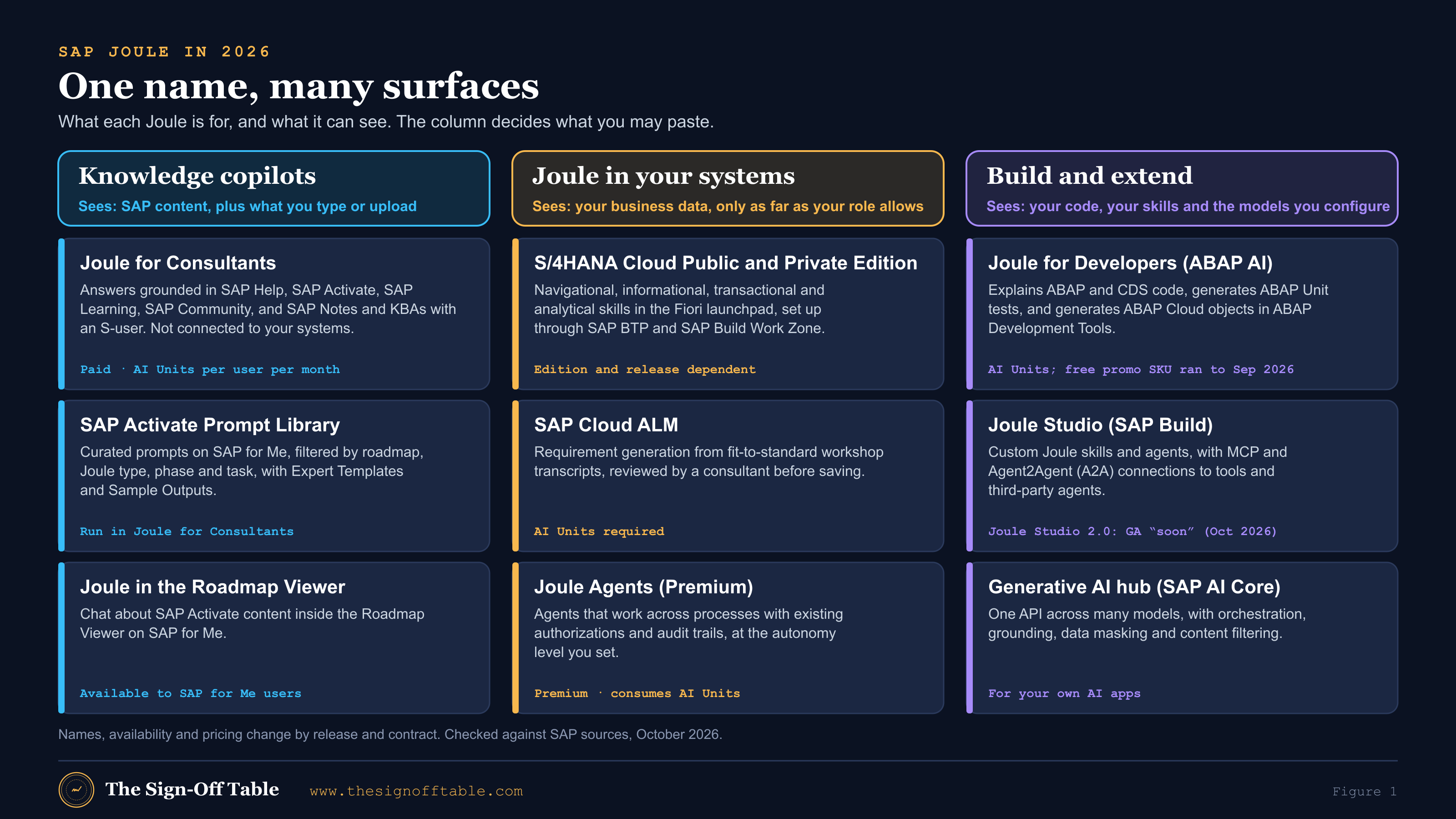
| Surface | Who uses it on a project | What it can see | How it is paid for |
|---|---|---|---|
| Joule for Consultants | Consultants, architects, test leads, PMO | SAP content, plus what you type or upload[5] | AI Units per user per month[7] |
| Joule in the SAP Activate Roadmap Viewer | Anyone reading SAP Activate | SAP Activate content[4] | Available to SAP for Me users[4] |
| Joule in S/4HANA Cloud | Key users, business users, consultants in test systems | Business data within the user’s authorizations[24] | Base without AI Units; Premium with AI Units[14] |
| AI in SAP Cloud ALM | Consultants, PMO, test leads | Project content in your Cloud ALM tenant[3] | AI Units for requirement generation[25] |
| Joule for Developers | ABAP and SAP Build developers | Your code in the development tools[28] | AI Units, plus the base product[27] |
| Joule Studio and the generative AI hub | Platform and AI engineering teams | What you build and configure[30],[32] | Per contract; check current terms |
Joule for Consultants
What it is
Joule for Consultants is SAP’s AI assistant for implementation professionals. SAP’s FAQ describes it as a copilot whose answers are grounded in exclusive SAP content, covering more than 200,000 pages of SAP documentation and learning content and more than 2 terabytes of curated SAP Community content[5]. Its knowledge sources include SAP Activate, SAP Help Portal, SAP Learning, line-of-business content, SAP Community and, for users with an S-user ID, gated content such as SAP Notes and Knowledge Base Articles. SAP says the content is refreshed on a two-week cycle and retrieved with retrieval-augmented generation (RAG)[5]. The FAQ also mentions a fine-tuned ABAP model. It gives 250 million lines of ABAP as the training figure, while SAP’s Q2 2025 highlights say 300 million, so treat the exact number loosely[5],[15].
SAP’s FAQ is explicit that Joule for Consultants answers from a knowledge base that Joule Base cannot reach[5]. That is the point of it. A consultant asking how a standard process works in a given release gets an answer with sources, rather than a generic model’s best guess.
Availability, languages and limits
SAP Learning dates general release to May 2025[9], and SAP’s Q2 2025 highlights list it as generally available[15]. The 2025 FAQ listed English, German, French, Spanish, Portuguese, Chinese, Japanese and Korean[5]. The Q1 2026 release added uploads of up to ten PDF or text files per chat, a sources side panel, admin-enabled web search and content from the SAP Enterprise Architecture Reference Library[16].
Limits have moved. The 2025 FAQ quoted an input limit of 2,048 tokens[5]. Current SAP Learning material gives 10,000 characters per prompt, up to 50 active conversations, conversations that expire after 8 hours of inactivity and are kept for 7 days, and file uploads up to 10 MB[6]. If a long prompt is cut off, attach the context as a file instead.
How it is licensed and priced
SAP’s FAQ describes a per-user, per-month offering charged in AI Units, at 35 AI Units per user per month, bought on an annual contract, with no trial[5]. The current SAP Learning lesson on the commercial model gives the same 35 AI Units per assigned user per month. It adds a pooled allowance of 22,900 requests per user per month, overage of 2 AI Units per 1,000 requests, and AI Units bought under SKU 8019164 in a minimum of 100 that expire after 12 months[7]. SAP’s FAQ says any SAP customer, partner or consultant can use it if their organization has a valid commercial arrangement[5].
Activation
SAP Learning describes the prerequisites. Joule for Consultants is deployed in a dedicated subaccount of the customer’s SAP BTP global account in the EU10 or EU11 region, with sign-in through an SAP Cloud Identity Services tenant, and provisioning starts once the agreement with SAP is final. Users without an S-user ID can still use it, but they don’t get gated content such as SAP Notes and KBAs[8]. For a systems integrator, that means the firm’s own SAP agreement usually decides who on the project has Joule for Consultants, not the client’s.
Experts, the in-app prompt library and Expert Workspace
Joule for Consultants has its own prompt library, organized by consulting role and subject area, with favorites. Administrators can publish custom prompts for their users through a “Manage Custom Prompts” template[6]. SAP’s product documentation also describes Experts, custom personas configured with a role, expertise and behavior, and an Expert Workspace[11],[1]. Experts matter for the SAP Activate Prompt Library below, because some of its prompts come with an Expert Template.
SAP’s own prompt guidance for Joule for Consultants comes down to three questions: who you are (role and project context), what you want (a specific task), and how you want it (a table, a numbered list, SAP Notes)[6]. SAP’s best-practice material for CX projects adds that you should treat it as a retrieval system rather than an oracle. Use domain terms, structure your request, refine it step by step, and ask for evidence and reasoning[12].
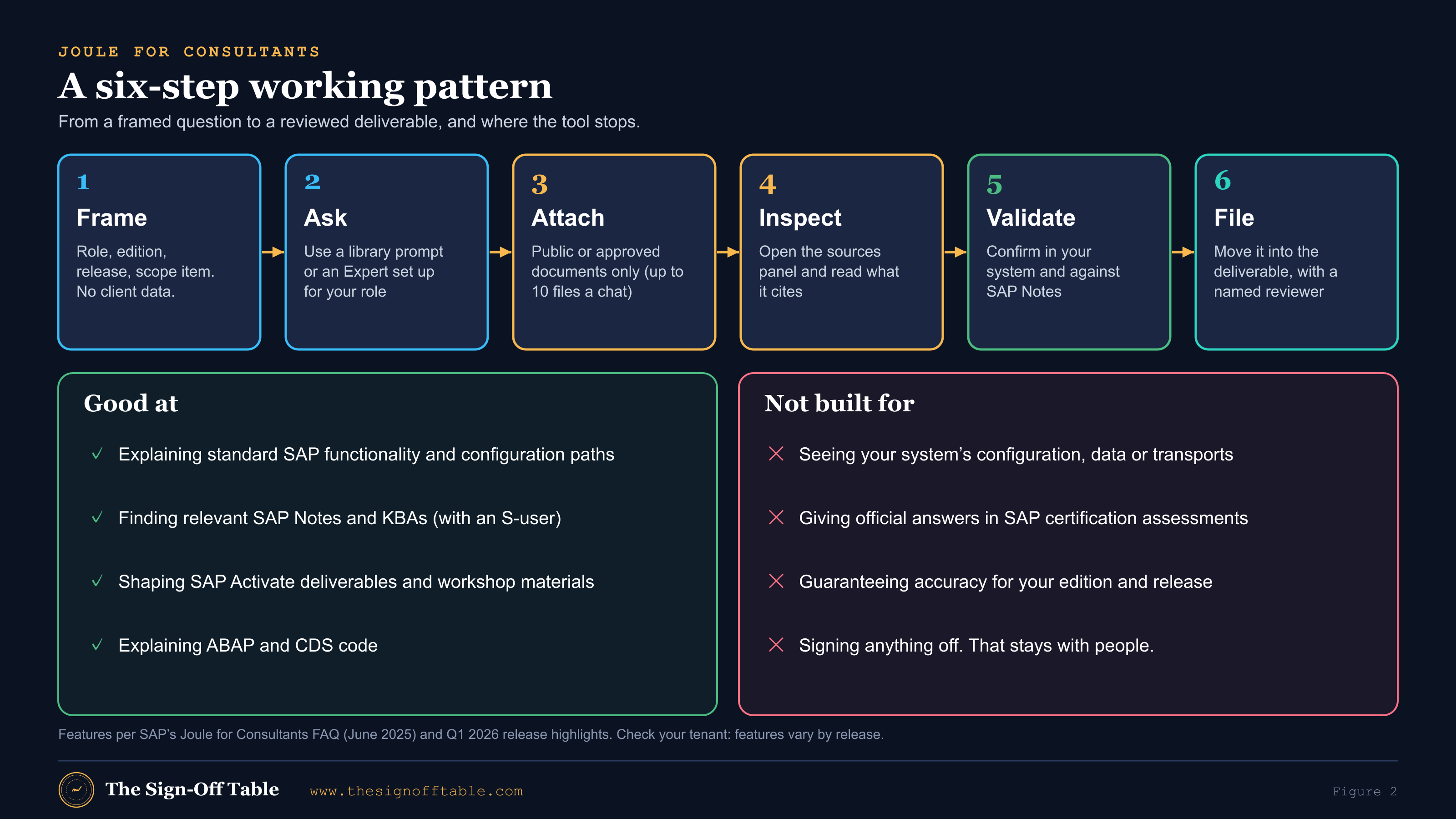
One more boundary is worth knowing. SAP allows Joule for Consultants in eligible system-based certification assessments, but says it does not provide official assessment answers[10].
Joule in S/4HANA Cloud and the Fiori launchpad
Joule inside S/4HANA is the Joule your business users will see after go-live, and the one your project must set up, test and train. In Private Edition the prerequisites are an SAP BTP global account with Joule and SAP Build Work Zone entitlements, SAP Build Work Zone standard edition in the subaccount, SAP Cloud Identity Services (Identity Authentication, usually with Identity Provisioning), secure connectivity such as the Cloud Connector, and admin access on both the BTP and S/4HANA sides[22]. SAP’s reference architecture[21] adds:
- Private Edition release 2021 or later, with some capabilities depending on the release.
- Minimum SAPUI5 versions per release.
- The Work Zone launchpad site that hosts Joule.
- A BTP booster that automates much of the setup.
- For Private Edition, Joule is exclusively for RISE with SAP customers.
Public Edition relies more on SAP automation, notably the Joule booster[23]. In both editions, transactional skills such as creating a purchase order depend on the underlying OData services being active[21]. SAP keeps adding capability. The Public Edition Q1 2026 release brought a project setup agent and plain-language error explanations[16], and Cloud ERP Private 2025 FPS02 extended Joule into further areas such as quality management[20].
Joule and AI in SAP Cloud ALM
SAP Cloud ALM is where many projects keep requirements, tasks, tests and defects. SAP describes AI-assisted requirement generation that drafts requirements in SAP’s template from fit-to-standard workshop transcripts and documents. A consultant reviews each one before saving it, and the feature needs AI Units[25]. Jan Musil’s September 2026 post lists three Cloud ALM AI features used in SAP Activate tasks: requirement generation from workshop documents, document summarization, and natural-language access to project tasks and configuration guidance through Joule for Cloud ALM[3]. SAP’s product page gives time-saving percentages for requirements and user stories. Those are marketing figures, so this guide doesn’t repeat them[25].
On testing, SAP’s 2026 migration event material describes Joule orchestrating migration assistants to define a risk-based test scope, generate test cases for Cloud ALM and create test data[26]. I couldn’t confirm that this is generally available, so treat it as direction, not a feature to plan around. Cloud ALM is also a way into the Prompt Library: its Task Management app can filter SAP Activate tasks by the AI-Assisted Procedure tag[2].
Joule Studio, agents, developers and the generative AI hub
Joule for Developers (ABAP AI)
SAP describes Joule for Developers’ ABAP features in ABAP Development Tools for Eclipse[28]:
- Explaining ABAP and CDS code.
- Generating ABAP Unit tests.
- Answering ABAP questions in chat.
- Generating end-to-end ABAP Cloud development scenarios with the objects they need.
SAP Learning says AI Units are currently required on top of the base product. A free promotional SKU ran until September 30, 2026[27]. I couldn’t confirm the terms after that date. In SAP Activate, Joule for Developers supports clean-core work: it explains objects flagged by ABAP Test Cockpit findings and identifies released APIs that can replace them[3].
Joule Studio and agents
Joule Studio, in SAP Build, is where customers build their own Joule skills and agents. The skill builder was listed as generally available in July 2025[15]. At TechEd 2025 SAP said the agent builder would reach general availability in December 2025 and announced MCP and A2A support[29]. In May 2026 SAP introduced the next Joule Studio as a fully managed offering for agents, apps and workflows, grounded in the SAP Knowledge Graph, SAP Business Data Cloud and SAP domain models, with free design-time access through the end of 2026 under fair-use limits[30]. The same month, CIO reported that adoption was minimal and general availability was later than first promised[31]. In October 2026 SAP still described Joule Studio as soon to be generally available[18]. Treat Studio as a platform decision for your architecture board, not a tool a consultant can just switch on.
Generative AI hub
The generative AI hub in SAP AI Core gives developers one API across many foundation models. Its orchestration service adds templating, grounding on your own data, data masking that anonymizes or pseudonymizes sensitive data before it reaches a model, content filtering in both directions, and translation[32]. SAP Learning has a full course on prompt templates, the Prompt Registry, few-shot and meta-prompting and evaluating prompts across models[33]. If your project builds its own AI extension, its prompts belong in that registry, versioned and tested like code.
Grounding and what Joule can see
Grounding means the model answers from a defined body of sources rather than only from what it learned in training. Joule for Consultants is grounded in SAP’s curated content[5]. Joule Work is grounded in the SAP Knowledge Graph, which SAP says maps more than 7 million data fields[17]. SAP’s document grounding service retrieves from documents in SAP and approved third-party repositories, shows its sources and requires AI Units[34]. Grounding reduces hallucination. It does not remove it.
Authorizations. SAP’s reference architecture says a user cannot use Joule to reach information or change processes they couldn’t reach directly in the application[24]. That is the right default, and it also means a project user with broad test-system roles will get broad answers. Plan role-based testing of Joule with production-like roles.
Training and retention. SAP says its LLM partners are contractually barred from training their models on customer data[24]. For Joule for Consultants, SAP’s FAQ says the service is trained only on SAP-authored and curated content, keeps conversation history for seven days, isolates data per tenant, and does not share customer data with external LLMs. It also describes integration with customer-specific SAP data as planned, not available[5]. Since the Q1 2026 release users can upload files[16], so what you upload is now part of what the tool sees. Your organization’s rules on what may be uploaded apply in full.
The practical rule: Joule for Consultants knows SAP, not your client. It can tell you how standard pricing determination works. It cannot tell you why your condition record didn’t fire. For that you need Joule in the system (within your role), a consultant, or both.
The SAP Activate Prompt Library, in depth
This is the most useful thing SAP has shipped for project prompting, and it is easy to use badly. This section takes SAP’s July 2026 launch post by Chandan Gurav[1] and the two companion posts by Jan Musil[2],[3], explains each part in practitioner terms, and adds when and how to use it on an S/4HANA deployment. It describes the library. It does not reproduce SAP’s prompts, which stay on SAP for Me.
What it is and why SAP built it
The SAP Activate Prompt Library is a portal inside the SAP Activate Roadmap Viewer on SAP for Me. It holds a searchable set of prompts written for specific SAP implementation tasks and aligned to SAP Activate[1]. SAP says experts and architects developed, tested and validated every prompt, and that each one puts Joule into a defined role and context, tied to a phase, a roadmap and a deliverable[1].
SAP gives two reasons for building it. First, the blank-page problem. Consultants want to know what to type, and a strong prompt for a complex deliverable takes expertise to write[1]. Second, integrity and access. Musil explains that SAP built one central library to keep the prompts linked to SAP Activate consistent, and so that everyone can read them, including people who don’t yet have access to the AI tool itself[2]. That second point is underrated. Even without a Joule for Consultants license, the library shows you what SAP thinks a good input and output look like for a deliverable.
The library is part of what Musil calls the third dimension of Business AI in SAP Activate. The first is adopting Joule and SAP Business AI in the solution. The second is extending SAP with AI on the SAP Business AI platform. The third is using AI to run the implementation itself[2]. Keep the three apart in your plan. The Prompt Library helps the project team do its work. It does not put Joule in front of your business users. That is the first dimension, and it has its own SAP Activate tasks, tagged for SAP Business AI and Joule in the Roadmap Viewer[2].
Who can access it, and how
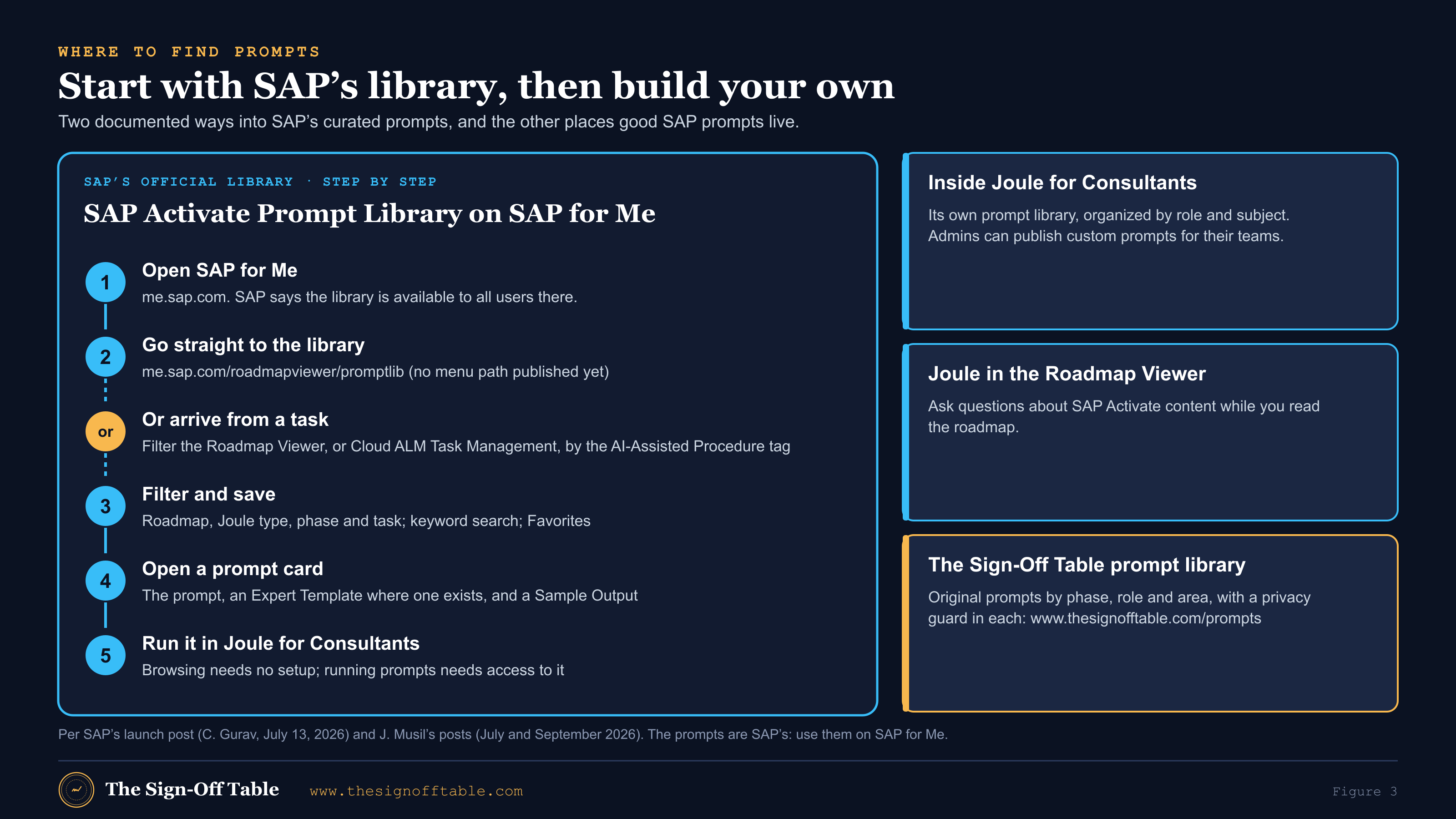
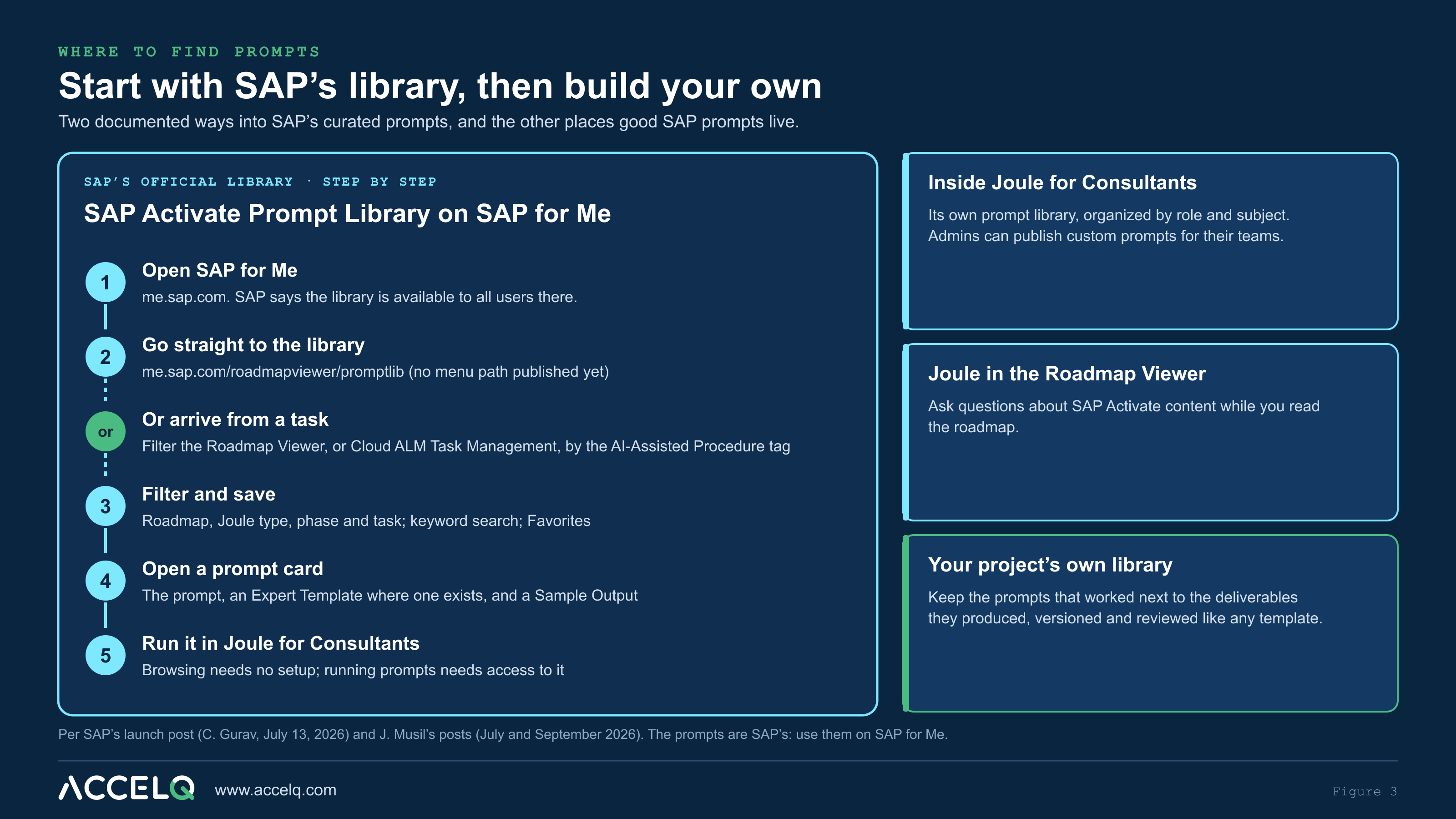
SAP’s launch post says the library is “available to all users through the SAP Activate Road Map Viewer on SAP for Me”[1], at me.sap.com/roadmapviewer/promptlib. It also says browsing needs no additional setup, while running the prompts in Joule for Consultants needs access to that capability in your environment[1]. In practice:
- Reading the prompts is open to SAP for Me users. SAP for Me is a signed-in portal, so plan on signing in with your SAP user. I could not find a public statement on whether the library page itself works anonymously, and I didn’t test it.
- Running them as intended needs Joule for Consultants, which your organization licenses in AI Units (see above).
- Partners and customers both use the Roadmap Viewer[4]. I found no published difference in library access between them.
Navigation is the first gotcha. On October 2, 2026, a reader asked on SAP’s launch post how to reach the library from the Roadmap Viewer’s menu, and no answer was visible when I checked[1]. Two routes are documented:
- The direct URL above. Bookmark it, and put it in your project’s onboarding pack.
- From a task. Every AI-Assisted task links to its prompt in the library. Find those tasks by filtering the Roadmap Viewer on the AI-Assisted Procedure tag, or by using the same filter in SAP Cloud ALM’s Task Management app[2],[3].
The second route is the better habit, because it puts the task’s instructions in front of you before the prompt.
How the library is organized
The main view is a set of prompt cards with four filters, a keyword search and a Favorites list[1]:
| Filter | Values at launch (July 2026) | How to use it on a project |
|---|---|---|
| Roadmap | SAP Activate for SAP Cloud ERP; Private: New Implementation; Private: Selective Data Transition; Private: System Conversion; S/4HANA Cloud Public Edition[1] | Set it once to your project’s roadmap and leave it. The same deliverable can need different inputs in a conversion than in a new implementation. |
| Joule type | The Joule capability the prompt is written for; at launch, SAP Joule for Consultants, with more planned[1] | Filter to what your team is licensed for. Since September 2026, AI-Assisted tasks also cover SAP Cloud ALM, SAP LeanIX, Joule for Developers and SAP Signavio, so expect this list to grow. |
| Phase | Prepare, Explore, Realize and the other SAP Activate phases[1] | Filter to the current phase at the start of each phase, and again at each quality gate. |
| Task | The type of implementation task[1] | Use it to find every prompt for your workstream, such as testing, data migration or project management. |
Prompt IDs. Prompts carry IDs. The one public example is AI_0004, which a reader cited in the comments on the launch post, for detailed design of an extension with classic extensibility techniques[1]. SAP has not published the full ID scheme or a prompt count. The 55 figure is AI-Assisted tasks, not prompts[3]. Cite the ID in your deliverables, for example “drafted with AI_00xx, reviewed by …”, so a reviewer can find the source prompt.
Favorites. Favorites live in your own view[1]. I found nothing published about shared team favorites, so agree a short list of approved prompt IDs per workstream in your project wiki and point people to it.
The prompt card and its three layers
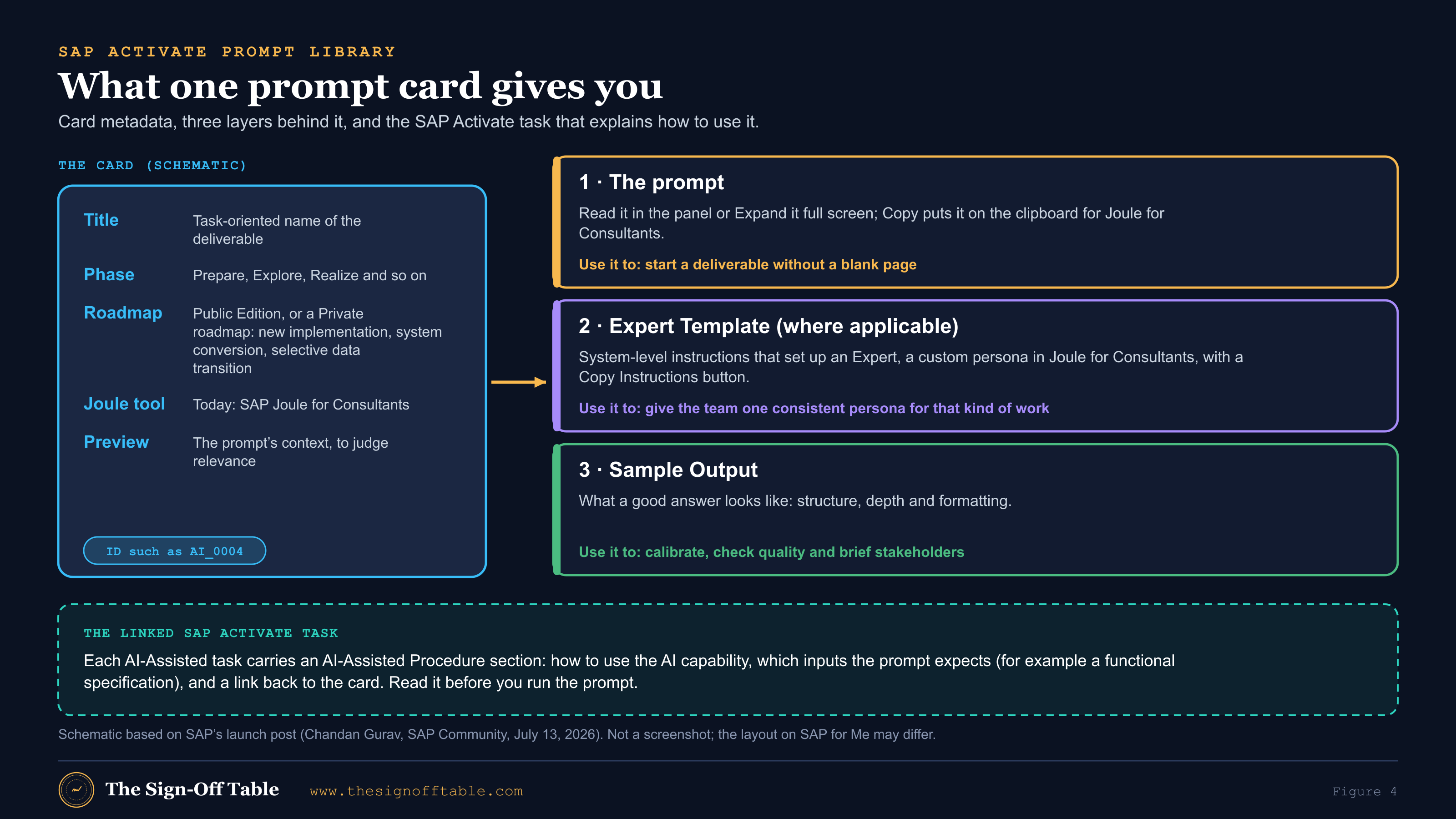
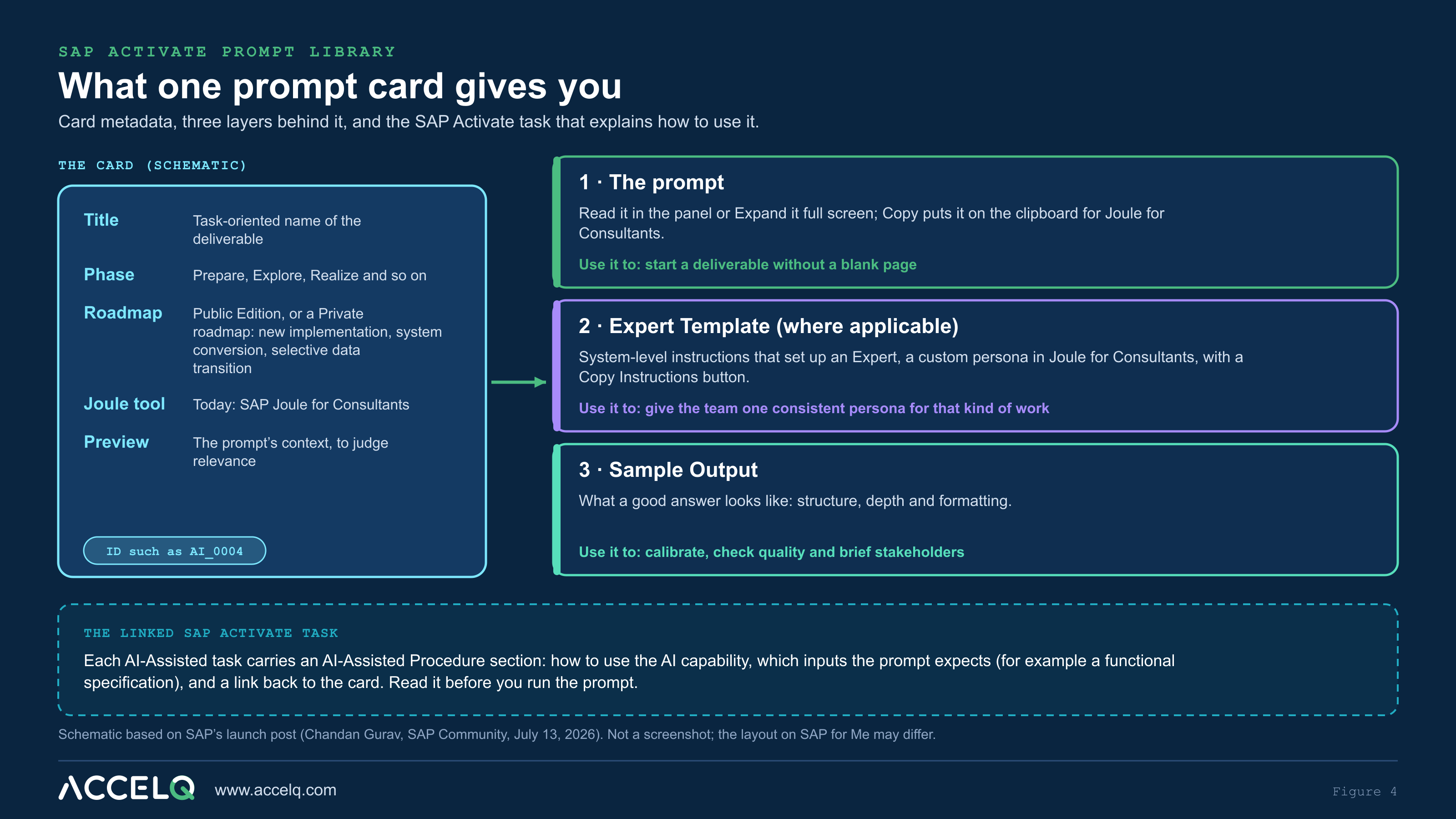
Each card shows a task-oriented title, the SAP Activate phase, the target roadmap, the target Joule tool and a preview of the prompt’s context, so you can judge relevance without opening it[1]. The launch post gives two titles as examples, “Create Project Charter and Scope Statement” and “Prioritize Delta Requirements”[1]. Opening a card shows three layers[1]:
- The prompt. Read it in the panel or expand it full screen. A Copy button puts it on your clipboard for pasting into Joule for Consultants.
- The Expert Template, where one applies. This is the system-level instruction text that creates or configures an Expert in Joule for Consultants, copied with a Copy Instructions button.
- The Sample Output: an example of a good response, with the expected structure, depth and formatting.
Expert Templates: set up the persona once
An Expert in Joule for Consultants is a custom AI persona with a defined role, expertise and behavior[1]. Where a library prompt is meant to run with an Expert, the card includes the full Expert Template. SAP’s example is the project charter prompt, designed for a Project Manager Expert with long SAP implementation experience that thinks in risks, dependencies and governance deliverables[1]. SAP says more Expert Templates are coming beyond project management, for solution architects, functional consultants, data architects and others[1].
When to use it. Set up the Expert once per workstream at the start of a phase, not once per chat. The Expert holds the stable part (role, standards, output habits) and the prompt holds the variable part (this deliverable, this scope item). That is the same split that makes prompts reusable in any assistant.
Pitfalls.
- Teams edit an Expert Template to taste and then can’t explain why outputs differ between consultants. Keep one approved version per workstream and log changes.
- People run an Expert-based prompt without creating the Expert first, then blame the prompt for a generic answer.
No Expert Template exists yet for testing, so here is an original one written for this guide. Use it as the persona for your test workstream. It shares no wording with SAP’s templates.
Original Expert instructions: SAP test manager (this guide)
You are a senior SAP S/4HANA test manager who has led test
programs on Public Edition and Private Edition projects.

How you work:
- You think in SAP Activate terms: fit-to-standard, delta
  requirements, unit and string tests, integration test, UAT,
  regression, cutover rehearsals.
- You tie every test to a requirement, a scope item or a
  process step. If you cannot, you say so.
- You separate what SAP standard does from what depends on our
  configuration, and you flag the second kind for confirmation.
- You never invent SAP Notes, transaction codes, app IDs or
  scope item numbers. If you are unsure, you write "verify".
- You end every answer with: sources used, assumptions made,
  and open questions for the project team.

Default output: tables a test lead can paste into a test plan.
Sample Outputs: your quality bar
SAP gives three uses for the Sample Output: calibrating expectations, checking that your Joule session is producing quality results, and showing stakeholders who are new to AI-assisted delivery what to expect[1]. Use it as a checklist. Before you accept your own result, compare its structure with the sample. Are all the sections there? Is the depth similar? Are the tables the same shape? If your output is thinner, the cause is usually missing input, not a weak model.
Pitfall: treating the Sample Output as the deliverable. It is an example from a generic context. Pasting its content into a client deliverable is the fastest way to ship text that isn’t true of the client.
AI-Assisted tasks: read the procedure before the prompt
Every library prompt sits behind an AI-Assisted task in SAP Activate. Musil describes two elements in each such task[2]:
- An AI-Assisted Procedure section in the task description, explaining how to use the AI capability.
- A link to the Prompt Library entry, which has the prompt text, the example output and further guidance.
The comment thread on the launch post shows why the order matters. A reader asked for a sample of the input document that AI_0004 refers to, a functional specification. Gurav replied that the prompts are accelerators and that the detailed AI-Assisted procedures sit in the matching SAP Activate task[1]. The prompt assumes inputs. The task tells you which ones.
The tasks cover the whole lifecycle. SAP’s posts name these examples:
| AI-Assisted task (per SAP) | AI capability | What the AI drafts | Human step SAP describes |
|---|---|---|---|
| Conduct Project Quality Gate for Prepare Phase[3] | Joule for Consultants Expert plus a library prompt | A quality gate review package: completion criteria, deliverable status table, risk register, go/no-go template | The team reviews and validates it before the steering committee |
| Conduct Workshop by Business Process Area[3] | Joule for Consultants, SAP Signavio and SAP Cloud ALM | Workshop summary, relevant best-practice process models, requirements from workshop documents and transcripts | Consultants confirm the requirements |
| Develop the Data Migration Approach and Plan[3] | Joule for Consultants | A sample RACI, a data governance framework and a data protection plan | Treated as starting material, not templates |
| Define Clean Core Approach for Extensibility Scenarios[3] | Joule for Developers | Explanations of flagged objects and the released APIs that can replace them | Developers decide the remediation |
| Create Cutover Plan and Documentation[3] | Joule for Consultants | A sample list of product-specific cutover tasks | Teams validate and refine it |
The first wave in June 2026 named seven front-runner topics. One of them was testing: preparing the test strategy and approach, preparing test scripts, determining test scope and managing testing[2]. If you lead testing, filter the Roadmap Viewer to your roadmap, the AI-Assisted Procedure tag and the testing workstream before you write your own prompts. Start from SAP’s procedure and add your project context.
Worked example: one library prompt, end to end
Here is the flow for a test lead in Explore on a Private Edition new implementation. It is generic on purpose, and uses no SAP prompt text.
- Find the task. In the Roadmap Viewer, set the roadmap to Private: New Implementation, filter by the AI-Assisted Procedure tag, and open the testing task for your phase. Read its procedure: inputs, steps and the capability it expects.
- Prepare the inputs. Gather what the procedure asks for, such as the scope item list and the approved delta requirements. Strip client names, people and figures. If the inputs are long, save them as a file you are allowed to upload.
- Set up the Expert, if the card has a template. Create it once for the test workstream.
- Copy the prompt from the card into Joule for Consultants and fill its placeholders with your anonymized context.
- Compare with the Sample Output. Check the structure first, then the depth. Ask follow-ups for any missing section.
- Verify. Run the loop in Figure 7. Open the cited sources, check the release, and confirm configuration-dependent points in the system.
- File it. Put the reviewed result in the deliverable, in SAP Cloud ALM if that is your system of record. Record the prompt ID, the date and the reviewer.
Using library prompts in other assistants
SAP wrote the library prompts for Joule for Consultants[1]. You can copy the text, so people will try it elsewhere. Three cautions:
- You lose the grounding. A general assistant doesn’t have SAP’s curated content, Notes or Activate material behind it, so the same prompt yields a less reliable answer.
- You may break your own rules. Your client contract, and your firm’s AI policy, decide which assistants may see project context.
- The prompts are SAP’s content on SAP for Me. Check SAP for Me’s terms before you reuse them outside SAP’s tools. I found no public statement either way.
If your team has no Joule for Consultants access yet, there is still value in reading. The library and its Sample Outputs show what SAP expects a deliverable to contain, and you can use that as a review checklist for work done by hand.
How it fits with Joule for Consultants and SAP Cloud ALM
| Tool | Role in the flow | Watch out for |
|---|---|---|
| SAP Activate Roadmap Viewer | Where the task and its AI-Assisted Procedure live; filter by the AI-Assisted Procedure tag | The procedure, not the prompt, defines the inputs |
| SAP Activate Prompt Library | Where the prompt, Expert Template and Sample Output live | No published menu path; bookmark the URL |
| Joule in the Roadmap Viewer | Quick questions about SAP Activate content, with answers you can copy[2] | Answers are limited to SAP Activate content; Joule for Consultants has broader scope[4] |
| Joule for Consultants | Where the prompt runs, with Experts, file uploads and sources | Licensed per user in AI Units; not connected to your systems |
| SAP Cloud ALM | Task Management shows the same tagged tasks; AI drafts requirements from workshop documents; the reviewed output lands here[2],[3] | Requirement generation needs AI Units; review before saving |
The testing and quality angle
For a test lead, the library changes three things:
- Upstream quality. Requirements generated with AI from workshop artifacts arrive faster and more uniform. That helps test design only if they still carry acceptance criteria a tester can check, so make that a review rule for every AI-generated requirement in Cloud ALM.
- Traceability of AI work. When a test strategy, a cutover list or a migration plan was drafted with a library prompt, record the prompt ID and the reviewer in the artifact. Auditors and steering committees will ask how AI was used. A prompt ID plus a named reviewer is a good answer.
- Sample Outputs as test oracles for the process. At each quality gate, compare AI-drafted deliverables against the Sample Output for completeness. It is a cheap completeness check that doesn’t depend on who did the drafting.
Pitfalls to design out
| Pitfall | What it looks like | Design it out |
|---|---|---|
| Prompt without procedure | Generic output, because the inputs the prompt assumes were never supplied | Read the AI-Assisted Procedure first; list its inputs in your checklist |
| Wrong roadmap | Conversion-specific advice on a new implementation, or the reverse | Set the roadmap filter first, every time |
| Sample Output pasted as content | Deliverables that describe a generic company | Use samples for structure only; reviewers check for generic text |
| Expert drift | Each consultant tunes the Expert; outputs diverge | One approved Expert per workstream, change-logged |
| Client data in the chat | Workshop notes pasted with names, prices and volumes | Anonymize before upload; see the privacy checklist |
| No reviewer of record | AI drafts reach the steering committee unreviewed | Prompt ID, date and named reviewer on every AI-assisted artifact |
What SAP says comes next
SAP calls the library a living resource. It plans more prompts across phases, roadmaps and task areas, in step with Joule for Consultants and SAP Business AI, and more Expert Templates beyond project management[1]. Musil adds that SAP Activate will evolve as new agents and assistants arrive in SAP Cloud ALM[2], and that AI-Assisted task coverage will keep growing with new capabilities[3]. Feedback goes to sapactivatemethodology@sap.com or the comments on the posts[1],[2]. If you find a gap for testing, tell SAP. The testing workstream benefits most from more prompts.
Where to find prompts
SAP for Me, step by step
- Sign in to SAP for Me at me.sap.com with your SAP user.
- Open https://me.sap.com/roadmapviewer/promptlib directly. SAP hasn’t published a menu path[1].
- Or open the Roadmap Viewer, choose your roadmap, filter tasks by the AI-Assisted Procedure tag, and follow the task’s link to the prompt[2].
- Filter by roadmap, Joule type, phase and task; search by keyword; star the prompts you use[1].
- Open a card: copy the prompt, set up the Expert if there is a template, and read the Sample Output[1].
- Run it in Joule for Consultants, compare the result with the Sample Output, then verify.
Other places
- Inside Joule for Consultants: its own prompt library by role and subject, plus any custom prompts your administrator publishes[6].
- Joule in the Roadmap Viewer: click the Joule icon at the top right of the Roadmap Viewer to ask about SAP Activate content[2].
- General Joule: SAP’s documentation describes a prompt library for the general Joule web client, offered through an Early Adopter Care program[11]. It is a different product from the Activate library.
The Sign-Off Table prompt library. Our own library at /prompts holds original prompts, filterable by SAP Activate phase, role and area, each with a privacy guard and tips. None of it is copied or adapted from SAP’s library. Use it alongside SAP’s prompts, not instead of them, and bring its prompts into Joule for Consultants with your own anonymized context.
Prompting technique for SAP work
SAP’s three-part guidance (who you are, what you want, how you want it)[6] is the right core. For SAP project work, add three more parts: grounding and limits, and a verification ask, with the context part made specific to SAP.
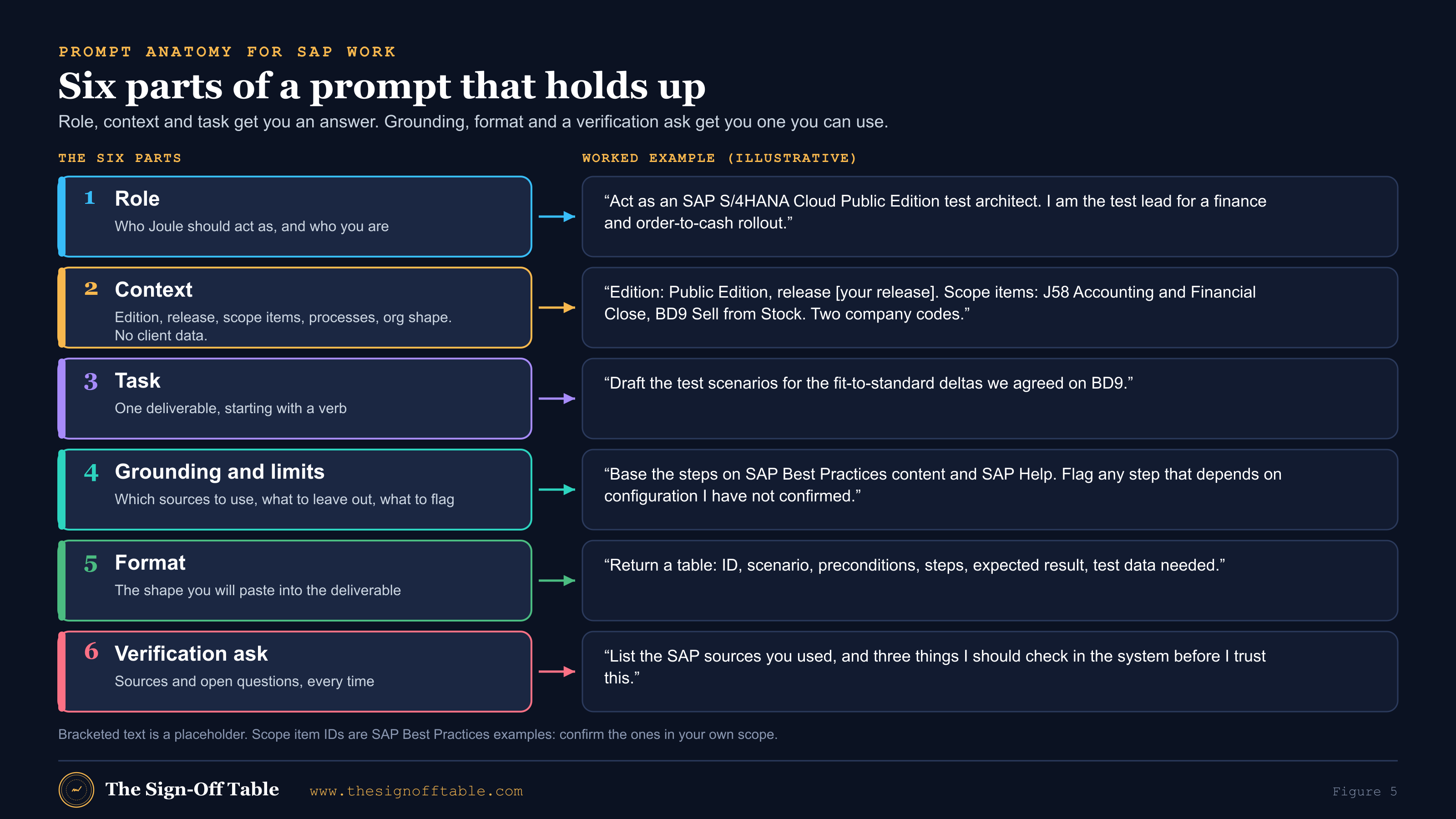
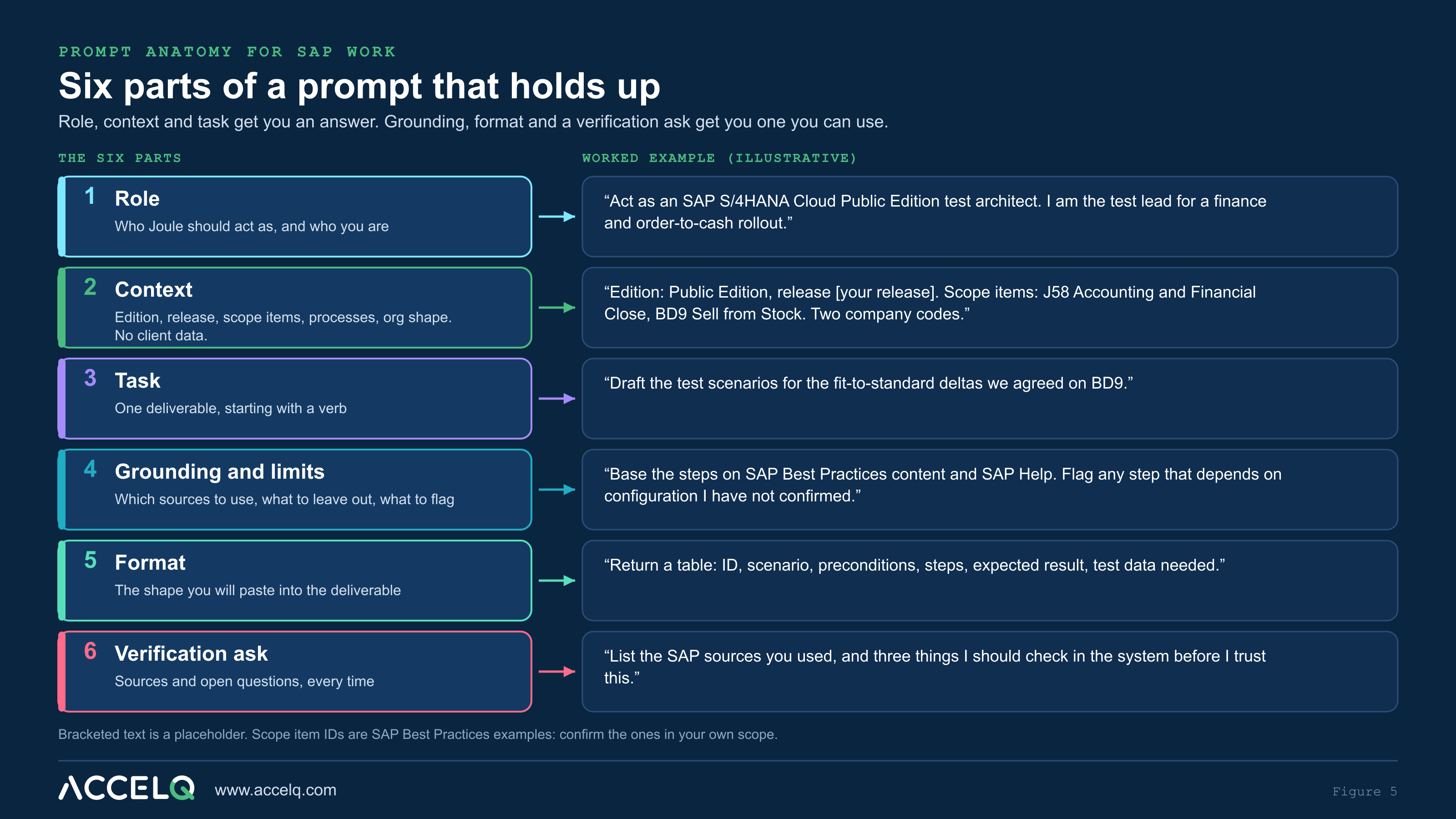
| Part | What to include for SAP work | Common mistake |
|---|---|---|
| Role | The expert Joule should act as, and your own role | “You are an SAP expert” (too vague to change anything) |
| Context | Edition (Public or Private), release, roadmap, scope item IDs and names, process, org structure in generic terms | Leaving out the release, then getting an answer for another one |
| Task | One deliverable, starting with a verb: draft, compare, classify, list, explain | Five tasks in one prompt |
| Grounding and limits | Which sources to rely on; what to exclude; “say ‘verify’ when unsure” | Letting the model fill gaps silently |
| Format | The table columns or headings your deliverable uses | Accepting prose and reformatting it by hand |
| Verification ask | Sources used, assumptions, open questions | No way to tell evidence from guesswork |
Ground prompts in SAP’s own vocabulary
Grounded models retrieve better when you use the words in SAP’s content[12]. Name the scope item ID and title from SAP Best Practices, the standard process name, the Fiori app or transaction if you know it, and the SAP Activate deliverable name. “Sell from Stock” beats “our sales process”. “Fit-to-standard workshop” beats “design meeting”.
Iterate in small steps
Long deliverables come out better in stages: outline first, then each section, then a review pass. SAP’s guidance recommends refining iteratively and asking for comparisons and evidence[12]. Keep one chat per deliverable so the context stays clean. If the input runs over the prompt limit, attach it as a file you are allowed to upload[6],[16].
Make the model check itself, then check it yourself
A self-review prompt doesn’t replace your review, but it surfaces the claims you need to check. Use it after any answer you plan to reuse:
Original prompt: self-review pass
Review your previous answer as a skeptical SAP reviewer.
1. List every factual claim about SAP functionality, apps,
   transactions, Notes or scope items.
2. For each, say whether it is from a source you can name,
   general SAP knowledge, or an assumption.
3. Mark anything that depends on edition, release or our
   configuration.
4. Rewrite the answer with the assumptions labeled.
The privacy checklist
The safest prompts are about the process, not the client. Write them so they would still make sense if you posted them on SAP Community. Joule for Consultants has strong data-handling commitments[5], but your contract and data protection agreement still decide what may leave the project.
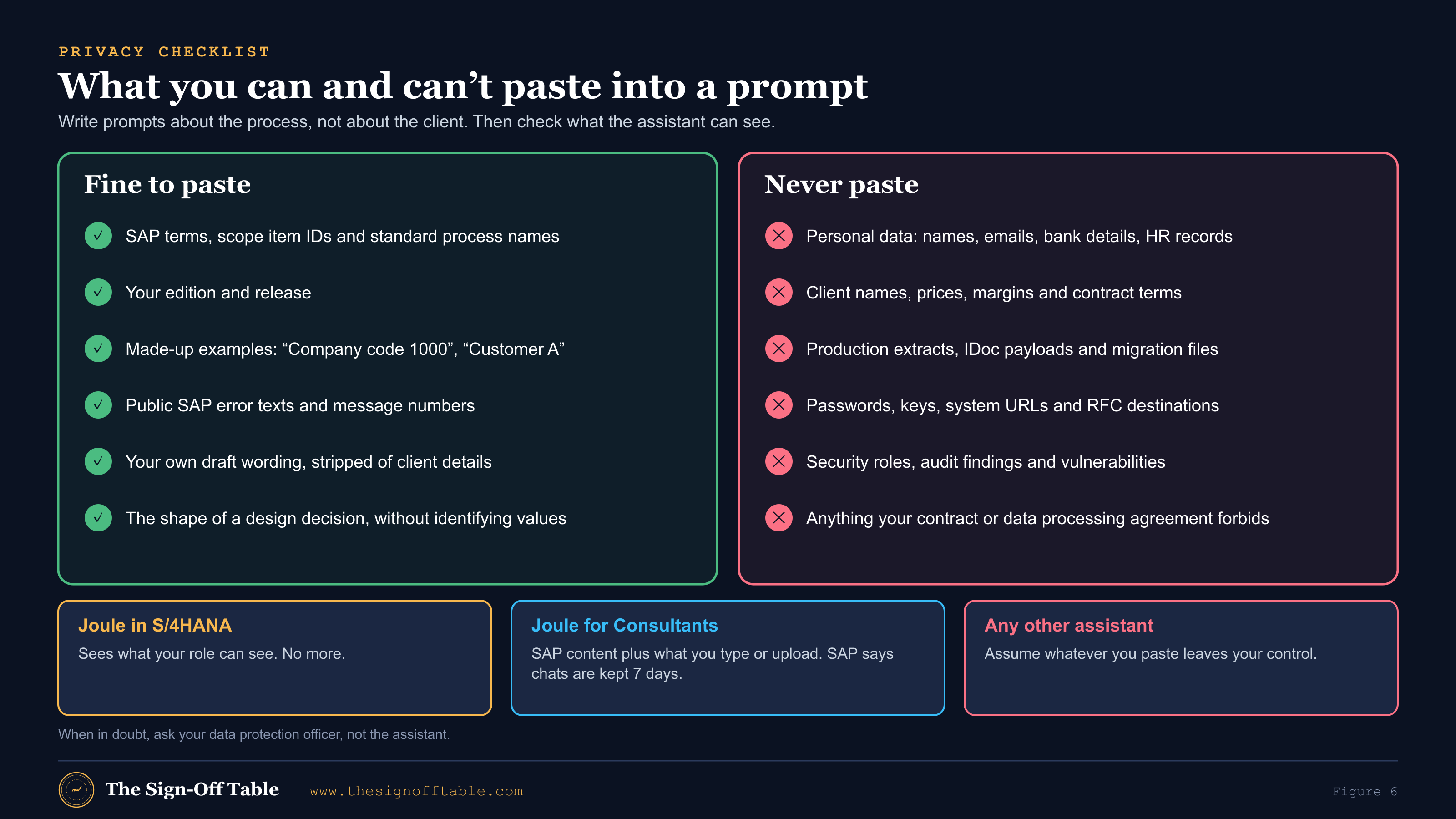
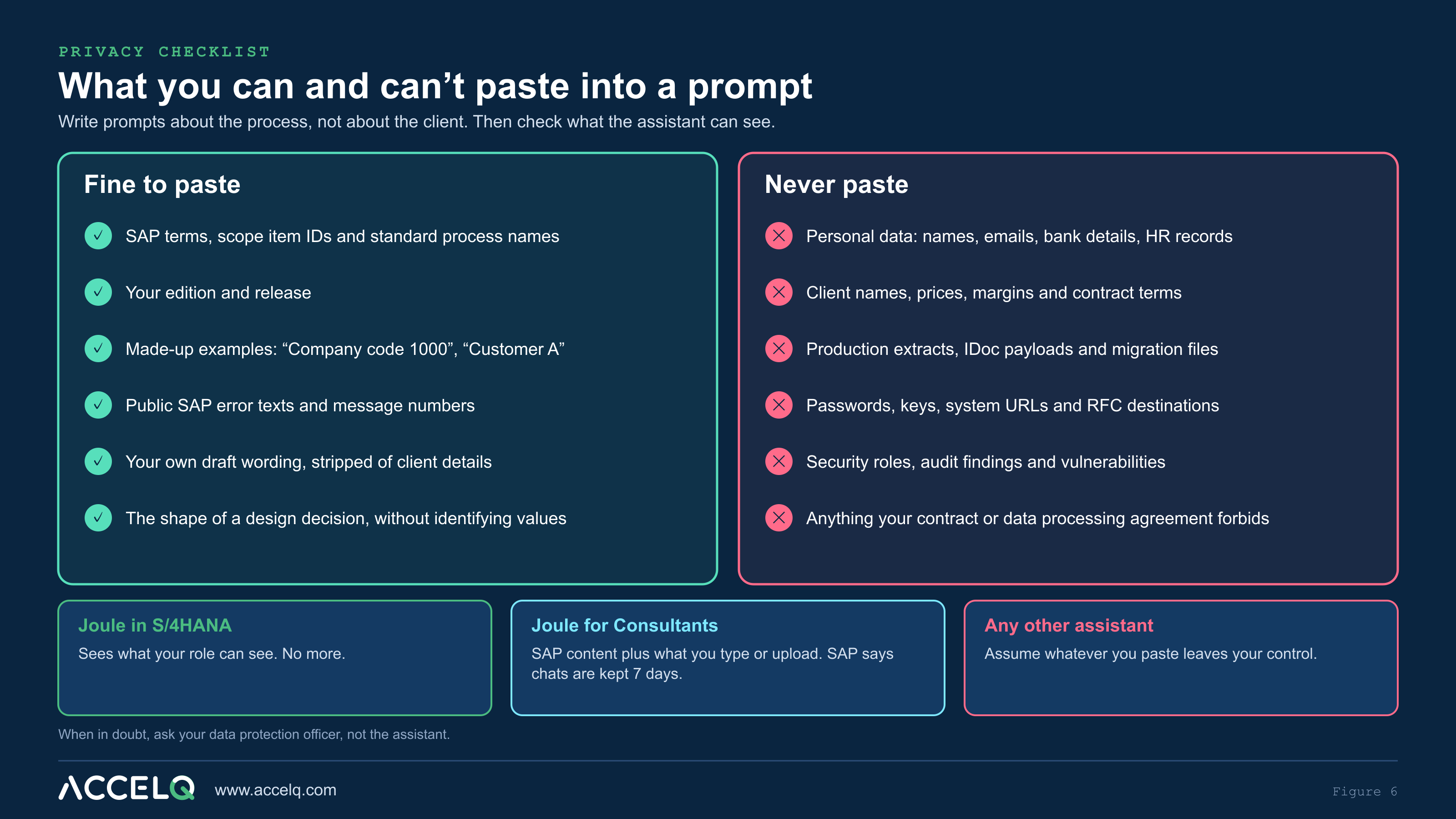
Before you press enter
- No personal data: names, emails, phone numbers, employee IDs, bank details, HR or health data.
- No client identifiers: company name, brand names, plant or site names that identify them.
- No commercial data: prices, margins, volumes, contract terms, supplier terms.
- No production data: table extracts, IDoc or API payloads, migration load files, screenshots with live data.
- No secrets: passwords, keys, tokens, system URLs, hostnames, RFC destinations.
- No security findings: role designs with weaknesses, audit findings, vulnerability reports.
- Uploads are documents you are allowed to share: public SAP material or approved, anonymized project documents.
- The assistant is one your contract allows for this client and this data.
Verify before you trust
SAP’s notice for its AI features says generative AI can produce inaccurate, incomplete or biased information and that you should verify important details before acting[35]. On a project, “important” covers anything that ends up in a design, a test, a cutover step or a sign-off. The loop below takes a few minutes per answer and saves days.
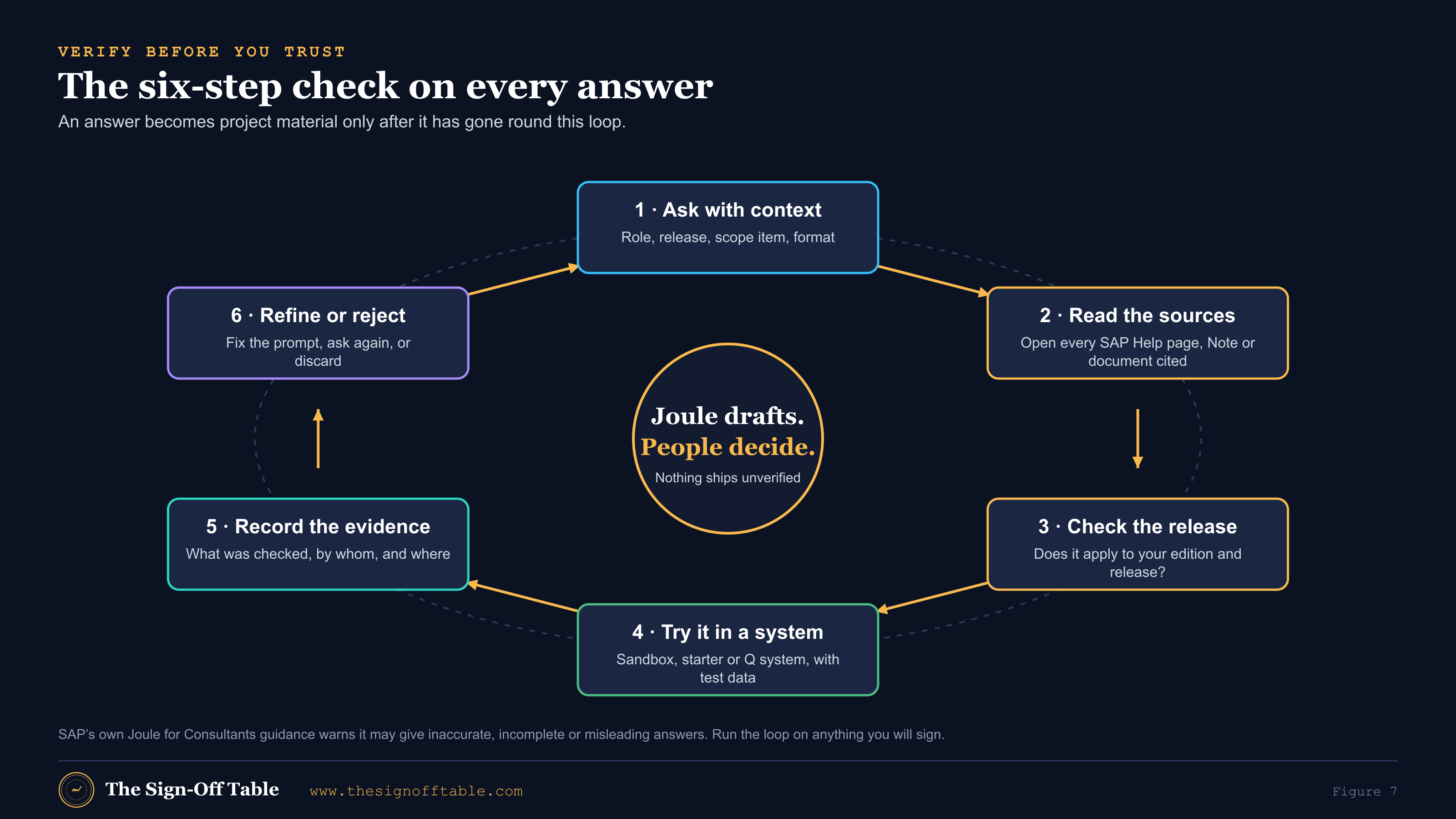
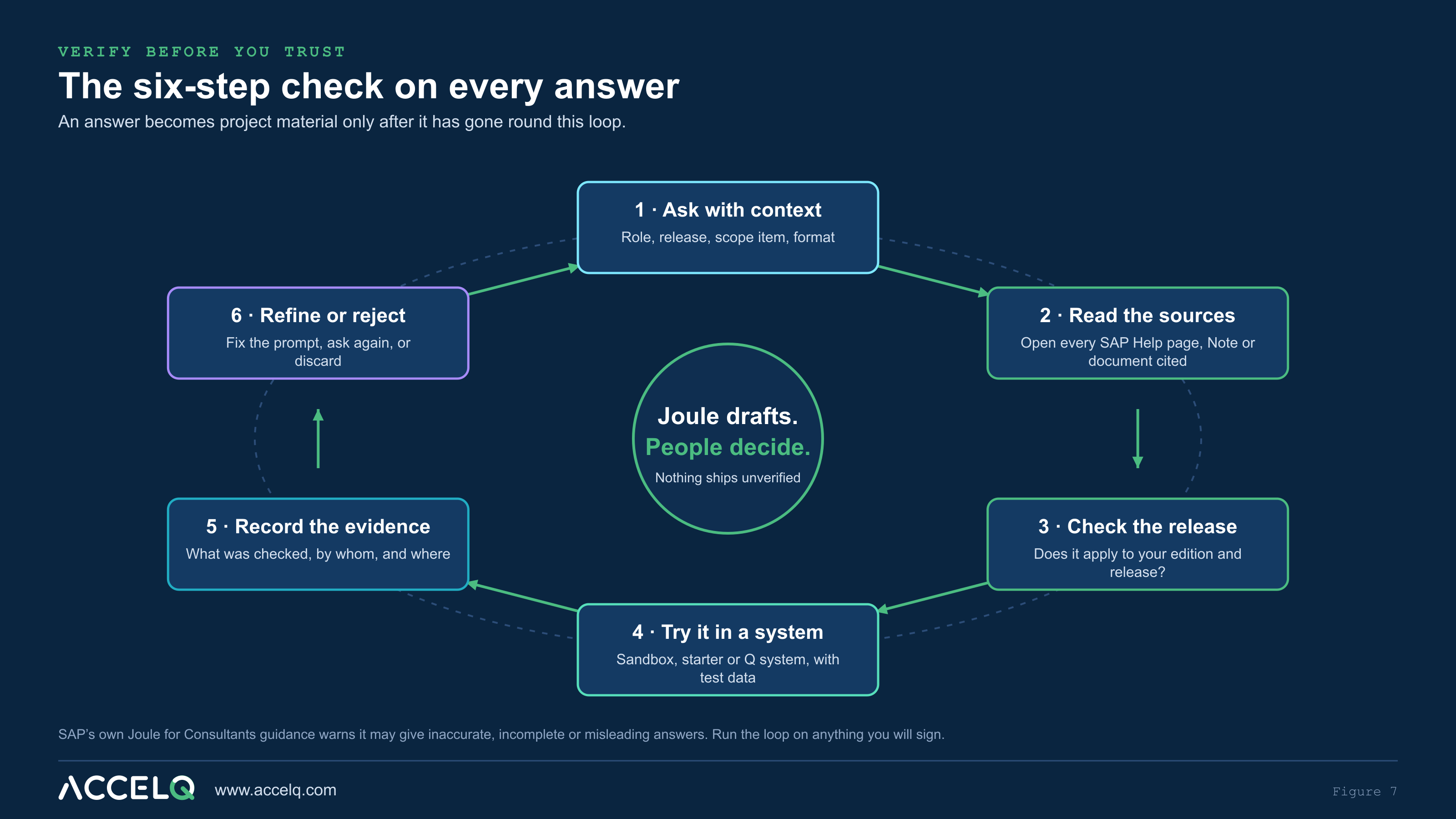
| Step | What to do | Typical catch |
|---|---|---|
| Read the sources | Open each cited SAP Help page, Note or KBA; check it says what the answer says | A Note that applies to another component or support package |
| Check the release | Confirm the feature exists in your edition and release | An app or option that came in a later release, or is Public Edition only |
| Try it in a system | Walk the steps in a sandbox or Q system with test data | A field that is mandatory in your configuration but missing from the steps |
| Record the evidence | Note what was checked, by whom and where it is stored | Nothing yet: this is what lets a reviewer trust the next one |
| Refine or reject | Feed corrections back; discard answers that fail | A prompt that needed one more line of context |
Prompts across the SAP Activate phases
SAP Activate runs Discover, Prepare, Explore, Realize, Deploy and Run. AI is useful in every phase, but for different roles and with different risks. The figure gives prompt ideas per phase, with the testing thread underneath, and the table maps them to roles.
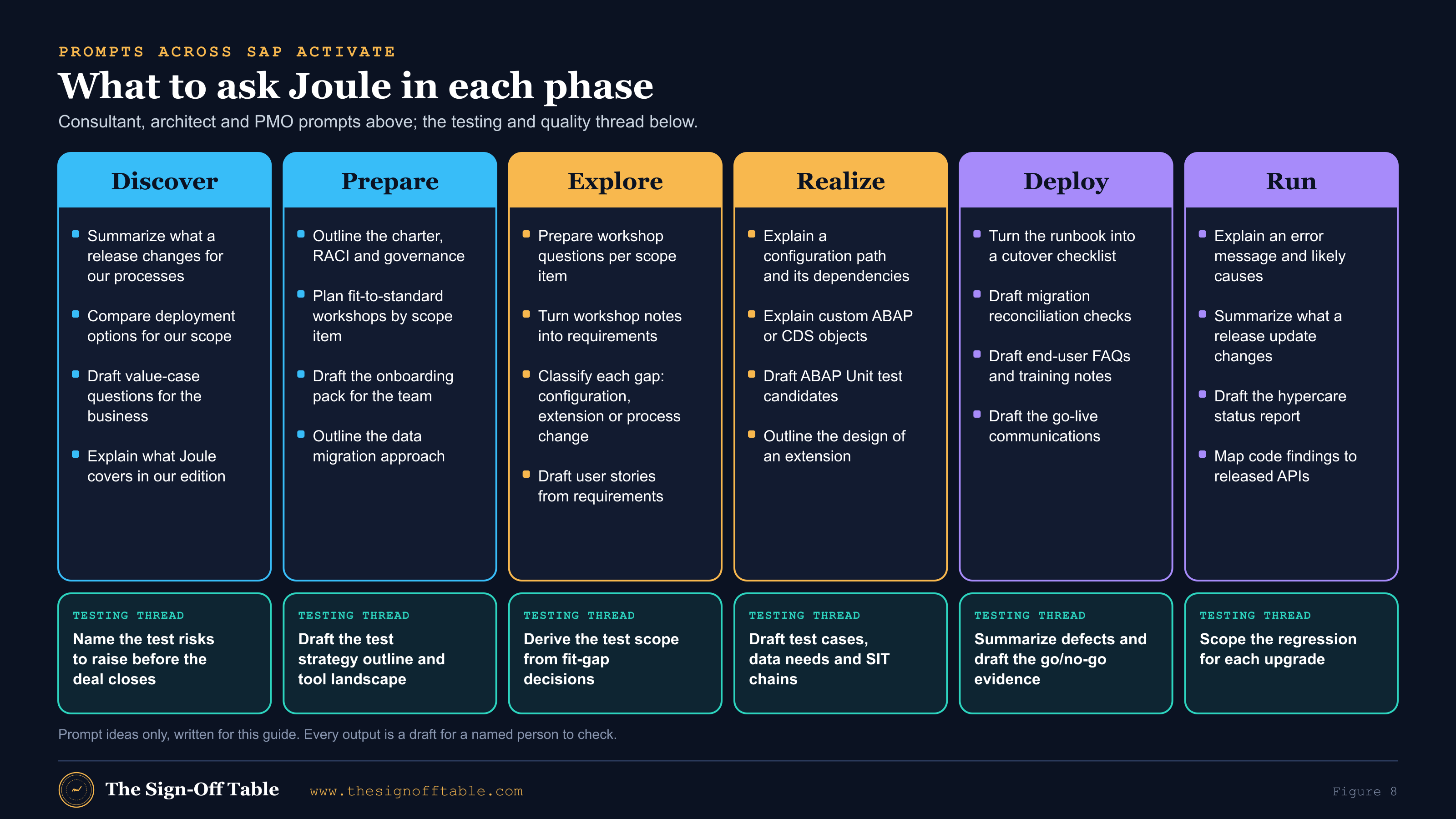
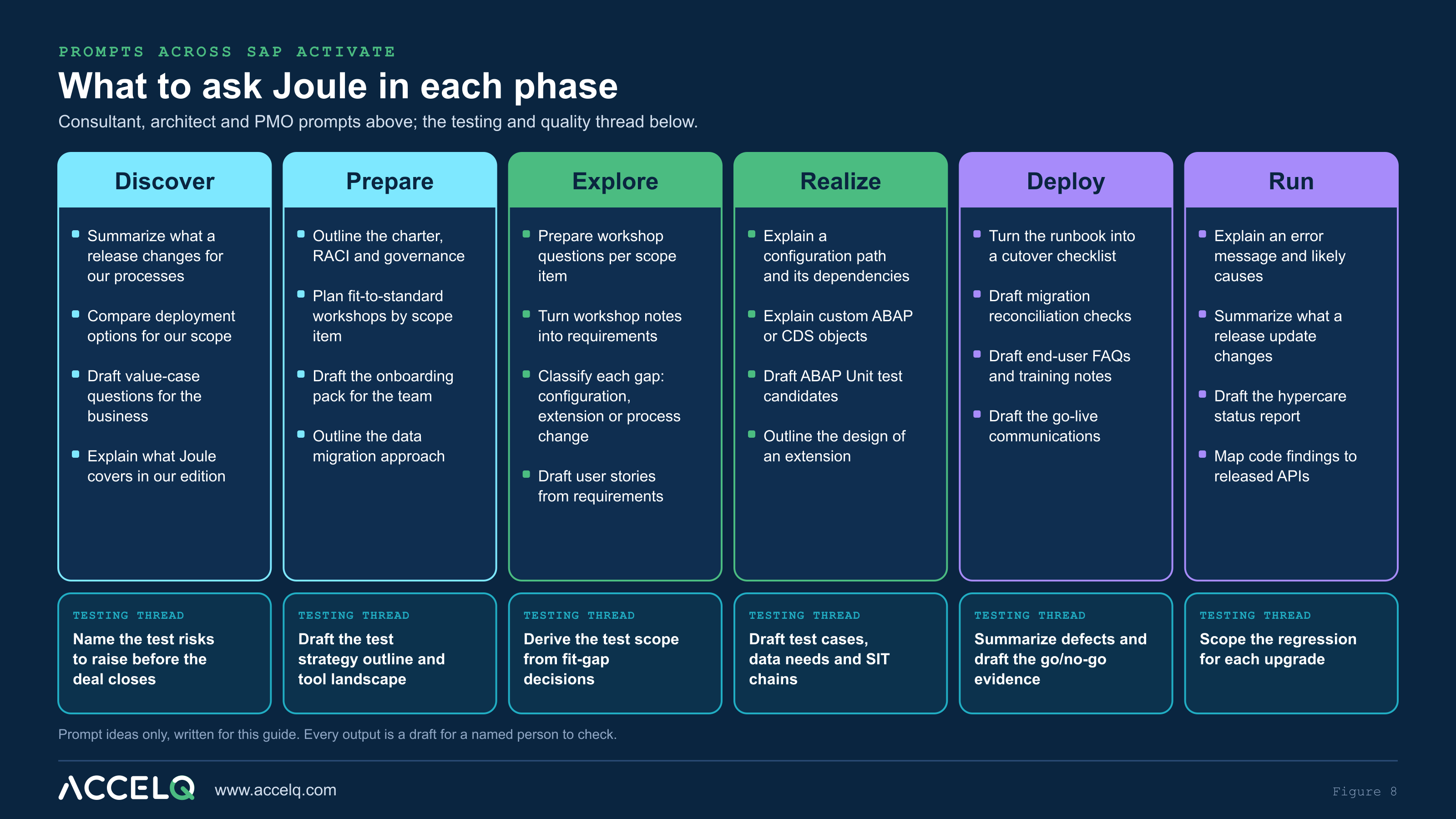
| Phase | Consultant / architect | Data migration lead | Test lead | PMO |
|---|---|---|---|---|
| Discover | Release highlights for in-scope processes; deployment option trade-offs | Questions to size legacy data quality | Test risks and test tool landscape questions | Value-case questions; stakeholder map outline |
| Prepare | Fit-to-standard workshop plan per scope item | Migration approach outline; object list by scope item | Test strategy outline; environment and data needs | Charter, RACI, governance; quality gate checklist |
| Explore | Workshop prep; notes to delta requirements; gap classification | Field mapping questions per object | Test scope from fit-gap; acceptance criteria review | Decision log and risk register drafts |
| Realize | Configuration explanations; extension design outlines | Validation rules and reconciliation checks | Test cases, data needs, integration test chains, UAT scripts | Status summaries from counts |
| Deploy | End-user FAQs; known-issue notes | Mock-load validation plans; sign-off templates | Defect triage summaries; go/no-go evidence | Cutover checklist from runbook; go-live comms |
| Run | Error explanations; release update impact | Data quality monitoring checks | Regression scope per upgrade | Hypercare report; lessons learned |
Two original prompts for Explore show the pattern. Both use placeholders and no client data:
Original prompt: fit-to-standard workshop preparation (Explore)
Context: S/4HANA Cloud [Public Edition / Private Edition],
release [release]. Fit-to-standard workshop next week for scope
item [ID and name]. Attendees: process owner, two key users,
finance controller. No client data in this chat.

Task: Prepare me for the workshop.
1. Summarize the standard process flow in 8-10 steps.
2. List the configuration decisions the business must make,
   grouped by step.
3. List 10 questions that usually expose a gap or a hidden
   variant (for example, intercompany, returns, partial
   deliveries).
4. For each likely gap, say whether it is usually solved by
   configuration, key-user extensibility, developer
   extensibility or a process change.

Format: four short sections with tables where useful.
Finish with the SAP sources you used and anything I should
verify for this release.
Original prompt: workshop notes to delta requirements (Explore)
I will paste anonymized notes from a fit-to-standard workshop
(names and figures removed). Turn them into delta requirements.

For each requirement give: ID (REQ-xx), the process step it
belongs to, the requirement in one sentence, the reason the
business gave, a proposed classification (configuration /
extension / process change / out of scope), and acceptance
criteria written so a tester can check them.

Rules: do not invent requirements that are not in the notes.
Where the notes are ambiguous, add the requirement with the
flag "CLARIFY" and the question to ask.

Notes:
[paste anonymized notes]
If your project uses SAP Cloud ALM’s requirement generation, use that instead of the second prompt. It works on the workshop documents in your tenant and saves to Cloud ALM after review[25]. Keep the second prompt’s rules as your review checklist: nothing invented, ambiguity flagged, acceptance criteria testable.
The testing and quality playbook
Testing is where AI help is most tempting and most dangerous. It is tempting because test design is a lot of structured writing. It is dangerous because a plausible but wrong test case passes review more easily than a wrong design. The rule that makes it safe: AI drafts, a named person verifies, and the evidence goes on record.
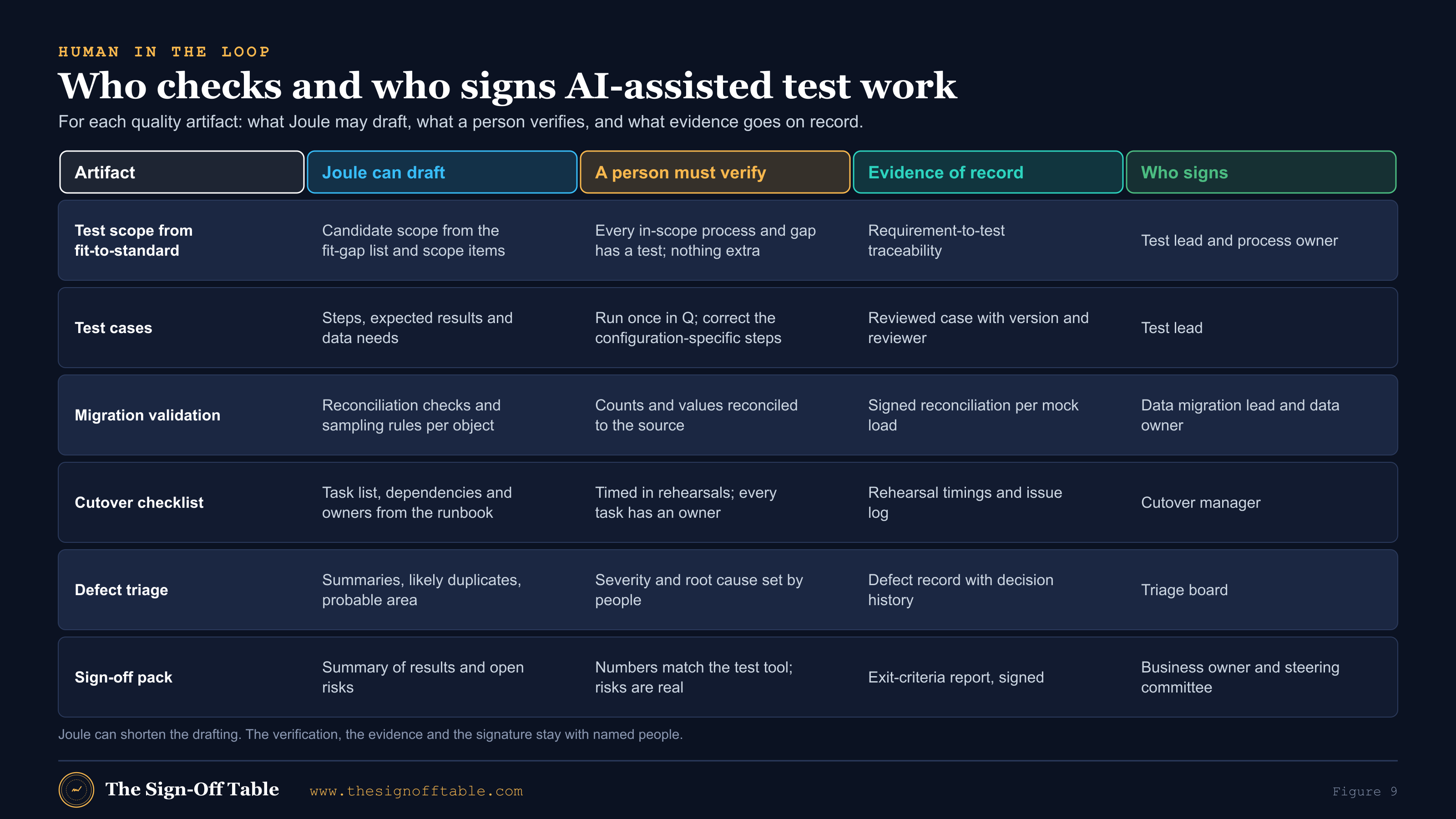
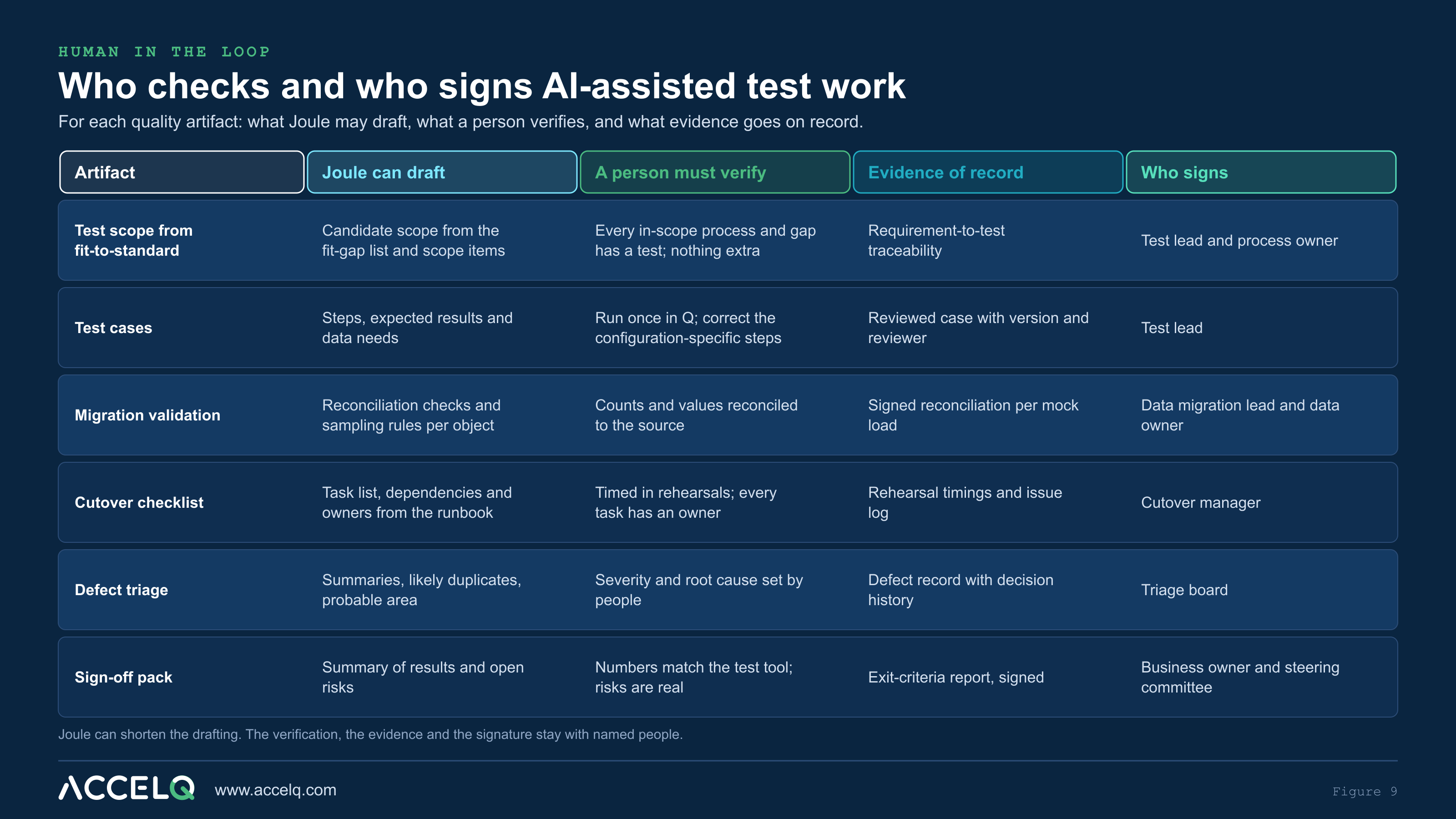
1. Test scope from fit-to-standard
Test scope should come from what was decided in Explore: the in-scope scope items, the delta requirements and the integrations. AI is good at drafting the first cross-reference and at spotting requirements with no test. It is bad at knowing which variants your business actually runs.
Original prompt: test scope from fit-gap decisions
Role: SAP test architect. Context: [edition, release]. In
scope: scope items [IDs], plus these delta requirements:
[paste REQ IDs and one-line descriptions, no client data].

Task: Propose the test scope.
1. For each scope item, list the end-to-end processes that need
   a string or integration test, and which delta requirements
   they cover.
2. List the integrations each process touches that must be in
   integration test (by type: SAP to SAP, SAP to third party,
   file, API).
3. Mark each test as "new", "adapted from SAP standard test
   content" or "regression only".
4. Show any requirement with no test as a gap.

Format: one table per test level. Then a coverage summary:
requirements covered / total, and the gaps.
State what you assumed about our configuration.
Verify: every in-scope scope item and approved requirement appears, and nothing out of scope is added. Then have the process owner confirm the variants. Record the result as requirement-to-test traceability in your test management tool or Cloud ALM.
2. Test case drafting
Draft from acceptance criteria, not from a process name. If the requirement lacks testable acceptance criteria, fix the requirement first.
Original prompt: test cases from a requirement
Act as an S/4HANA test designer. Write test cases for this
requirement:
[REQ ID and acceptance criteria]

Process: [process name, scope item ID]. Release: [release].

For each test case give: ID, title, type (positive / negative /
boundary), preconditions, master data needed, steps (with the
Fiori app or transaction you expect, marked "verify"), expected
result per step, and the evidence a tester should capture.

Include at least two negative cases and one boundary case.
Do not assume custom fields or custom apps unless I list them.
End with the data I must prepare before the test can run.
Verify: walk every AI-drafted case once in a Q or sandbox system before it enters a test cycle. Correct the app names, field names and mandatory fields to match your configuration. Mark it reviewed with a version and the reviewer’s name. A test case nobody has executed is still a draft.
3. Migration validation
SAP’s own AI-Assisted data migration task treats AI output as starting material[3]. Migration validation is the clearest case for that rule: AI can propose the checks, but the reconciliation has to run against real extracts in a controlled environment, never in a chat.
Original prompt: validation plan for a mock load
Role: SAP data migration lead. Migration object: [object, e.g.
customer, open AR items, material]. Approach: [migration
cockpit / other]. Source: [legacy system type]. No real data.

Task: Draft the validation plan for one mock load.
1. Technical checks: record counts, rejected records, mandatory
   fields, field length and format.
2. Business checks: which values must reconcile to the source
   (for example totals by company code and currency) and how to
   sample the rest.
3. Who should sign each check (data owner, migration lead,
   process owner).
4. The evidence to keep per check.

Format: a table with check, method, pass threshold (leave as a
placeholder for us to set), owner, evidence.
Verify: the data owner sets the pass thresholds, the checks run in your migration tooling and database, and each mock load ends with a signed reconciliation. Never paste load files or extracts into an assistant.
4. Cutover checklists
SAP’s Create Cutover Plan and Documentation task uses Joule for Consultants to produce a sample list of product-specific cutover tasks, so teams don’t start from a blank page[3]. Use it, then convert your own runbook into a checklist with owners, dependencies and verification steps:
Original prompt: runbook outline to cutover checklist
Role: SAP cutover manager. Context: [edition, release], go-live
over a weekend, migration objects: [list], interfaces: [list by
type, no hostnames].

Task: Turn this outline into a cutover checklist.
[paste the runbook outline, with system names removed]

For each task give: ID, phase (pre-cutover / blackout / go-live
/ post go-live), task, predecessor, owner role, estimated
duration (leave blank if unknown), verification step, and
rollback note.

Flag any task with no verification step and any dependency that
crosses teams. Do not invent timings.
Verify: durations come from mock cutovers, not from the model. Every task needs an owner and a verification step before the dress rehearsal.
5. Defect triage
During integration test and UAT, AI can sort a defect backlog by likely area and flag probable duplicates and missing information. Severity, priority and root cause stay with the triage board.
Original prompt: triage assistance for anonymized defects
I will paste defect summaries from our test tool, with names,
customer data and system details removed.

For each defect: suggest the likely process area, whether it
looks like configuration, master data, authorization, interface
or code, possible duplicates in this list, and the information
missing for a developer to reproduce it.

Do not set severity or priority. Those are set by the triage
board. Output a table, then a short list of patterns across
defects.

Defects:
[paste anonymized summaries]
6. Sign-off evidence
A go/no-go pack has to be correct before it is fluent. Give the model counts and statuses only, ask it to point out numbers that don’t add up, and keep the recommendation for people.
Original prompt: test summary for the go/no-go pack
Role: test manager preparing a go/no-go pack. Inputs below are
counts and statuses only, exported from our test tool.

Task: Draft the test summary for the steering committee.
1. Results by test level against the exit criteria I list.
2. Open defects by severity, with the business impact stated
   plainly.
3. Risks and the mitigation for each.
4. A recommendation section with placeholders. Do not make the
   recommendation yourself.

Rules: use only the numbers I give you. If a number does not
add up, say so instead of fixing it.

Exit criteria: [paste]
Results: [paste counts]Testing AI-assisted work, with ACCELQ
This section names ACCELQ. Matt Angerer, who runs The Sign-Off Table, works at ACCELQ (disclosure). The principles apply whatever test tooling you use.
AI-assisted delivery speeds up the work that feeds testing. Requirements arrive faster, extensions are drafted faster, and configuration changes follow AI-explained options. None of that reduces the need to test. It raises it, because more change lands in the same window. Three habits keep quality in step:
- Requirements to tests, with traceability. Each AI-generated requirement gets testable acceptance criteria and at least one linked test before it counts as done.
- Regression after Joule-assisted changes. Treat a change made on an AI suggestion like any other change, and run the regression for the processes it touches. Configuration that Joule explained is still configuration you changed.
- Human approval of AI-generated tests. The same human-in-the-loop rule applies to AI on the testing side.
ACCELQ describes itself as a cloud-based continuous testing platform for functional and API testing, with manual testing and test management alongside[36]. It covers the testing side of this guide in four ways:
- Autopilot generates test cases from a scenario’s logic[37].
- The ACCELQ MCP server lets an AI assistant plan and create tests, run them and report on runs. It proposes a test plan for your approval before it creates anything[38],[39]. That is the approve-before-act pattern this guide recommends for Joule.
- Traceability links manual and automated tests to requirements and user stories in Jira, Azure DevOps and Rally, with requirement-based suites and coverage reporting[40],[41].
- Regression at speed. Suites can be triggered from CI pipelines through a REST API[43], self-healing keeps tests running as screens change[44], and business users can run manual UAT steps in the Test Runner with screenshots and defects attached[45]. Database checks can reconcile values directly for migration validation[46].
Feature availability depends on your ACCELQ plan[37]. ACCELQ’s 2025 Autopilot press release reports early adopters cutting test creation time by 65% and maintenance effort by 80%[47]. Those are vendor-reported figures, not independent measurements, so test them on your own flows. A native SAP Cloud ALM integration is on ACCELQ’s roadmap but not generally available, so don’t plan around it yet.
Limits and failure modes
| Limit | Why it happens | What to do |
|---|---|---|
| Hallucination[10],[35] | Generative models produce fluent text even when sources are thin | Ask for sources; run the verify loop; reject unsourced specifics |
| Release mismatch | Content covers many releases; SAP changes features every release | Put edition and release in every prompt; check the answer against your release |
| Edition and setup dependence[21],[22] | In-system skills depend on release, UI5 version, activated OData services and setup | Test Joule skills per role after setup and after each upgrade |
| No view of your system (Joule for Consultants)[5] | It is grounded in SAP content, not in your tenant | Confirm configuration-dependent answers in the system |
| Prompt and context limits[6] | Character limits per prompt and expiring conversations | Attach context as files; one chat per deliverable; save results promptly |
| Fast-moving product names and GA dates[31],[18] | Announcements arrive ahead of availability | Plan on what is GA in your tenant today, not on keynote dates |
| Over-trust | Polished output looks reviewed | Named reviewer and evidence on every AI-assisted artifact |
A 30-day rollout for your project
| Week | Do this | Output |
|---|---|---|
| 1 | Confirm who has Joule for Consultants (and S-users), what Joule is in scope for go-live, and the AI rules in the client contract | A one-page AI usage policy for the project |
| 1 | Bookmark the Prompt Library; filter by your roadmap and the AI-Assisted Procedure tag; list the tasks per workstream | An approved prompt list by workstream, with IDs |
| 2 | Set up one Expert per workstream (SAP templates where available; your own for gaps such as testing) | Change-logged Expert instructions |
| 2 | Run the privacy checklist training: 30 minutes, with examples from your project | Every user briefed; checklist in the onboarding pack |
| 3 | Pilot on two deliverables: one Explore artifact and one test artifact; run the verify loop and time it | Two reviewed deliverables with prompt IDs and reviewers |
| 4 | Add AI-assisted fields to your templates (prompt ID, reviewer, date); add Joule skills to the test strategy if Joule is in scope | Updated templates and test strategy |
Frequently asked questions
What is SAP Joule?
SAP’s generative AI assistant, embedded across SAP’s cloud solutions, with transactional, navigational, informational and analytical capabilities[13]. By Q1 2026 SAP reported it in 35 solutions with more than 2,400 skills[16].
Where is the SAP Joule prompt library?
SAP’s SAP Activate Prompt Library is at me.sap.com/roadmapviewer/promptlib, inside the Roadmap Viewer on SAP for Me[1]. Joule for Consultants also has an in-app prompt library by role and subject[6].
How do I get to the Prompt Library from the Roadmap Viewer menu?
SAP hasn’t published a menu path. A reader asked on the launch post in October 2026 and no answer was visible[1]. Use the direct URL, or open an AI-Assisted task (filter by the AI-Assisted Procedure tag) and follow its link[2].
Is the SAP Activate Prompt Library free? Who can access it?
SAP says it is available to all users through the Roadmap Viewer on SAP for Me, and that browsing needs no additional setup. Running the prompts in Joule for Consultants requires access to that paid capability[1].
What do prompt IDs like AI_0004 mean?
They identify individual prompts in the library. AI_0004 is the one public example, for extension design with classic extensibility techniques[1]. SAP hasn’t published the full scheme. Cite the ID in deliverables you draft with it.
What is an Expert Template?
The system-level instructions that create an Expert, a custom persona in Joule for Consultants, for prompts designed to run with one. The library shows it on the prompt card with a Copy Instructions button[1].
What is the Sample Output for?
To calibrate expectations, check that your session produces good results, and show stakeholders what AI-assisted delivery looks like[1]. Use it for structure, never as content.
Why does my output look nothing like the Sample Output?
Usually missing inputs. Read the AI-Assisted Procedure in the linked SAP Activate task, which describes what the prompt expects, such as a functional specification[1]. Also check that you created the Expert if the card has a template.
Can I use SAP’s library prompts in other AI assistants?
SAP designed them for Joule for Consultants[1]. Elsewhere you lose SAP’s grounding, may breach your project’s data rules, and should check SAP for Me’s terms first. See Using library prompts in other assistants.
What is Joule for Consultants, and how much does it cost?
An AI assistant for implementation professionals, grounded in SAP documentation, SAP Activate, SAP Learning, SAP Community and, with an S-user, SAP Notes and KBAs[5]. SAP material gives 35 AI Units per assigned user per month, with AI Units bought in a minimum of 100 that expire after 12 months[5],[7]. Get a current quote.
Is there a Joule for Consultants free trial?
SAP’s 2025 FAQ says no[5]. Joule in the Roadmap Viewer is available to SAP for Me users[4], and the Prompt Library can be browsed without Joule for Consultants[1].
How is Joule for Consultants activated, and how do users log in?
It is provisioned into a dedicated SAP BTP subaccount (EU10 or EU11) once the agreement is final, and users sign in through SAP Cloud Identity Services. An S-user unlocks gated content such as SAP Notes[8].
Joule for Consultants vs Joule for Developers: what is the difference?
Joule for Consultants answers implementation questions from SAP content[5]. Joule for Developers works inside development tools: explaining ABAP and CDS, generating ABAP Unit tests and generating ABAP Cloud objects[28].
Can Joule see my company’s data?
Joule in S/4HANA works within the user’s authorizations[24]. Joule for Consultants is not connected to your systems; it sees SAP content plus what you type or upload[5],[16].
Does SAP train models on my data?
SAP says its LLM partners are contractually barred from training on customer data[24], and that Joule for Consultants is trained only on SAP-authored and curated content[5].
Can Joule generate test cases?
Joule for Consultants can draft test cases from a prompt, Joule for Developers generates ABAP Unit tests[28], and SAP has described Joule-orchestrated test case generation for Cloud ALM in migration scenarios[26]. Every case still needs a person to execute and review it before it counts.
Does Joule work in S/4HANA Cloud Private Edition?
Yes, for RISE with SAP customers on release 2021 or later, with capabilities that vary by release and setup through SAP BTP and SAP Build Work Zone[21].
What makes a good SAP Joule prompt?
Role, context (edition, release, scope item, process), one task, grounding and limits, an output format, and a request for sources and open questions. See Prompting technique.
Where can I find more example prompts?
SAP’s library on SAP for Me, the library inside Joule for Consultants, and The Sign-Off Table’s own library at /prompts, with original prompts by phase, role and area.
Summary and next steps
Joule is now part of how SAP expects S/4HANA projects to run, and SAP Activate tells you where. The teams that get value from it treat prompts like any other project asset. They write them with context, run them against the right Joule, check what comes back, and record who checked it. Five things to take away:
- Know which Joule you are using and what it can see. That decides what you may paste and how far you can trust the answer.
- Start from SAP’s Prompt Library, via the task. Read the AI-Assisted Procedure, set up the Expert, use the Sample Output as your quality bar, and cite the prompt ID.
- Write six-part prompts with edition, release and scope item in the context, and a verification ask at the end.
- Keep client data out of every prompt, and run the verify loop on anything that becomes project material.
- In testing, let AI draft and people sign. Test scope, test cases, migration checks, cutover lists, defect triage and sign-off packs all get faster, and all still need a named reviewer and evidence.
Next: browse The Sign-Off Table prompt library, open SAP’s library at me.sap.com/roadmapviewer/promptlib, and subscribe to the newsletter for updates as Joule and SAP Activate change.
Sources
- [1]Introducing the SAP Activate Prompt Library: Curated AI Prompts for Your Implementation Project (Chandan Gurav, SAP), with reader comments of July 14 and October 2, 2026, SAP Community, July 13, 2026
- [2]SAP Business AI in SAP Activate: Three Dimensions of AI for Your Implementation (Jan Musil, SAP), SAP Community, July 12, 2026, updated July 21, 2026
- [3]From 9 to 55 AI-Assisted tasks in eight weeks: scaling AI across SAP Activate (Jan Musil, SAP), SAP Community, September 8, 2026
- [4]Say Hi to Joule in SAP Activate road map viewer (Chandan Gurav, SAP), with comments, SAP Community, July 16, 2025
- [5]SAP Joule for Consultants: Frequently Asked Questions (SAP SE document, “Last update: June 18, 2025”), as published by SAPinsider, SAP SE via SAPinsider, June 18, 2025
- [6]Navigating the user interface and prompt best practices (Introducing SAP Joule for Consultants), SAP Learning, n.d., accessed October 25, 2026
- [7]Evaluating the commercial model (Introducing SAP Joule for Consultants), SAP Learning, n.d., accessed October 25, 2026
- [8]Evaluating prerequisites for activation (Introducing SAP Joule for Consultants), SAP Learning, n.d., accessed October 25, 2026
- [9]Outlining content and roadmap (Accelerating SAP project delivery using SAP Joule for Consultants), SAP Learning, n.d., accessed October 25, 2026
- [10]Joule for Consultants in system-based assessments, SAP Learning Help Center, n.d., accessed October 25, 2026
- [11]What is Joule (product documentation, PDF), SAP Help Portal, October 20, 2026
- [12]Using AI-powered guidance to accelerate SAP Customer Experience projects (Joule for Consultants best practices), SAP Learning, n.d., accessed October 25, 2026
- [13]Introducing SAP Joule core capabilities (Implementing SAP S/4HANA Cloud Public Edition: Sales), SAP Learning, n.d., accessed October 25, 2026
- [14]Understanding the commercial model (Introducing Joule), SAP Learning, n.d., accessed October 25, 2026
- [15]SAP Business AI: release highlights Q2 2025, SAP News Center, July 24, 2025
- [16]SAP Business AI: Highlights des Q1 2026 Release (German), SAP News Center, May 4, 2026
- [17]SAP Connect: SAP puts the autonomous enterprise to work, SAP News Center, October 6, 2026
- [18]Joule Work and the SAP Business AI platform power the next generation of business AI, SAP News Center, October 8, 2026
- [19]At SAP Connect, SAP expands Joule across every line of business, ERP Today, October 8, 2026
- [20]SAP Cloud ERP Private 2025 FPS02: a foundation for the autonomous enterprise, SAP News Center, October 13, 2026
- [21]Joule reference architecture for SAP S/4HANA Cloud (ref-arch ebe268), SAP Architecture Center, updated October 29, 2025
- [22]Setting up Joule for SAP S/4HANA Cloud Private Edition, SAP Learning, n.d., accessed October 25, 2026
- [23]Setting up Joule for SAP S/4HANA Cloud Public Edition, SAP Learning, n.d., accessed October 25, 2026
- [24]SAP Business AI reference architecture (ref-arch 464deb): security, authorizations and data protection, SAP Architecture Center, updated March 16, 2026
- [25]SAP Cloud ALM: requirement generation, SAP (product page), n.d., accessed October 25, 2026
- [26]Fast-track migrations with the test management assistant (online event description), SAP (events), event July 21, 2026
- [27]Setting up SAP Joule for Developers, SAP Learning, n.d., accessed October 25, 2026
- [28]SAP S/4HANA Cloud Private Edition: Joule for developers, ABAP AI features, SAP (product page), n.d., accessed October 25, 2026
- [29]New agentic capabilities in SAP BTP supercharge developers, SAP News Center, November 5, 2025
- [30]New Joule Studio: enterprise-scale agentic development, SAP News Center, May 13, 2026
- [31]SAP’s AI promises from last year: most are still rolling out, CIO, May 13, 2026
- [32]Discovering the orchestration service (Discovering SAP’s generative AI hub), SAP Learning, n.d., accessed October 25, 2026
- [33]Solve your business problems using prompts and LLMs in SAP generative AI hub, SAP Learning, n.d., accessed October 25, 2026
- [34]Document grounding, SAP (product page), n.d., accessed October 25, 2026
- [35]AI notice, SAP Developers, updated August 7, 2026
- [36]What is ACCELQ?, ACCELQ Support, updated November 19, 2025
- [37]Working with test cases in ACCELQ, ACCELQ Support, updated October 12, 2026
- [38]Connect AI assistants to ACCELQ MCP, ACCELQ Support, updated September 27, 2026
- [39]ACCELQ MCP tools guide, ACCELQ Support, updated October 7, 2026
- [40]Setting up traceability between requirements and scenarios, ACCELQ Support, updated July 15, 2026
- [41]Establishing integration with requirements and defect tracking tools, ACCELQ Support, updated August 18, 2026
- [42]Test suites in ACCELQ, ACCELQ Support, updated June 9, 2025
- [43]REST API end-point to trigger test execution externally, ACCELQ Support, updated August 12, 2026
- [44]Self healing, ACCELQ Support, updated August 29, 2026
- [45]Running manual tests, ACCELQ Support, updated August 22, 2024
- [46]Database testing with ACCELQ, ACCELQ Support, updated August 22, 2024
- [47]ACCELQ’s Gen AI offering sets itself apart (Autopilot press release), BusinessWire, April 3, 2025